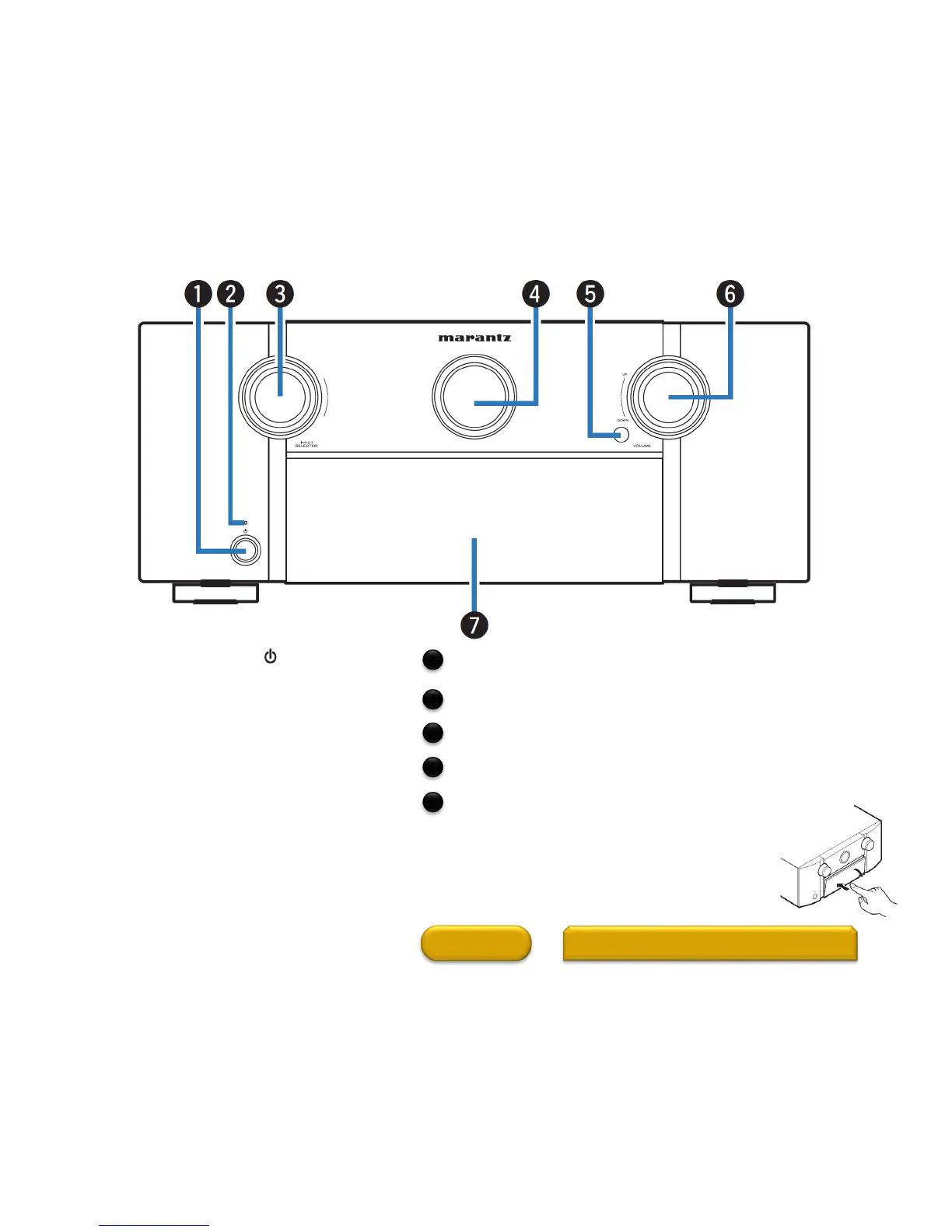
Front Panel
Power operation button ( )
Used to turn the power of the MAIN ZONE
(room where this unit is located) on/off
(standby).
Power indicator
This is lit as follows according to the power status:
• Off: Power on
• Red: Normal standby
• Orange:
•
When “HDMI Pass Through” is set to “On”
•
When “HDMI Control” is set to “On”
•
When “IP Control” is set to “Always On”
HOME
Buttons and Display exposed when the door is
Open (1 of 3)
2
INPUT SELECTOR knob
This selects the input source.
Main display
This displays various pieces of information.
Remote control sensor
This receives signals from the remote control unit.
VOLUME knob
This adjusts the volume level.
Door
When you are using buttons and/or connectors
behind the door, press the bottom of the door to
open it. Be careful not to catch your fingers
when closing the door.
3
4
5
6
7



 To Next Page