14
ENGLISH
OPERATING AMP & TUNER
To control the SR9300 by your RC3200A, you have to select the
device AMP or TUNER on HOME screen.
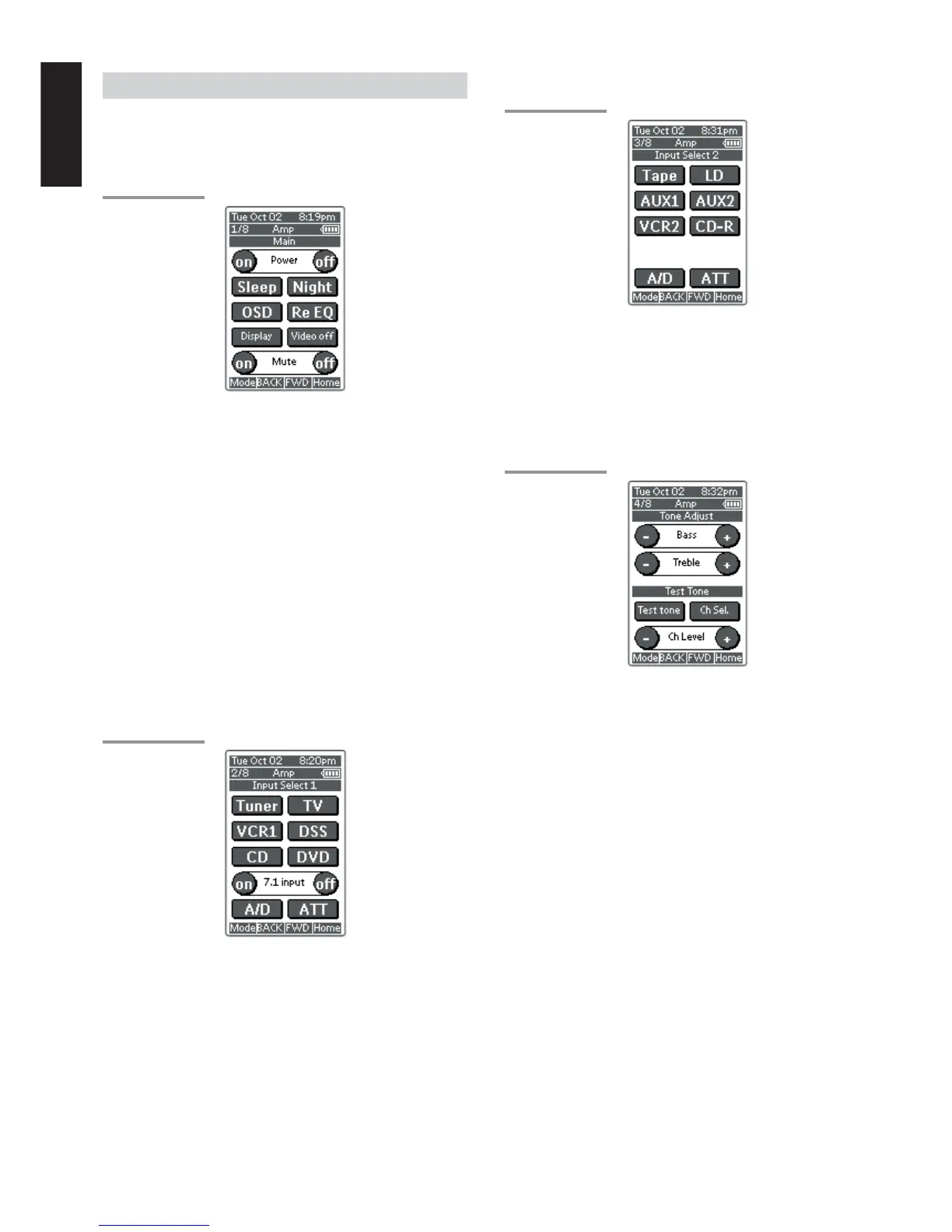
MAIN
AMP PAGE 1/8
Power on and off buttons
These buttons are used to turn on or off SR9300
Sleep button
This button is used to set the sleep timer. (see page 39)
Night button
This button is used to set night mode. (see page 39)
Display button
This button is used to select the display mode for front display. (see
page 44)
Video off button
This button is used to turn off or on the video signal outputs from
MONITOR OUT terminals. (see page 44)
Cinema Re-EQ button
This button is used to active the Cinema Re-EQ™, press again this is
inactive.
OSD button
This button is used to turn on the On Screen Display for general
information.
You can find the current condition of SR9300.
INPUT SELECT 1
AMP PAGE 2/8
Tuner, TV, VCR1, DSS, CD, DVD, buttons
These buttons are used for selecting an input source. (see page 38)
7.1 INPUT On/Off buttons
These buttons are used to select 7.1ch Input source. (see page 46)
A/D button
This button is used to select the Auto digital input, fixed digital input or
analog input. (see page 44)
ATT button
This button is used to attenuate to analog input signals. (see page 44)
INPUT SELECT 2
AMP PAGE 3/8
Tape, LD, AUX1, AUX2, VCR2, CD-R
These buttons are used for selecting an input source. (see page 38)
A/D button
This button is used to select the Auto digital input, fixed digital input or
analog input. (see page 44)
ATT button
This button is used to attenuate to analog input signals. (see page 44)
TONE ADJUST
AMP PAGE 4/8
BASS + and –
These buttons are used to adjust the tone of low-frequency sound.
(see page 38)
Treble + and –
These buttons are used to adjust the tone of high-frequency sound.
(see page 38)
Test tone
This button is used to generate the test tone noise signal.
You can check the balance of output signal level.
Ch sel.
This button is used to change the test tone noise signal output
channel.
Ch. Level + and –
This button is used to adjust the output level of each channel.


 To Next Page