24
ENGLISH
RC
MULTI
OUT
EXT. IR
OPT
COAX
DIGITAL-OUT
AC IN
MODEL NO.SR9300
6-8 OHMS
SPEAKER SYSTEMS
OUTIN
SBR
DVD-R
VCR2/
100W
UNSWITCHED
AC OUTLETS
230V 50HZ
SBL
1
ROOM
MULTI
ROOM
MULTI
RL
SW
RIGHT
LEFT
DC OUT 2
OUT
MULTI VIDEO
ANTENNA
BACK
SURR.
CENTER
C
SR
SL
R
L
OUT
MULTI
RS232C
DC OUT 1
RIGHT
LEFT
SURR.
CENTER
BACK
BACK
SURR.
RIGHT
LEFT
FRONT
LEFT
–
+
SURR.
FRONT
SURR.
RIGHT
DIGITAL-IN
9
8
7
6
5
4
3
2
FRONT
MAIN IN
DVD IN
SCART/
SURR.
7.1CH-IN
R
AM
GND
LD
OUT
OUT
S-VIDEOVIDEO
VCR1
AUDIO
IN
MONI.
1
L
/MD
CD-R
IN
OUT
CD
IN
DVD
L
TAPE
OUT
PRE OUT
IN
S.W
R
TV
MONI.
2
LR
DSS
–
+
RC-5
GND
OUT
MONITOR
INVERT
OUTPUT
INPUT
LEVEL
BTL REMOTE CONT.EXT.CONT. IN
VIDEO/
+5~13VDC
SYSTEMOUT OUT
INPUT
MASTER SLAVE
MIN MAX
IN
F
U
S
E
SPEAKERSYSTEM
MINIMUM4 OHMS
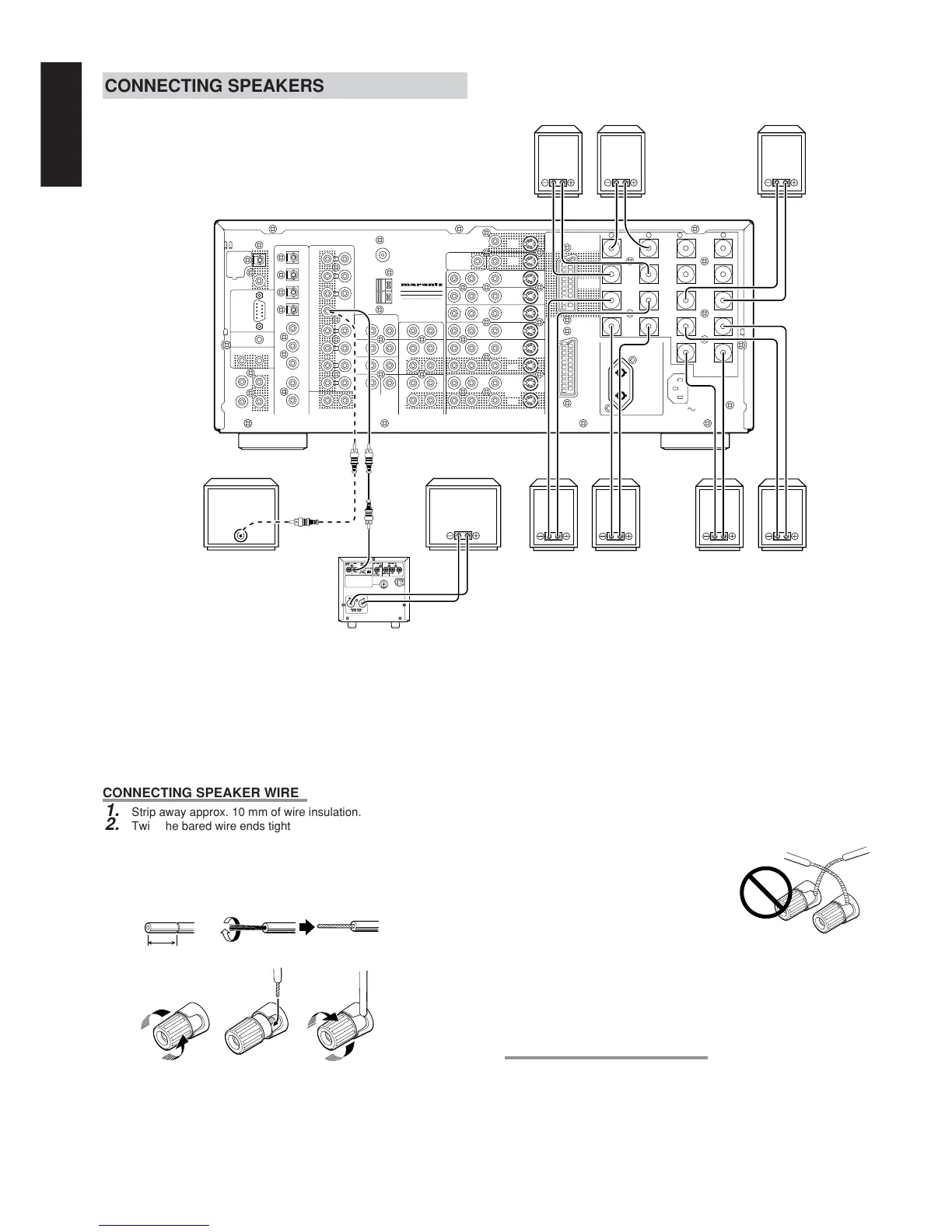
CONNECTING SPEAKERS
CONNECTING SPEAKER WIRE
1.
Strip away approx. 10 mm of wire insulation.
2.
Twist the bared wire ends tight to prevent short circuits.
3.
Loosen the knob by turning counterclockwise.
4.
Insert the bare part of the wire into the hole in the side of each
terminal.
5.
Tighten the knob by turning clockwise to secure the wire.
Caution:
• Be sure to use speakers with the specified impedance shown on
the rear panel of this unit.
• To prevent damage to circuitry, do
not let the bare speaker wires touch
each other and do not let them touch
any metal part of this unit.
• Do not touch the speaker terminals
when the power is on. It may cause
electric shocks.
• Do not connect more than one
speaker cable to one speaker terminal. Doing so may damage
this unit.
Note:
• Be sure to connect the positive and negative cables for the
speaker properly. If they are miss-connected, the signal phase
will reversed and the signal quality will be corrupted.
CONNECTING A SUBWOOFER
Use the PRE OUT SUBWOOFER jack to connect a powered
subwoofer (power amplifier built in ).
If your subwoofer is passive type (power amplifier is not built in),
connect a monaural power amplifier to the PRE OUT SUBWOOFER
jack and connect the subwoofer to the amplifier.
1. 2.
3. 4. 5.
ACTIVE
SUBWOOFER
PASSIVE
SUBWOOFER
FRONT
RIGHT
LEFT
SURROUND
SURROUND BACK
CENTER
RIGHT
LEFT
RIGHT
LEFT
POWER
AMPLIFIER
MA700
10 mm


 To Next Page