wr I—IIM t IV/I'I
Source selection
-
external
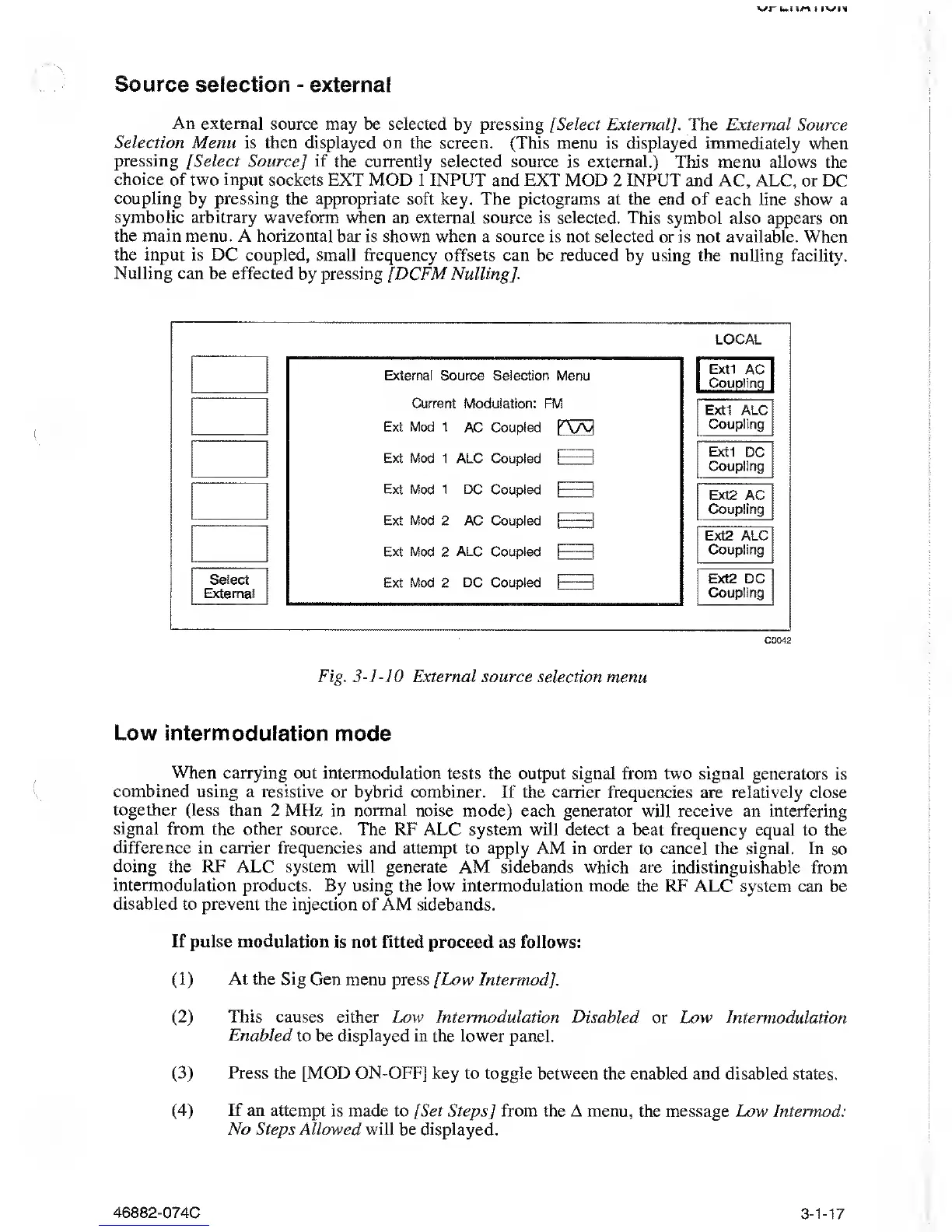
An external source
may be selected
by
pressing
[
Select External]. The
External Source
Selection Menu
is then displayed on the
screen.
(This
menu is displayed immediately when
pressing
[Select Source] if the currently
selected source is external.) This menu allows
the
choice of two input sockets
EXT MOD 1 INPUT and
EXT MOD 2
INPUT
and AC, ALC, or DC
coupling
by
pressing
the appropriate
soft key. The pictograms at the end of each line
show a
symbolic arbitrary waveform
when an external source is selected. This symbol also
appears on
the main menu.
A
horizontal
bar is shown when
a
source
is not selected or is not
available.
When
the input
is DC coupled, small
frequency offsets can be reduced by using the nulling
facility.
Nulling can be effected
by pressing [DCFM Nulling].
Select
External
External Source Selection
Menu
Current Modulation: FM
Ext Mod 1
AC Coupled
K\/V/|
Ext
Mod 1 ALC Coupled
I
—
1
Ext Mod 1 DC
Coupled
I [
Ext Mod 2 AC Coupled
1
:
::
|
Ext
Mod 2
ALC
Coupled
[
|
Ext Mod 2 DC
Coupled
f—
—
-j
LOCAL
Extl
AC
Coupling
Extl ALC
Coupling
Extl DC
Coupling
Ext2 AC
Coupling
Ext2 ALC
Coupling
Ext2 DC
Coupling
C0042
Fig
.
3-]-]0
External source selection menu
Low
intermodulation mode
When carrying
out intermodulation
tests the output signal from
two
signal generators
is
combined using a resistive
or hybrid combiner. If the carrier frequencies are relatively
close
together (less than 2
MHz in normal noise mode)
each generator
will receive
an interfering
signal
from the other source.
The RF ALC system will detect a beat frequency equal
to the
difference in carrier frequencies
and attempt
to
apply AM
in order to cancel the signal. In
so
doing
the
RF
ALC system will generate
AM sidebands which are indistinguishable
from
intermodulation products.
By using the low intermodulation mode the
RF ALC system can
be
disabled
to prevent the injection of AM sidebands.
If pulse
modulation is not fitted proceed
as
follows:
(1)
At
the Sig Gen menu press [Low Intermod].
(2)
This
causes either Low Intermodulation Disabled
or Low Intermodulation
Enabled to be displayed in the lower
panel.
(3)
Press
the [MOD ON-OFF] key to toggle between
the enabled and disabled states.
(4)
If an attempt
is made to [Set Steps
]
from the A menu,
the message Low Intermod:
No Steps Allowed will be
displayed.
46882-074C
3-1-17



 To Next Page