vi i— i *r\
i i
Overrange
Pressing the [Over-range] soft key toggles the status
(Enable/Disable) of the overrange
control. When enabled, the maximum RF
output
power is extended by an additional 6 dB
(subject to instrument capability). This increases the maximum
output power from +13 to +19
dBm for the standard instrument and from +19 to +25 dBm for an instrument
fitted with
Option
003. If the requested output
level
is in the
overrange region the UNCAL message is displayed on
the Sig Gen menu.
Note...
If the
overrange
facility is enabled the
signal generator is capable of generating much
higher signal levels. If the generator is set to a frequency
below 21
.09375 MHz and the
RF output is not terminated in
50 Q then the RPP may be tripped by the internal RF
signal. If this happens the RPP can only be rest if a 50 Q
termination is connected
to
the
RF
OUTPUT socket.
RF offset
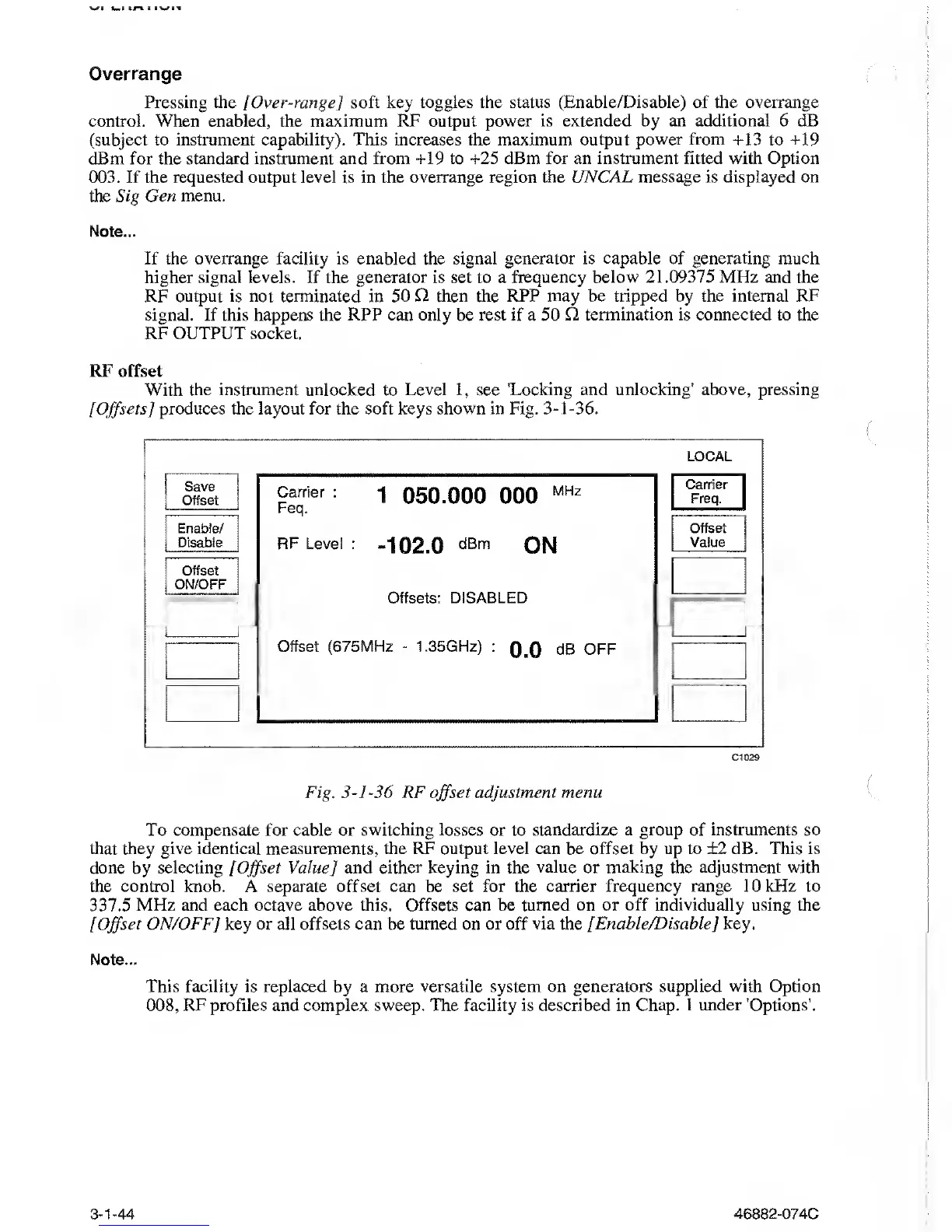
With the instrument unlocked to
Level
1,
see
'Locking and unlocking’ above, pressing
[Offsets]
produces the layout for the soft keys shown in Fig.
3-1-36.
LOCAL
Save
Offset
Enable/
Disable
Offset
ON/OFF
Carrier
:
Feq.
1 050.000 000
MHz
RF Level
:
-102.0
ON
Offsets: DISABLED
Offset (675MHz
-
1
,35GHz)
:
Q,0
dB OFF
Carrier
Freq.
Offset
Vaiue
Cl
029
Fig.
3-]
-36 RF
offset
adjustment menu
To
compensate for
cable or
switching losses or
to
standardize a group of instruments so
that they give identical measurements, the RF output level can be offset
by up to ±2 dB.
This is
done by selecting [
Offset
Value]
and
either keying in the value or making the adjustment with
the control knob. A separate offset can be set for the carrier
frequency range
10 kHz to
337.5 MHz
and
each
octave above this. Offsets can be turned on or off
individually
using the
[Offset
ON/OFF] key or all offsets can be turned on or off
via
the
[Enable/Disable] key.
Note...
This facility is replaced by a more
versatile system on generators supplied with Option
008,
RF profiles and complex sweep. The facility is described in Chap. 1 under ’Options’.
3-1-44
46882-074C



 To Next Page