EasyManua.ls Logo

Marine Air Systems vector compact - Passport II Display Panel Installation

Marine Air Systems vector compact
30 pages
Print Icon
To Next Page IconTo Next Page
To Previous Page IconTo Previous Page
Loading...
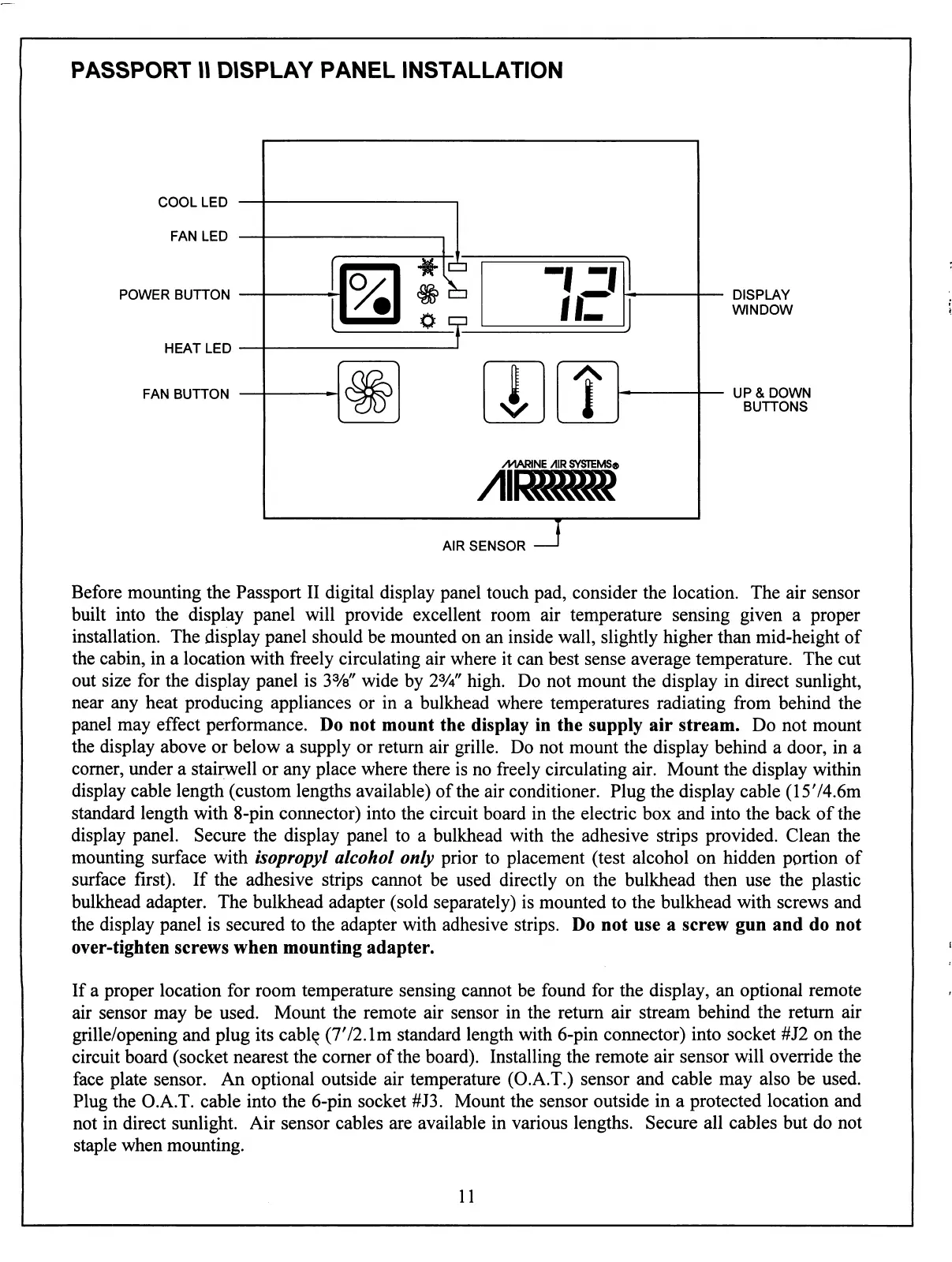
PASSPORT
II
DISPLAY
PANEL
INSTALLATION
COOL
LED
FAN
LED
POWER
BUTTON
HEAT
LED
FAN
BUTTON
DISPLAY
WINDOW
UP
&
DOWN
BUTTONS
AIR
SENSOR
Before
mounting
the
Passport
II
digital
display
panel
touch
pad,
consider
the
location.
The
air
sensor
built
into
the
display
panel
will
provide
excellent
room
air
temperature
sensing
given
a
proper
installation.
The
display
panel
should
be
mounted
on
an
inside
wall,
slightly
higher
than
mid-height
of
the
cabin,
in
a
location
with
freely
circulating
air
where
it
can
best
sense
average
temperature.
The
cut
out
size
for
the
display
panel
is
3%"
wide by
2%"
high.
Do
not
mount
the
display
in
direct
sunlight,
near
any
heat
producing
appliances
or
in
a
bulkhead
where
temperatures
radiating
from
behind
the
panel
may
effect
performance.
Do
not
mount
the
display
in
the
supply
air
stream.
Do
not
mount
the
display
above
or
below
a
supply
or
return
air
grille.
Do
not
mount
the
display
behind
a
door,
in
a
corner,
under
a
stairwell
or
any
place
where
there
is
no
freely
circulating
air.
Mount
the
display
within
display
cable
length
(custom
lengths
available)
of
the
air
conditioner.
Plug
the
display
cable
(1574.6m
standard
length
with
8-pin
connector)
into
the
circuit
board
in
the
electric
box
and
into
the
back
of
the
display
panel.
Secure
the
display
panel
to
a
bulkhead
with
the
adhesive
strips
provided.
Clean
the
mounting
surface
with
isopropyl
alcohol
only
prior
to
placement
(test
alcohol
on
hidden
portion
of
surface
first).
If
the
adhesive
strips
cannot be
used
directly
on
the
bulkhead
then
use
the
plastic
bulkhead
adapter.
The
bulkhead
adapter
(sold
separately)
is
mounted
to
the
bulkhead
with
screws
and
the
display
panel
is
secured
to
the
adapter
with
adhesive
strips.
Do
not use
a
screw
gun
and
do
not
over-tighten
screws
when
mounting
adapter.
If
a
proper
location
for
room
temperature
sensing
cannot
be
found
for
the
display,
an
optional
remote
air
sensor
may
be
used.
Mount
the
remote
air
sensor
in
the
return
air
stream
behind
the
return
air
grille/opening
and
plug
its
cable
(772.1m
standard
length
with
6-pin
connector)
into
socket
#J2
on
the
circuit
board
(socket nearest
the
corner
of
the
board).
Installing
the
remote
air
sensor
will
override
the
face
plate
sensor.
An
optional outside
air
temperature
(O.A.T.) sensor
and
cable
may
also
be
used.
Plug
the
O.A.T.
cable
into
the
6-pin
socket
#J3.
Mount
the
sensor
outside
in
a
protected
location
and
not
in
direct
sunlight.
Air
sensor
cables
are
available
in
various
lengths.
Secure
all
cables
but
do
not
staple
when
mounting.
11