EasyManua.ls Logo

Marine Air Systems vector compact - Manual Control Panel (MCP) Installation; Manual Control Panel (MCP) Operation

Marine Air Systems vector compact
30 pages
Print Icon
To Next Page IconTo Next Page
To Previous Page IconTo Previous Page
Loading...
MANUAL
CONTROL
PANEL
(MCP)
INSTALLATION
The
MCP
should
be
located
within
cap
tube
length
of
the
a/c
unit.
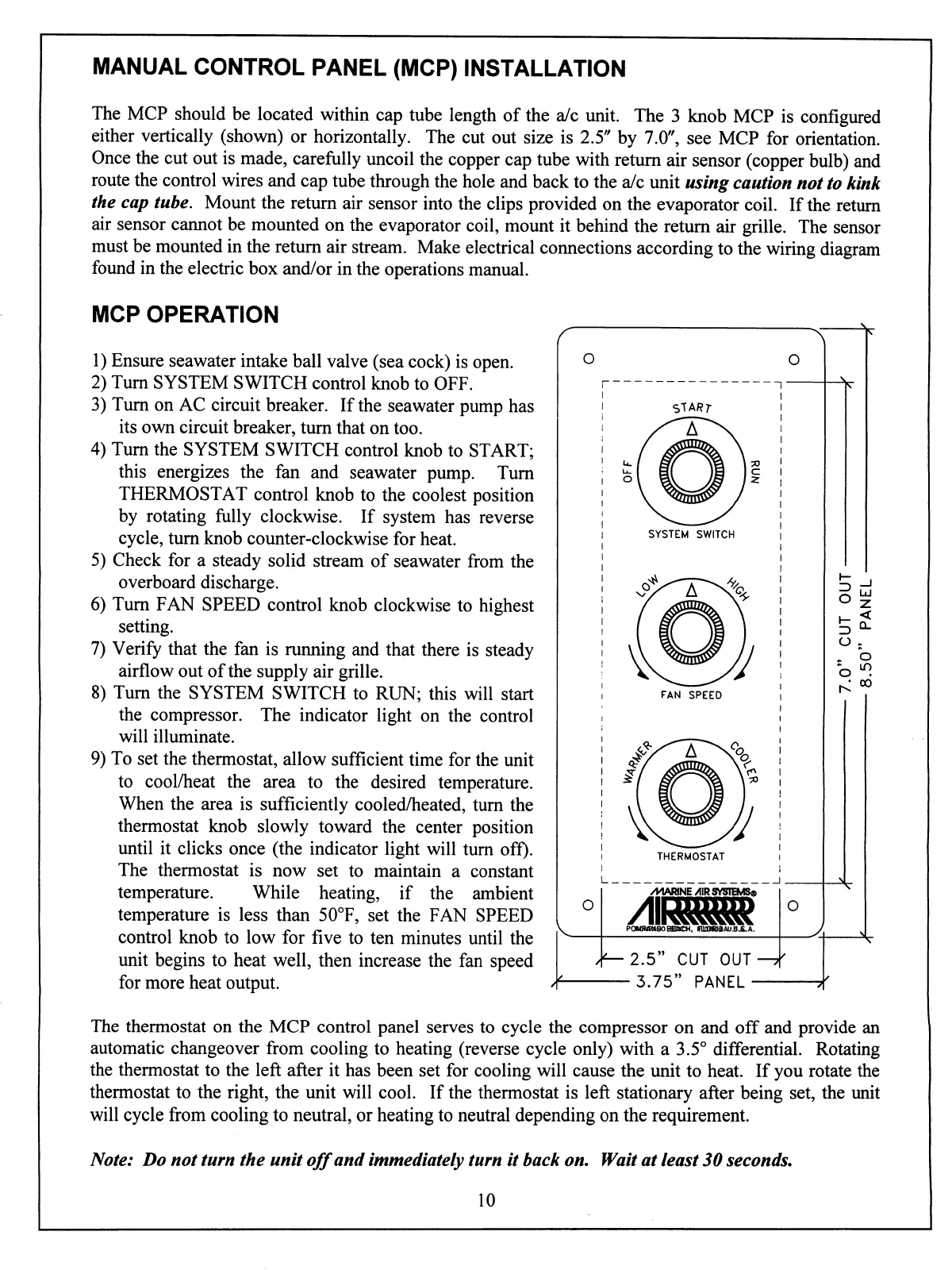
The
3
knob
MCP
is
configured
either
vertically
(shown)
or
horizontally.
The
cut
out
size
is
2.5"
by
7.0",
see
MCP
for
orientation.
Once
the
cut
out
is
made,
carefully
uncoil
the
copper
cap
tube
with
return
air
sensor
(copper
bulb)
and
route
the
control
wires
and
cap
tube
through
the
hole
and
back
to
the
a/c
unit
using
caution
not
to
kink
the
cap
tube.
Mount
the
return
air
sensor
into
the
clips
provided
on
the
evaporator
coil.
If
the
return
air
sensor
cannot
be
mounted
on
the
evaporator
coil,
mount
it
behind
the
return
air
grille.
The
sensor
must
be
mounted
in
the return
air
stream.
Make
electrical
connections
according
to
the
wiring
diagram
found
in
the
electric
box
and/or
in
the
operations
manual.
MCP
OPERATION
1)
Ensure
seawater
intake
ball
valve
(sea
cock)
is
open.
2)
Turn
SYSTEM
SWITCH
control
knob
to
OFF.
3)
Turn
on
AC
circuit
breaker.
If
the
seawater
pump
has
its
own
circuit
breaker,
turn
that
on
too.
4)
Turn
the
SYSTEM
SWITCH
control
knob
to
START;
this
energizes
the
fan
and
seawater
pump.
Turn
THERMOSTAT
control
knob
to
the
coolest
position
by
rotating
fully
clockwise.
If
system
has
reverse
cycle,
turn
knob
counter-clockwise
for
heat.
5)
Check
for
a
steady
solid
stream
of
seawater
from
the
overboard
discharge.
6)
Turn
FAN
SPEED
control
knob
clockwise
to
highest
setting.
7)
Verify
that
the
fan
is
running
and
that
there
is
steady
airflow
out
of
the
supply
air
grille.
8)
Turn
the
SYSTEM
SWITCH
to
RUN;
this
will
start
the
compressor.
The
indicator
light
on
the
control
will
illuminate.
9)
To
set
the
thermostat,
allow
sufficient
time
for
the
unit
to
cool/heat
the
area
to
the
desired
temperature.
When
the
area
is
sufficiently
cooled/heated,
turn
the
thermostat
knob
slowly
toward
the
center
position
until
it
clicks
once
(the
indicator
light
will
turn
off).
The
thermostat
is
now
set
to
maintain
a
constant
temperature.
While
heating,
if
the
ambient
temperature
is
less
than
50°F,
set
the
FAN
SPEED
control
knob
to
low
for
five
to
ten
minutes
until
the
unit
begins
to
heat
well,
then
increase
the
fan
speed
for
more
heat
output.
START
SYSTEM
SWITCH
FAN
SPEED
THERMOSTAT
O
/MARINE/URSVSIEMS&
2.5"
CUT
OUT
-3.75"
PANEL-
O
5
b
t^ °°
The
thermostat
on
the
MCP
control
panel
serves
to
cycle
the
compressor
on
and
off
and
provide
an
automatic
changeover
from
cooling
to
heating
(reverse
cycle
only)
with
a
3.5°
differential.
Rotating
the
thermostat
to
the
left
after
it
has
been
set
for
cooling
will
cause
the
unit
to
heat.
If
you
rotate
the
thermostat
to
the
right,
the
unit
will
cool.
If
the
thermostat
is
left
stationary
after
being
set,
the
unit
will
cycle
from
cooling
to
neutral,
or
heating
to
neutral
depending
on
the
requirement.
Note:
Do
not
turn
the
unit
off
and
immediately
turn
it
back
on.
Wait
at
least
30
seconds.
10