EasyManua.ls Logo

Marine Air Systems vector compact - Passport II Digital Control Troubleshooting Guidelines

Marine Air Systems vector compact
30 pages
Print Icon
To Next Page IconTo Next Page
To Previous Page IconTo Previous Page
Loading...
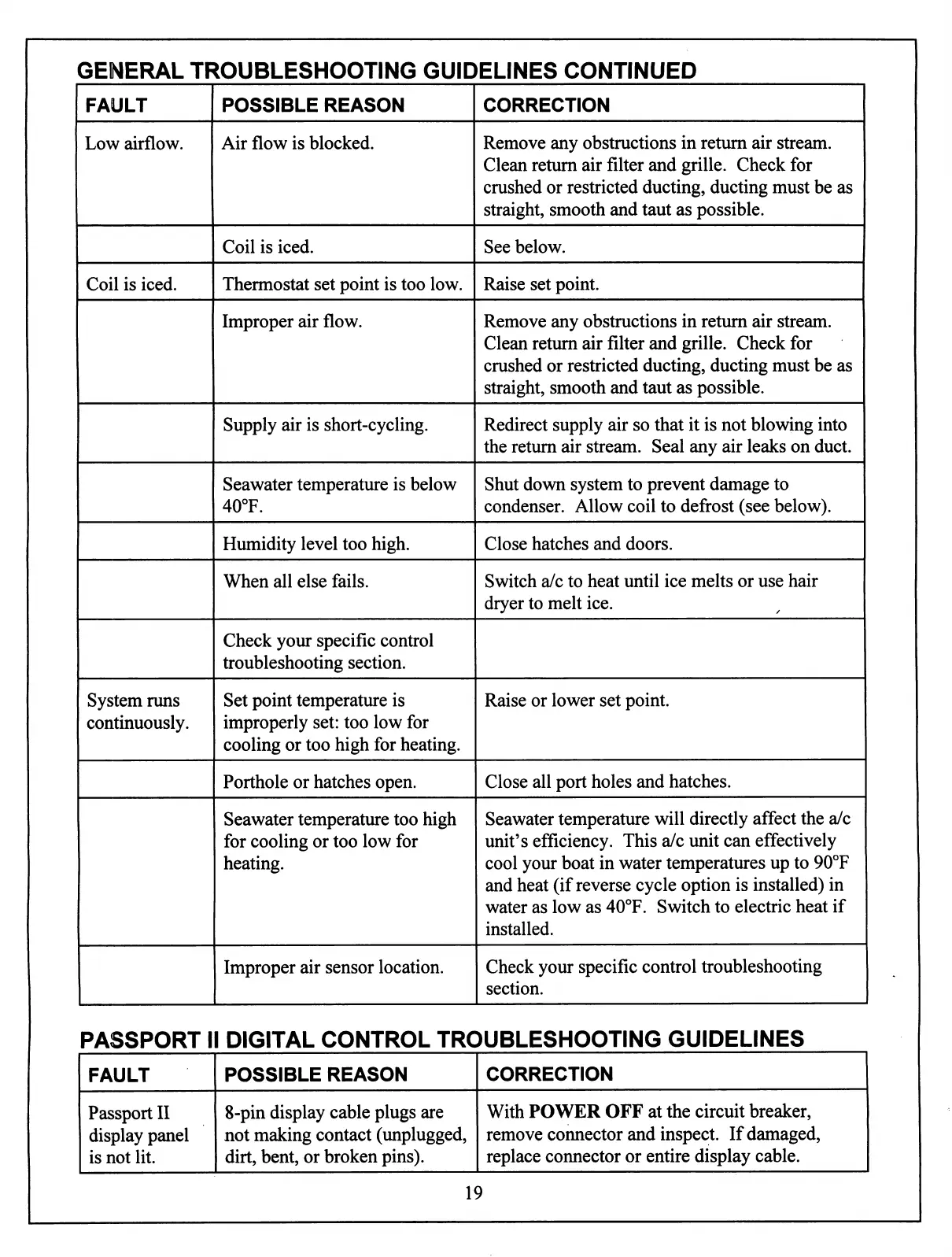
GENERAL
TROUBLESHOOTING
GUIDELINES
CONTINUED
FAULT
Low
airflow.
Coil
is
iced.
System
runs
continuously.
POSSIBLE
REASON
Air
flow
is
blocked.
Coil
is
iced.
Thermostat
set
point
is
too
low.
Improper
air
flow.
Supply
air
is
short-cycling.
Seawater
temperature
is
below
40°F.
Humidity
level
too
high.
When
all
else
fails.
Check
your
specific
control
troubleshooting
section.
Set
point
temperature
is
improperly
set:
too
low
for
cooling
or
too
high
for
heating.
Porthole
or
hatches
open.
Seawater
temperature
too
high
for
cooling
or
too
low
for
heating.
Improper
air
sensor
location.
CORRECTION
Remove
any
obstructions
in
return
air
stream.
Clean
return
air
filter
and
grille.
Check
for
crushed
or
restricted
ducting,
ducting
must
be
as
straight,
smooth
and
taut
as
possible.
See
below.
Raise
set
point.
Remove
any
obstructions
in
return
air
stream.
Clean
return
air
filter
and
grille.
Check
for
crushed
or
restricted
ducting,
ducting
must
be
as
straight,
smooth
and
taut
as
possible.
Redirect
supply
air
so
that
it
is
not
blowing
into
the
return
air
stream.
Seal
any
air
leaks
on
duct.
Shut
down
system
to
prevent
damage
to
condenser.
Allow
coil
to
defrost
(see
below).
Close
hatches
and
doors.
Switch
a/c
to
heat
until
ice
melts
or
use
hair
dryer
to
melt
ice.
Raise
or
lower
set
point.
Close
all
port
holes
and
hatches.
Seawater
temperature
will
directly
affect
the
a/c
unit's
efficiency.
This
a/c
unit
can
effectively
cool
your
boat
in
water
temperatures
up
to
90°F
and
heat
(if
reverse
cycle
option
is
installed)
in
water
as
low
as
40°F.
Switch
to
electric
heat
if
installed.
Check
your
specific
control
troubleshooting
section.
PASSPORT
II
DIGITAL
CONTROL
TROUBLESHOOTING
GUIDELINES
FAULT
Passport
II
display
panel
is
not
lit.
POSSIBLE
REASON
8-pin
display
cable
plugs
are
not
making
contact
(unplugged,
dirt,
bent,
or
broken
pins).
CORRECTION
With
POWER
OFF
at
the
circuit
breaker,
remove
connector
and
inspect.
If
damaged,
replace
connector
or
entire
display
cable.
19