To install the phono modules:
1. Place the Nº326S upside-down on a flat, level surface such as a
table or workbench. Do not place the Nº326S on a surface that
is unstable.
Note
Perform these installation instructions at a static-free
workstation to avoid damaging circuit boards. Damage
resulting from failure to work at a static-free workstation
may void the manufacturer’s warranty and/or standard
repair policies.
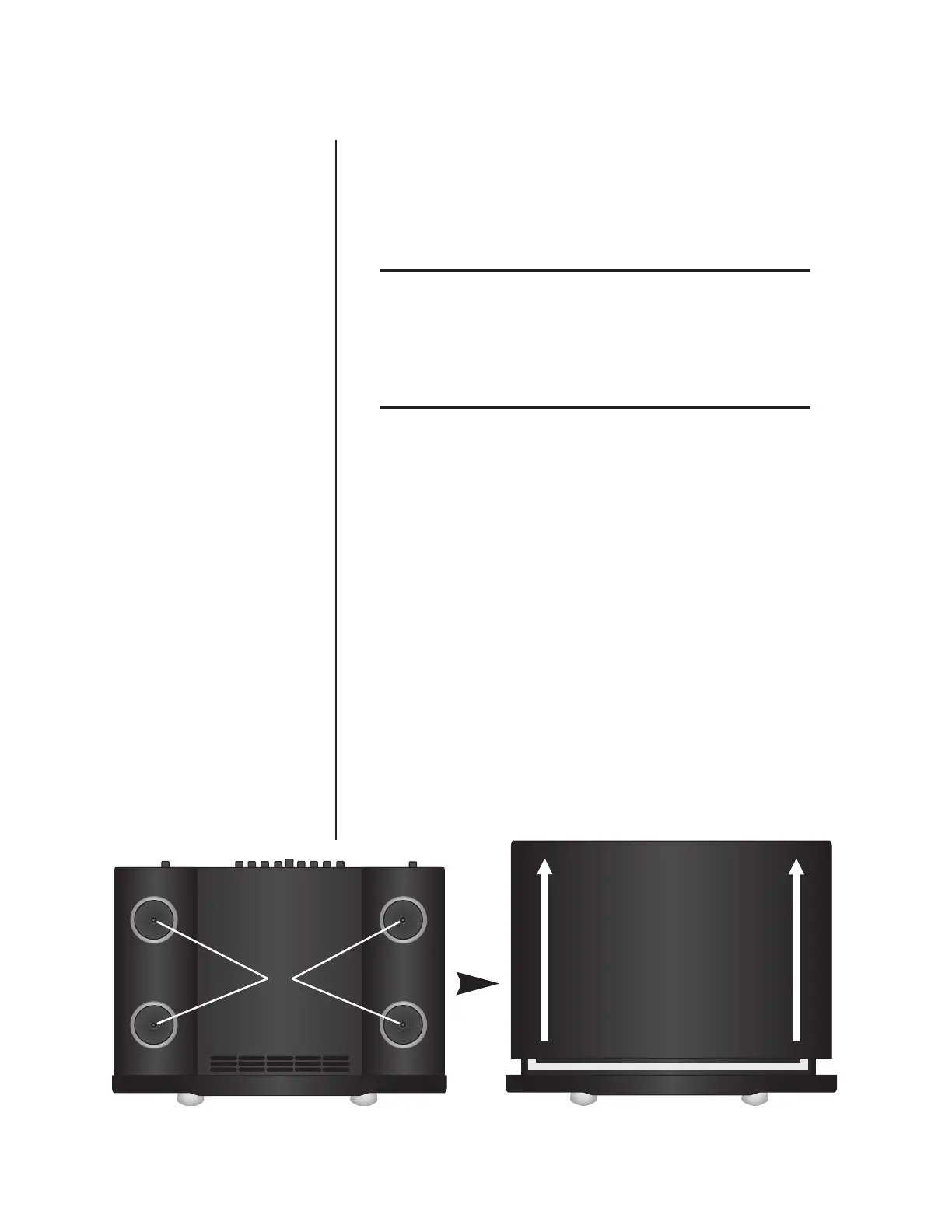
2. Use the provided 1/8-inch hex-key to remove the four screws
that secure the feet and the top cover. These screws are identi-
fied in the illustration shown below (left).
3. Place the Nº326S upright on the work surface. Take care to
avoid “dropping” the Nº326S on the work surface once the
feet are removed.
4. Remove the top cover from the Nº326S, gently sliding it
toward the rear panel as shown in illustration below (right).
5. Put on the provided anti-static wrist strap.
6. Remove the phono modules from their ESD protective bags.
6
Installation Instructions & Release Notes Mark Levinson












 To Next Page