15
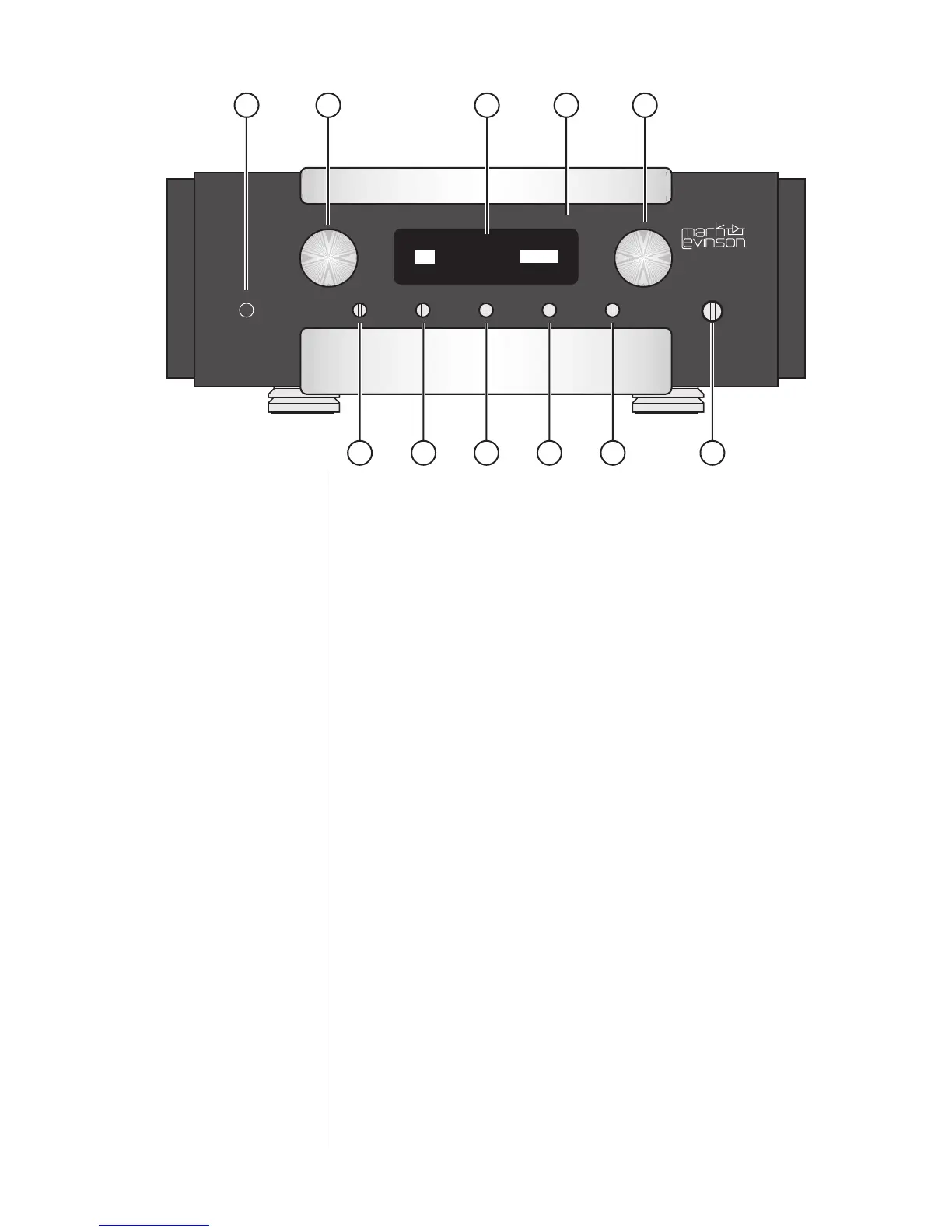
power display intensity setup enter balance mute
standby
volume
polarity
select
MADRIGAL AUDIO LABORATORIES
CD 47.3
1 2 3 4 5
6 7 8 9 10 11
Front Panel
1 Power Button
This button connects and disconnects the Nº383 from the AC
mains power. It is normally intended to be left engaged at all
times, unless you plan to be away from your home for an extended
period. By using the standby button rather than power to turn
the system on and off, the Nº383 can remain warmed up and
sounding its best at all times. It can also respond to commands
from its remote control when in standby, something it obviously
cannot do when disconnected from AC mains power.
Should you disconnect the Nº383 from power for an extended pe-
riod, either via this power button or by pulling its plug, it may
require a few hours to return to thermal equilibrium and optimal
sonic performance.
2 Select Knob
This knob is normally used to select among the various inputs of
the Nº383, with the resulting selections being shown in the display
window, immediately to the right of the select knob.
The select knob is also used during setup to select among vari-
ous menu items available (the volume knob is used to actually
adjust those items).











 To Next Page