11
N
0
52 RefeReNce PReamPlifieR / Quick-Start Guide
enGliSh
REMOTE CONTROL
Battery Replacement
Your N
0
52 remote control comes with two AAA alkaline
batteries already installed. If the remote control seems
to operate intermittently, or if the remote control’s IR
transmitter LED illuminates dimly or not at all when a
button is pressed, replace both batteries with new ones.
We recommend that you use alkaline batteries, which do
not leak and last longer than carbon batteries.
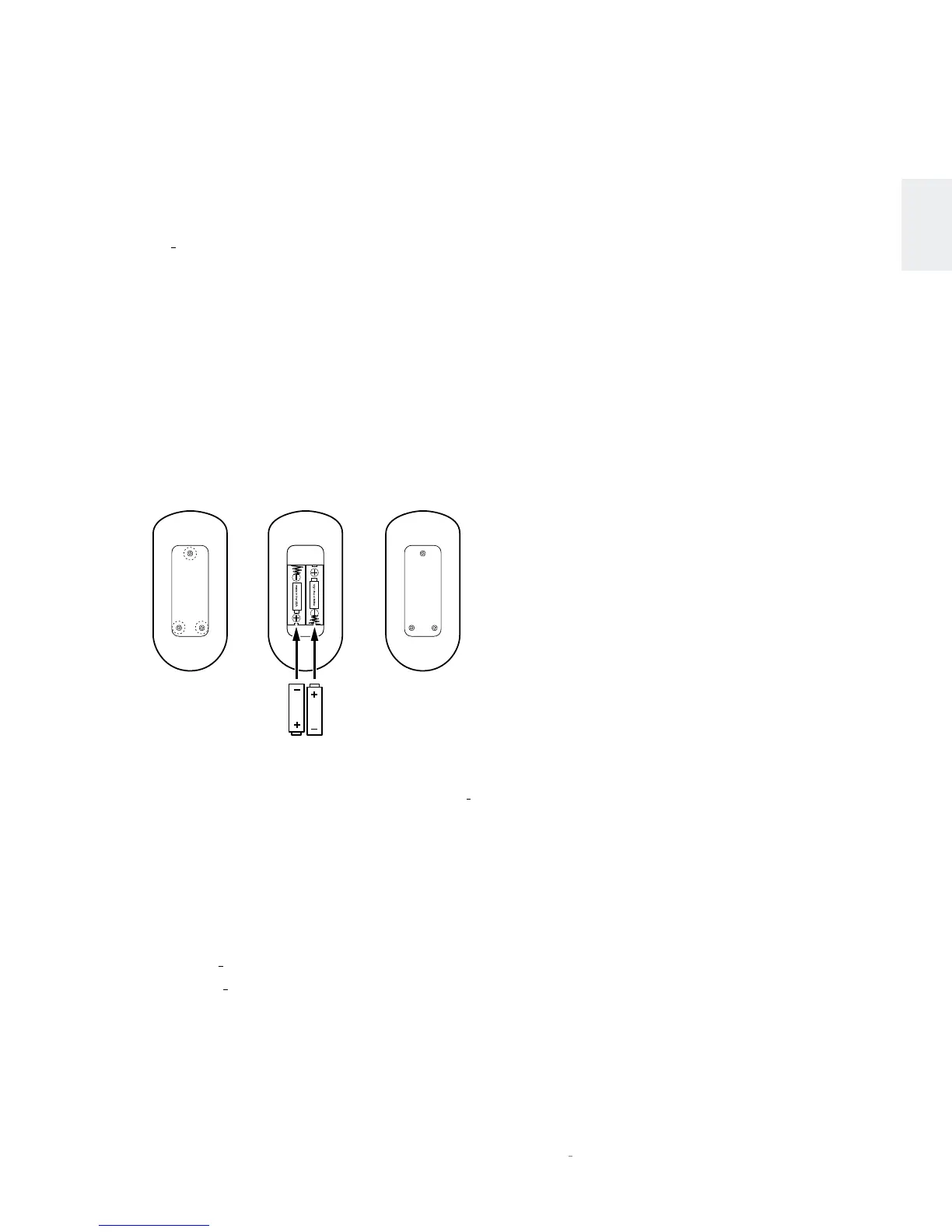
To replace the batteries, remove the remote control’s
battery cover, insert the batteries and replace the battery
cover as shown in the illustration below. Be sure to observe
proper battery polarity.
Remove Screws
and Cover
Insert 2 x AAA
Batteries
Replace Cover
and Screws
Using the Remote Control
When using the remote control, aim it toward the N
0
52
Controller chassis’ front panel IR receiver. Make sure that
no objects, such as furniture, block the remote’s view of the
receiver. Bright lights, fluorescent lights, and plasma video
displays may interfere with the function of the remote.
• The remote has a range of about 17 feet (5m), depending
on the lighting conditions.
• You can use the remote at an angle of up to 45° to either
side of the N
0
52 Controller.
• Placing the N
0
52 controller inside a cabinet behind tinted
glass will reduce the remote control’s effective range.
• Do not use remote controls for different components at
the same time. Remote controls for different components
can interfere with one another.
Quick SetuP and liSten
Quick SetuP and liSten









 To Next Page