33
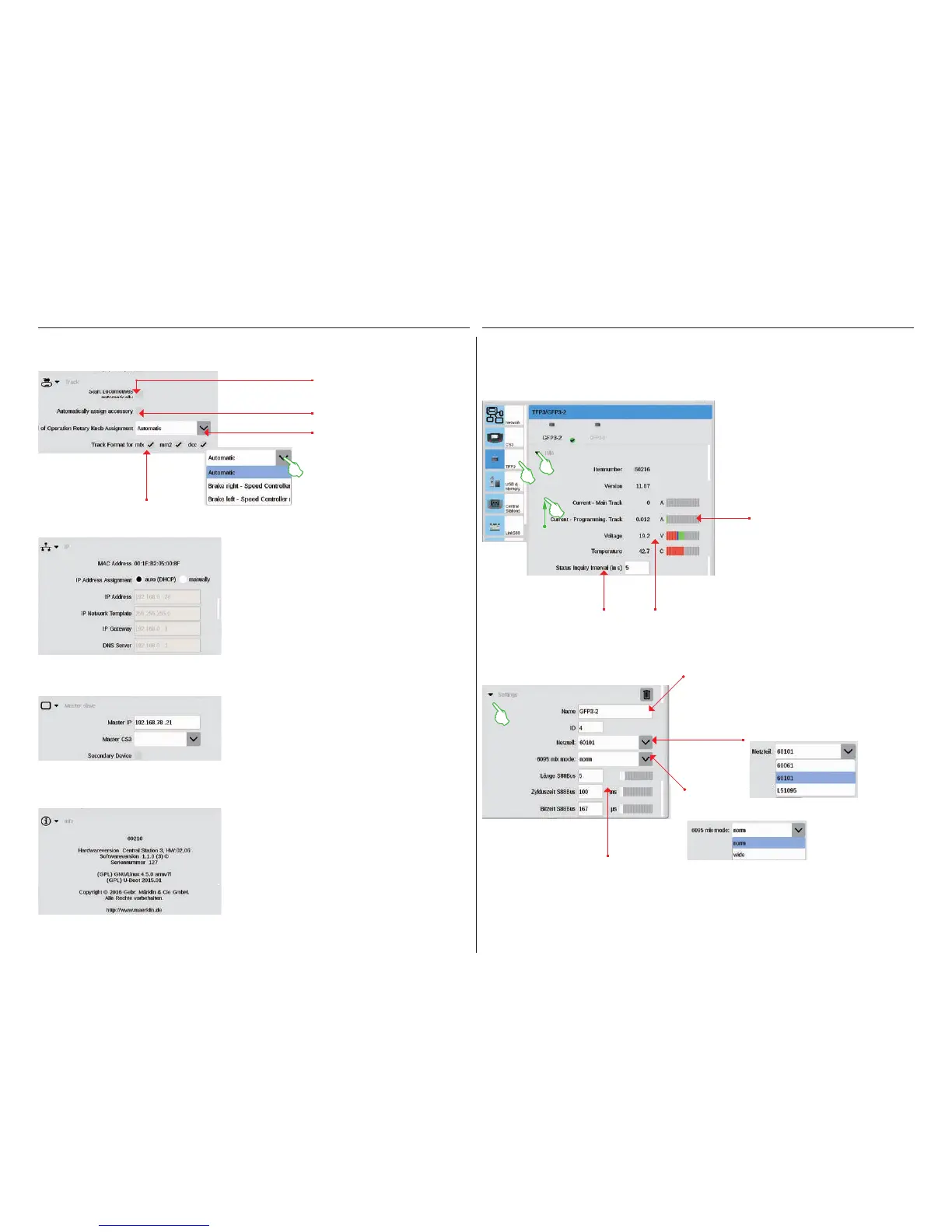
In the drop-down menu, you
can define the assignment for
the control knob in the World
of Operation mode.
This option is available when you connect
your Central Station 3 to your router with an
LAN cable. Here you have the choice whether
the CS3 is to obtain the necessary network
addresses from the router or whether you are
to enter the data manually.
This section takes on importance as soon as
more than one CS3 or CS3 plus is being used:
Here you set which CS3 is the main device
(Master) and whether this device is a secondary
or slave device.
The hardware and software version of your CS3
as well as legal information are shown in the
information section.
The GFP3 (Track Format Processor 3) gives you information about the current measurement data for the layout
and the CS3. A wipe of your finger upward takes you to the lower sections of the page, including the settings
(images below).
Calling up Track Settings
Seeing IP Settings
Master-Slave Settings
Information Section
Assigns new mfx items auto-
matically to a free address.
Here you can
shut off protocols
not being used.
Sets all locomotives automat-
ically to the last known status
after restarting the CS3.
GFP3 – Data
Electrical current present
currently in the main and
programming track.
Defines the time after
which the measured values
are recorded again.
Current voltage and
temperature values for
the CS3.
Changing a
designation.
S88 Bus: Setting the length,
cycle time, and bit time.
Selecting the
network in use:
Adjusting
the mode:
GFP3 – Settings


 To Next Page