32
Calling up and Changing System Settings
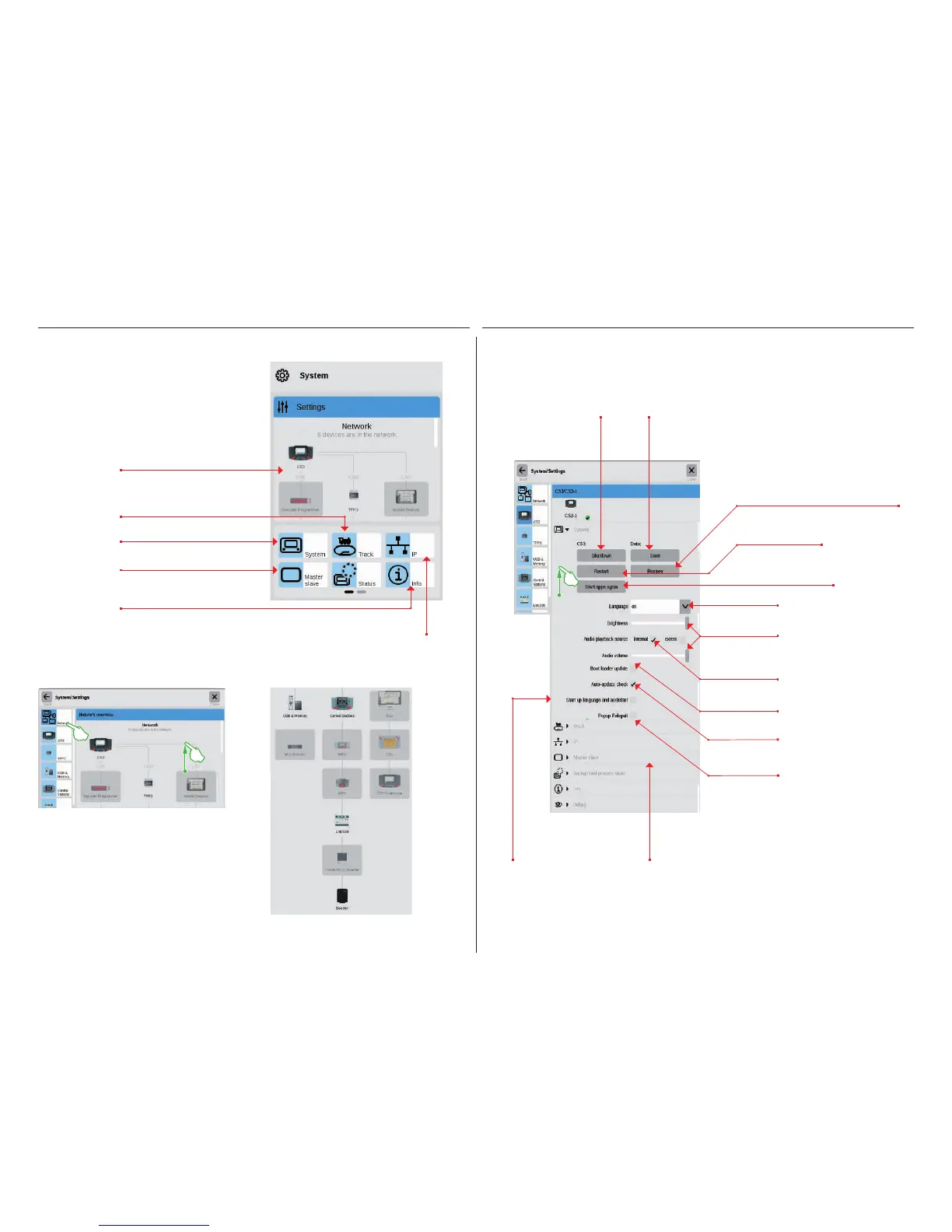
Overview of the
connected devices.
Options for the performance of
locomotives and solenoid items.
Settings for the Central Station 3.
Master-Slave options.
Gives the version numbers
for hardware and software.
IP setting in case an
LAN cable is connected.
You get to the startup page for the system settings (right
image) by tapping in the toolbar for the item list in the
upper left on the button „System“ (see also Page 6).
With a tap of your finger, open in each case the settings
or a detailed view on the startup page.
Calling up the System Menu
The network overview gives information about all con-
nected and active devices. You can reach their settings
directly by a tap of your finger in the overview or by means
of the menu column on the left edge. Wiping your finger
upward takes you to the lower sections of the page (right
image). Inactive devices are shown „greyed out”.
Network: Overview of all Active Components
Access to Basic Functions for the Central Station 3
Tap in the network overview or in the menu column on the left edge on the CS3 symbol in order to open the CS3
system settings. The lower sections of the page can be reached by wiping up with your finger in the middle of
the display.
Touch the „Go Back“ button in the upper left in order to go back at any time to the startup page for the system
settings. The other options shown in the left menu column can also be reached with a tap of your finger.
The safe and recom-
mended way to turn
the CS3 off.
Creates a protection for your current CS3 data.
Tip: Use this function regularly to protect editing statuses –
the best way is also with a USB stick.
Turns the CS3 off
and restarts.
Restart of the internal applications
such as the user interface.
Changes the language for
the user interface.
Restores the CS3 to an earlier editing
status with the help of a previously
created protection file (see also Page 6).
Adjusts screen bright-
ness or volume with a
sliding controller.
Choice between built-in and
external speaker.
Activates language selec-
tion dialog and setup wizard
when starting the CS3 (see
also Page 3).
The CS3 checks regularly whether
a firmware update is available
when this option is selected.
Enable quick access to the
locomotive controller.
Only relevant in case of an
incomplete CS3 update.
The other sections „Track”, „IP”,
„Master-Slave”, and „Info” are explained
on thxe next page. You can open them by
tapping on them.


 To Next Page