Page 14
8.4 INTERCOM CONFIGURATION
Primary function of the SOLO-NX unit is intercom support. Selecting (calling) apartment number is
achieved pressing the call button beside appropriate name plate.
This actions will start a voice call procedure from Phone number 1 till Phone number 5. After the
call is answered the called user has the option to trigger the output by pressing “11” for opening
Output 1 or “21” for triggering Output 2.
If the call is answered the unit will stop dialing next numbers on the list.
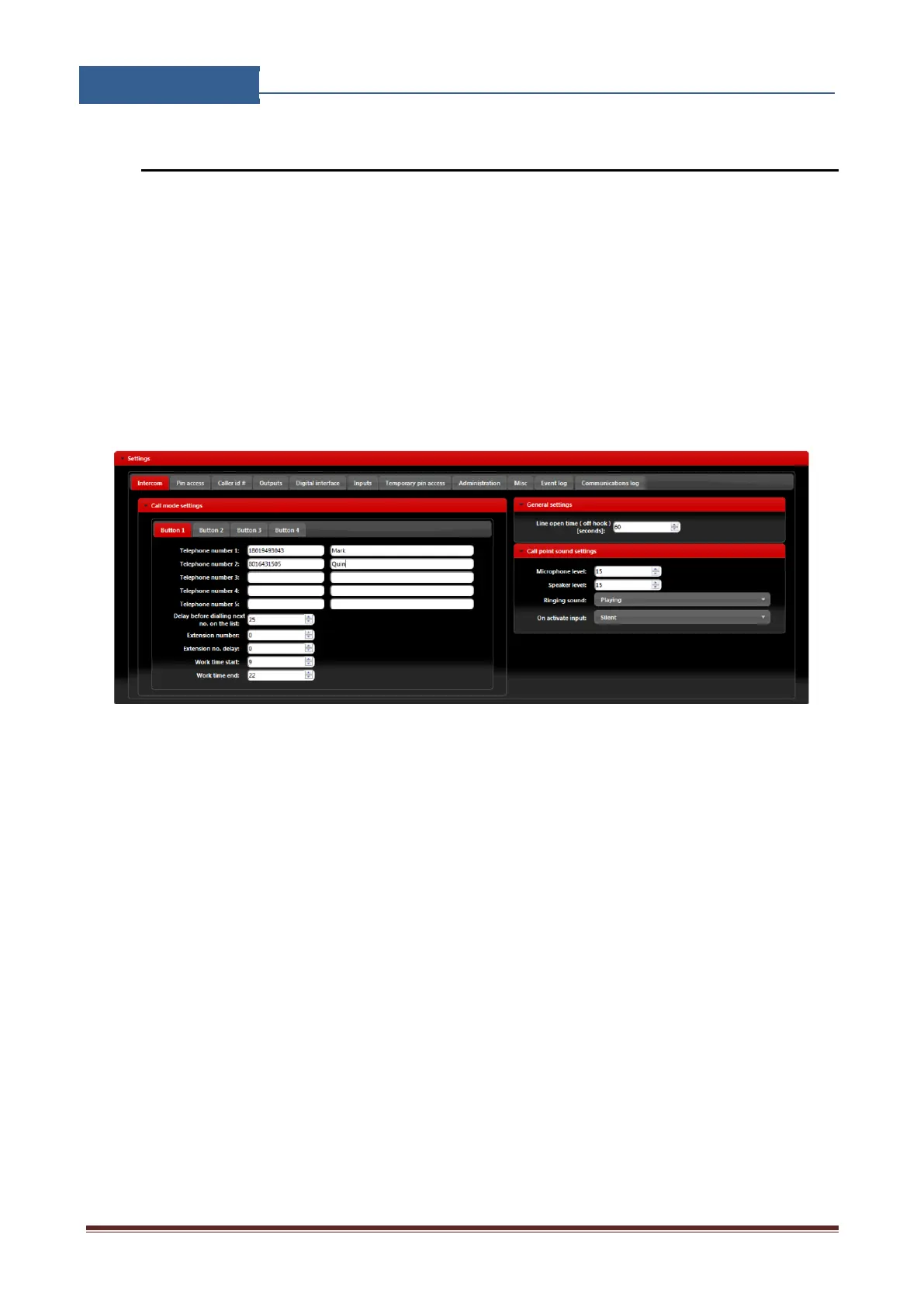
Management of the intercom function is found under Intercom tab.
Figure 6: WEB Server-Intercom settings.
Intercom management parameters:
• Telephone number 1…Telephone number 5: Number that the unit will call when call
button pressed.
• Delay before dialing next no. on the list: Time delay in second before next user on the list
gets dialed if the call to the previous user is not answered.
• Extension number: Parameter is used to set the DTMF number in auto self-select function
• Extension no. delay: Parameter is used to set the delay (in sec.) for sending DTMF number
in auto self-select function.
• Work time start, Work time end: Parameters are used to define work time schedule.
Inside this limits number under position 1 to 4 will be dialed, outside this limits number
under position 5 will be dialed.


 To Next Page