Model: MTS200 (1U)
Doc. Ref. no. : - m08/om/201
Issue no.: 03
Page 45 of 195 User’s Manual
GENERAL SETTINGS:
To enter the configuration mode of MTS200 using front keypad, user need to press “MENU” key and then
enter appropriate password. This will allow user to enter configurable parameters option and this
parameters can be configured as explained in below section.
1. SET HOUR MODE
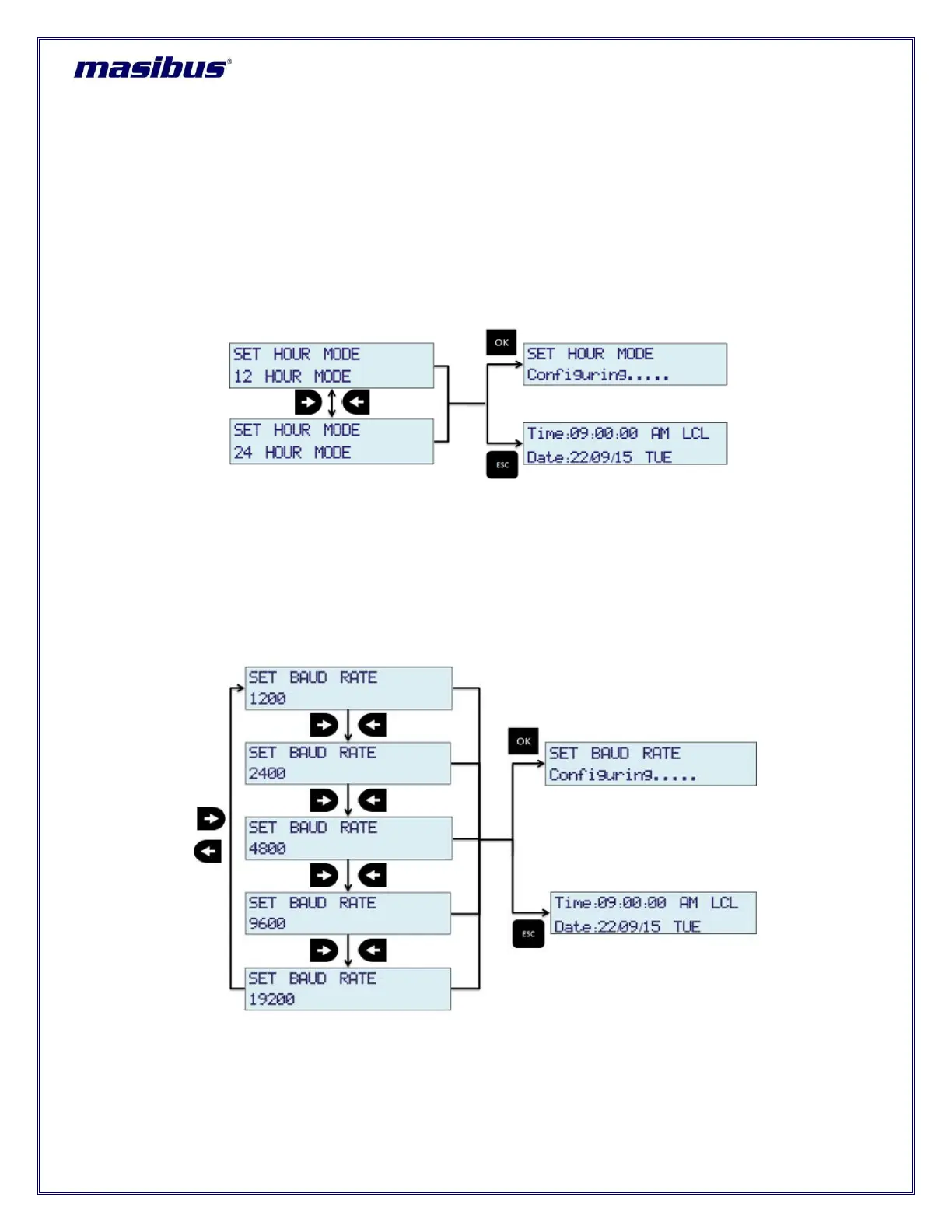
MTS200 provides its internal clock time information on LCD display, SNMP status and webserver home
page. This time information can be configured for 12 hour or 24 hour format. Whenever user selects 12
hour format, AM/PM information is displayed in time information.
As shown above, “LEFT” and “RIGHT” key are used to change setting of HOUR MODE. “OK” key will
save the setting and “ESC” key will reject new setting and keep old value of this parameter in effect and
come out of configuration MENU mode to RUN mode.
2. SET BAUD RATE
COM2 serial port output baudrate at rear panel of MTS200 can be set by using this option. MTS200 is
capable to provide serial time frame on COM2 terminal at configurable baud rates of 1200 / 2400 / 4800 /
9600 / 19200.
As shown above, “LEFT” and “RIGHT” key are used to change setting of HOUR MODE. “OK” key will
save the setting and “ESC” key will reject new setting and keep old value of this parameter in effect and
come out of configuration MENU mode to RUN mode.



 To Next Page