14
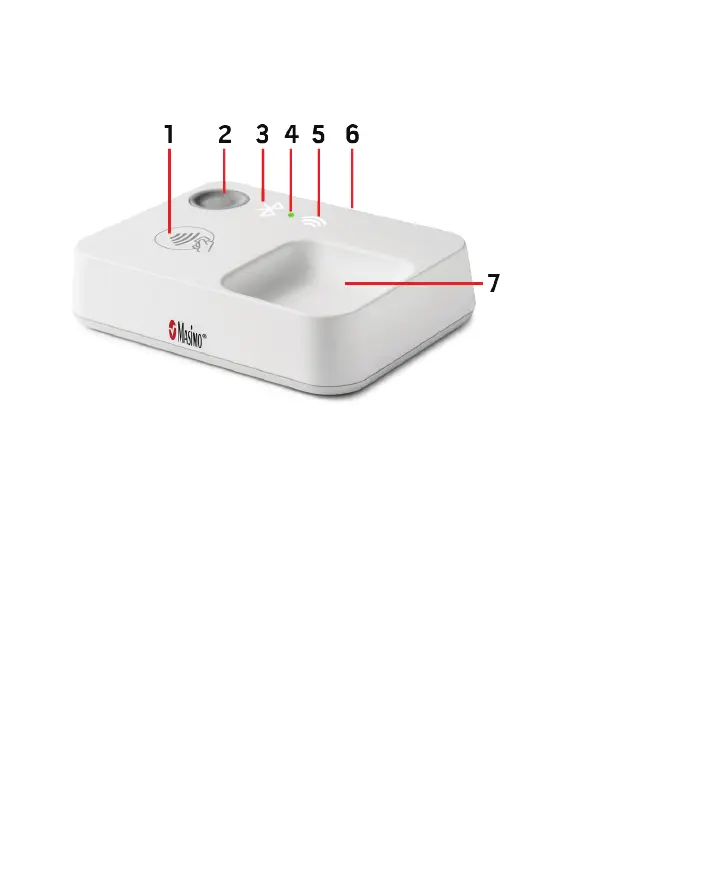
Masimo Stork Hub Overview
The Masimo Stork Hub is a device that transfers measured data from the wireless Masimo Sensor to the
Masimo Cloud and provides audible and visible alarms.
NEED NEW IMAGE
NEED TO KNOW WHAT INDICATORS THE HUB WILL HAVE
1. Pairing Symbol
Location on the Masimo Stork Hub for pairing the
Masimo Chip.
2. Masimo Stork Hub Button
Used for pairing and silencing alarms.
3. Bluetooth Status LED
Shows the Masimo Stork Hub Bluetooth status. See
Masimo Stork Hub Lights on page 14.
4. Masimo Stork Hub Status LED
Shows the Masimo Stork Hub power and monitoring
status. See Masimo Stork Hub Lights on page 14.
5. Wi-Fi Status LED
Shows the Masimo Stork Hub Wi-Fi status. See
Masimo Stork Hub Lights on page 14.
6. USB Power Connector
Power is provided to the Masimo Stork Hub
from the AC adapter and a USB cable.
7. Masimo Chip Storage Tray
Location on the Masimo Stork Hub for storage
of the chip when not in use.
Masimo Stork Hub Lights
The LED lights on the Masimo Stork Hub show the status of Bluetooth pairing and Wi-Fi connections.



 To Next Page