MasterclockGMRUserManualv2–2016.12
47
GPSOption
WiththeGPSoptiontheGMRderivesprecisionUTCtime
fromsatellites.TheGMRincludesaninternalreceiverthat
requiresapre‐amplifiedGPSantenna.
GPSANTENNACONNECTIONS
1. Disconnectpowerfromtheunit.
2. Providetheantennawithaclearviewofthesky.Donot
moveitagainuntilaftertheGMRhasachievedsatellite
lock(explainedbelow).Routetheantennacabletothe
backoftheGMR.
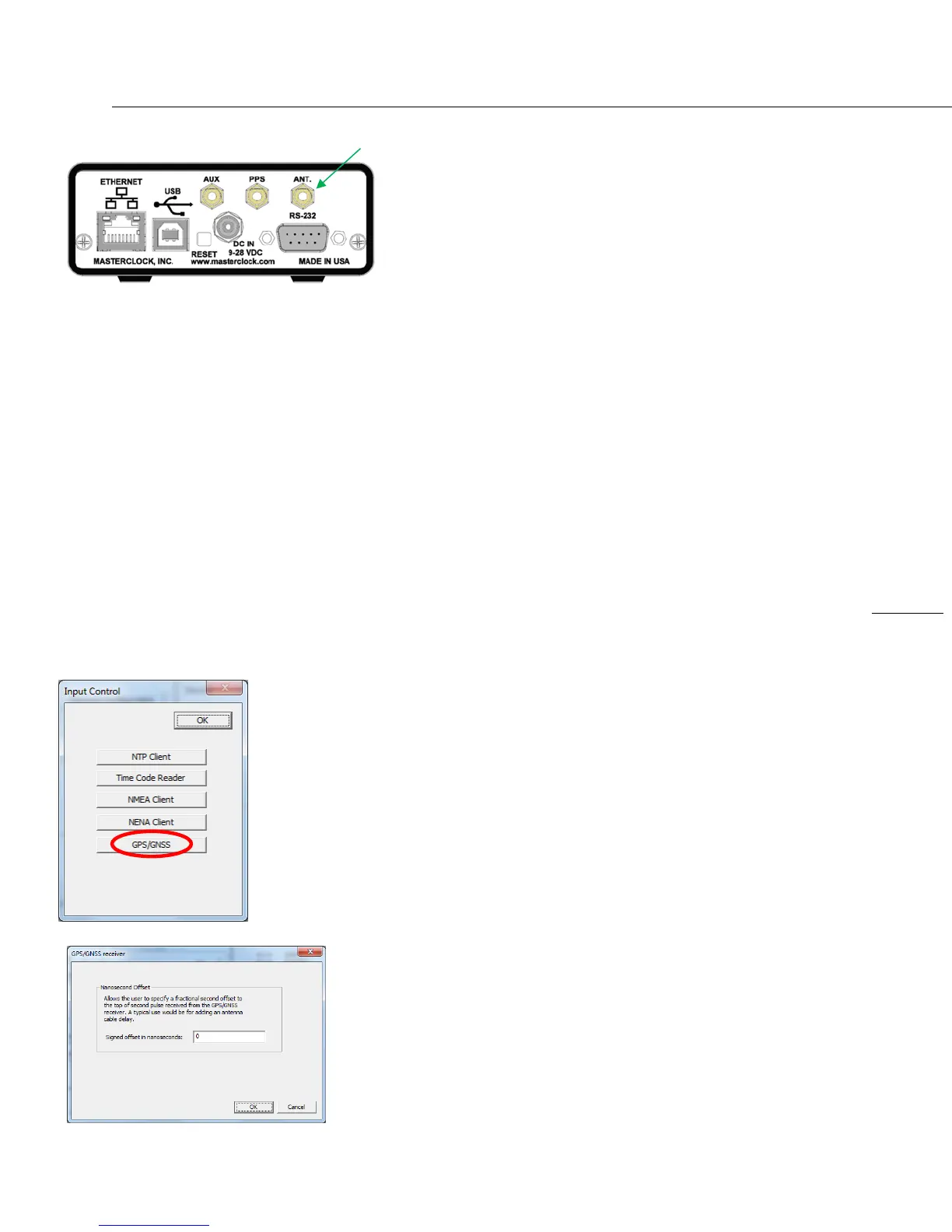
3. Connecttheantennacablecoaxialconnectortothe
gold
SMAfemaleconnectorontherearoftheunit(labeled
ANTinimageatleft).
4. ReapplypowertotheGMR.
START‐UPANDGPSSATELLITEACQUISITION
WhentheGMRisinitiallypoweredupthetimetoacquire
satellitesandextractcorrecttimeistypically5to15minutes.
Inlessthanoptimalconditionsthiscouldextendto25
minutes.Atmosphericconditions,typeofantenna,antenna
locationandantennacablelengthwillaffectacquisitiontime.
Whenrestarting,if
thelocation,timeandnumberofsatellites
havenotsignificantlychangedsincelastpowerdown,the
GPSshouldlockmuchfaster.ThegreenlockLEDonthefront
oftheGMRwillblinkoncepersecondwhenlockedtoa
reference,twicepersecondwhennotlocked.Verifythe
active
referenceusingdevicestatusavailablewith
WinDiscovery,SSH,ortelnet.
ANTENNACABLELENGTHCOMPENSATION
Nanosecondoffsetscanbeaddedtocompensateforcable
lengthunderInputControl‐GPS/GNSS.
GPSANTENNA–SMAFEMALE
Note:AllcomponentsoftheGPSsystem
(includingtheGMRunitwithGPSreceiver,
powersupply,GPSantennaandantennacable)
aretestedasasystematthefactorybefore
shipment.
Besure:
1)TheGPSantenna,theGMRandthe
suppliedcoaxialantennacablehavenot
beendamaged;
2)The
GPSantennahasanunobstructedview
ofthesky;
3)Thepowerconnectorisproperlyinstalled;
4)ThefrontpanelLEDfollowsthestartup
sequencedescribedearlier(on,offand
thenon).


 To Next Page