MasterclockGMRUserManualv2–2016.12
33
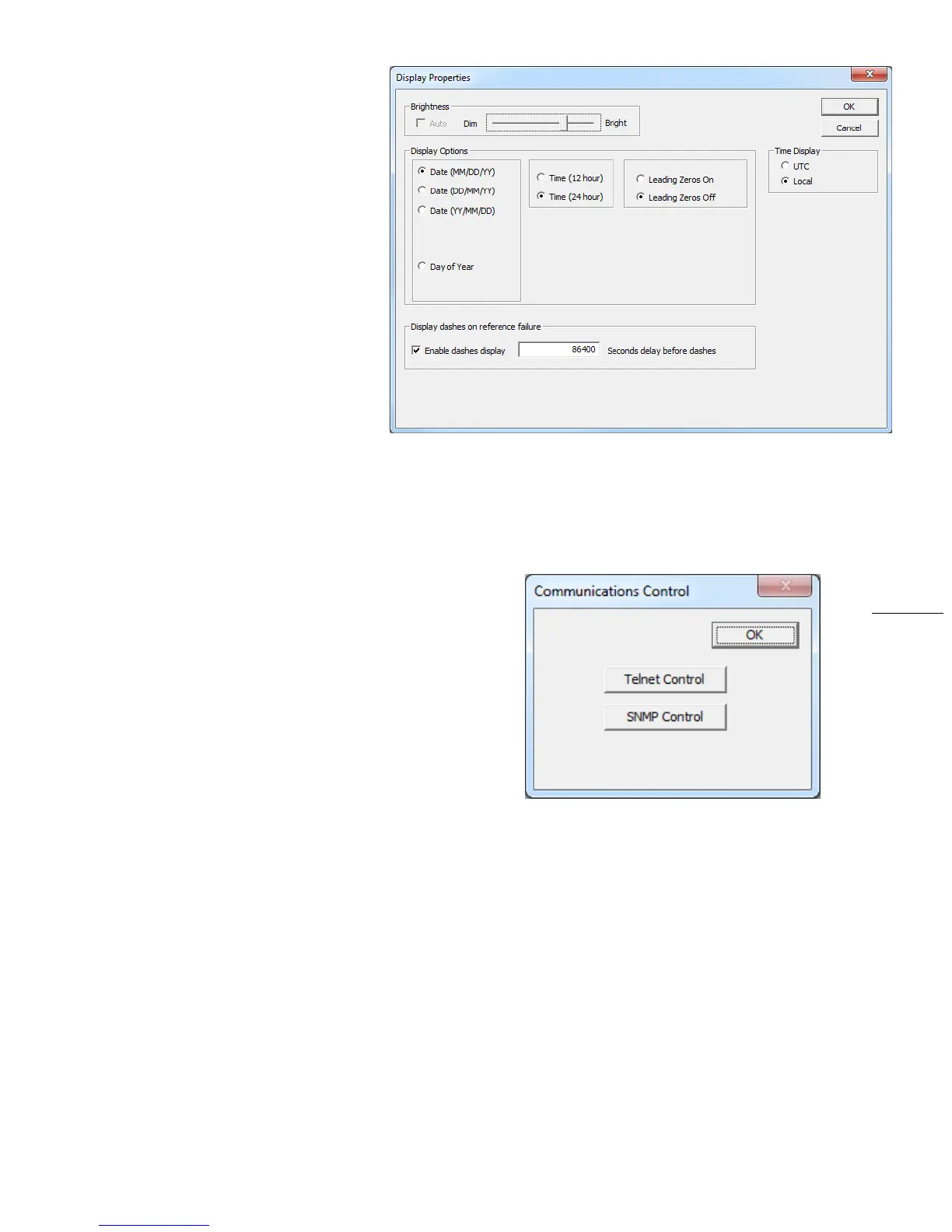
DEVICESETTINGS>DISPLAY
PROPERTIES
Hereyoucanchangethebrightnessof
thedisplayormodifythepresentationof
thedateandtime.Youcanchangethe
displayfromUTCtolocaltimeandyou
canalternatetimeswithdatesandset
therateatwhichtheychange.
COMMUNICATIONSCONTROL
TelnetandSNMPareconfiguredusingtheCommunications
Controlbutton.TelnetisaTCP/IPprotocolthroughwhichthe
GMRcanbeconfiguredviaacommandline.Almostallofthe
settingsavailableinWinDiscoveryarealsoavailableviaTelnet.
Thedefaultportnumber23cannotbechanged.
SNMPstandsforSimple
NetworkManagementProtocol.This
protocolenablesaPCapplication(calledanSNMPManageror
MIBBrowser)togetinformationfromtheSNMPAgentinthe
GMR.Thatinformationconveysthenetworkidentityand
statusoftheGMR,likethenumberofpacketstransmittedor
received,thenumberofcommunicationerrors,
etc.
InadditiontothatstandardSNMPdata,Masterclockhascreatedacustomset,calledacustomMIB,whichcanbe
importedintoaMIBBrowser.Itisavailablefordownloadfromourwebsite.Itconveysdatasuchasthis:
NTPleapsecondsetting,stratumlevel,precision,referencedelay,poll
interval,sourceandoffset.
Devicedescription,processor,firmwareversion,serialnumberandmodel.
GPSreceiverhealth,latitude,longitudeandnumberofsatellitesvisible.
ThelockstatusofNTP,TimeCode,GPS,PTP,NMEAandNENA.


 To Next Page