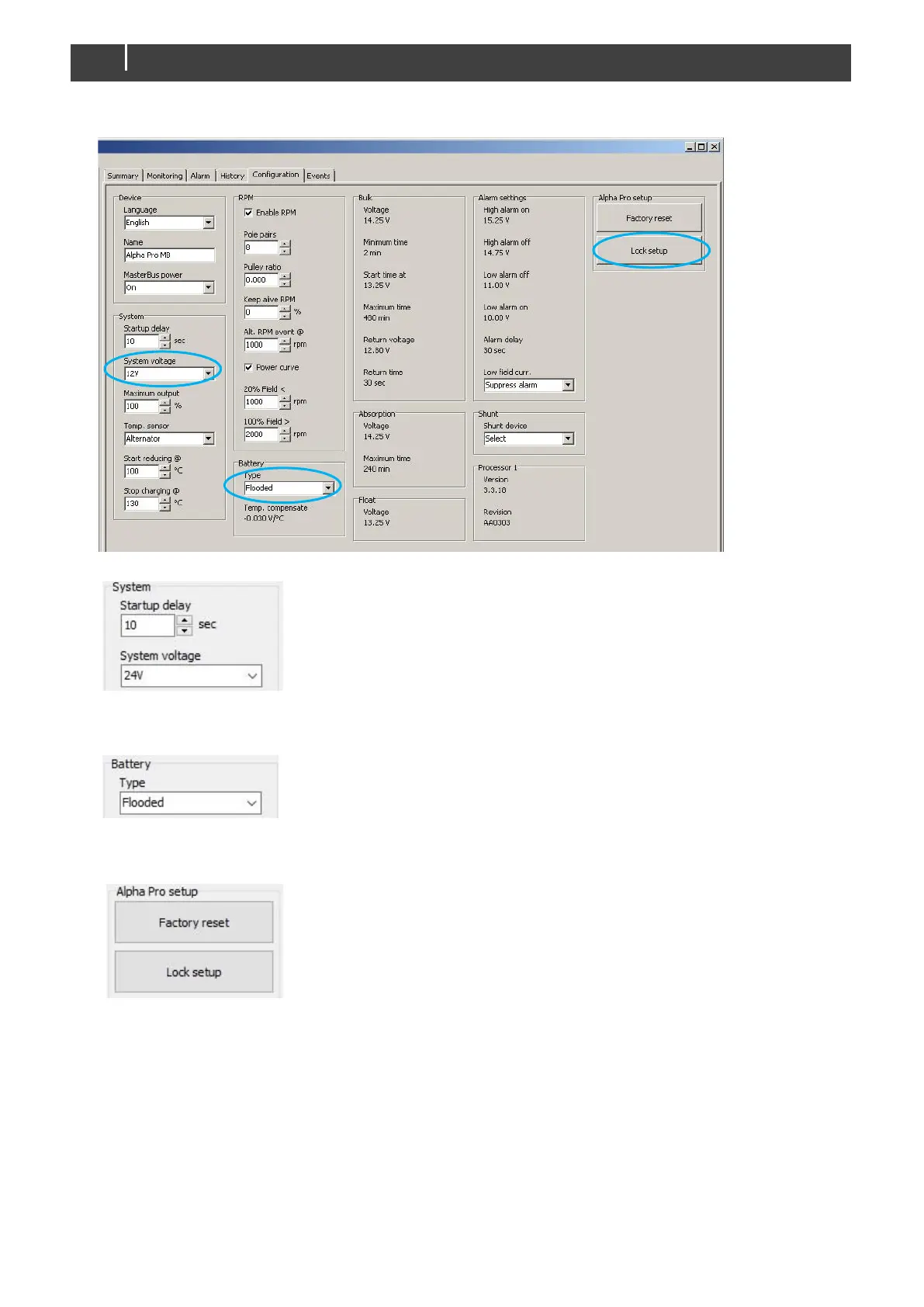
1 Go to the Configuration page.
2 Go to group "System" and select the "System voltage" present in your system.
Figure 14: Selecting "System voltage" through MasterAdjust
3 Go to group "Battery" and select the "Battery type" present in your system.
Figure 15: Selecting "Battery type" through MasterAdjust
4 Go to group "Alpha Pro setup" and select "Lock setup".
Figure 16: Selecting "Lock setup" via MasterAdjust
Now the Alpha Pro charge regulator is ready for testing. Or configure the following optional setting(s) first.
5.2 KEEP ALIVE FUNCTION (OPTION)
This feature can keep a connected RPM meter functional if the alternator field current drops. It will only function if
the White wire is connected to the W or R point of the alternator. Two situations can override this feature:
- if the alternator temperature reaches its "Stop charging @" temperature or
- if the charger receives a "Stop charge" event.



 To Next Page