Additional Functions
BATTERY/ALTERNATOR TEST
36
To access the Battery/Alternator Test menu:
1. Press MENU/ENTER
.
The Main Menu displays.
2. Select Battery/Alternator Test, then press MENU/ENTER
.
In cases where the Scan Tool has not determined the vehicle
make and model year (either by decoding the VIN or through
manual selection during code retrieval), the Select Vehicle
screen displays. The Select Vehicle screen shows the three
most recently tested vehicles.
To select a previously tested vehicle, highlight the desired
vehicle, then press MENU/ENTER
. Proceed to step 2.
To select a new vehicle, highlight
Select New Vehicle, then press
MENU/ENTER
.
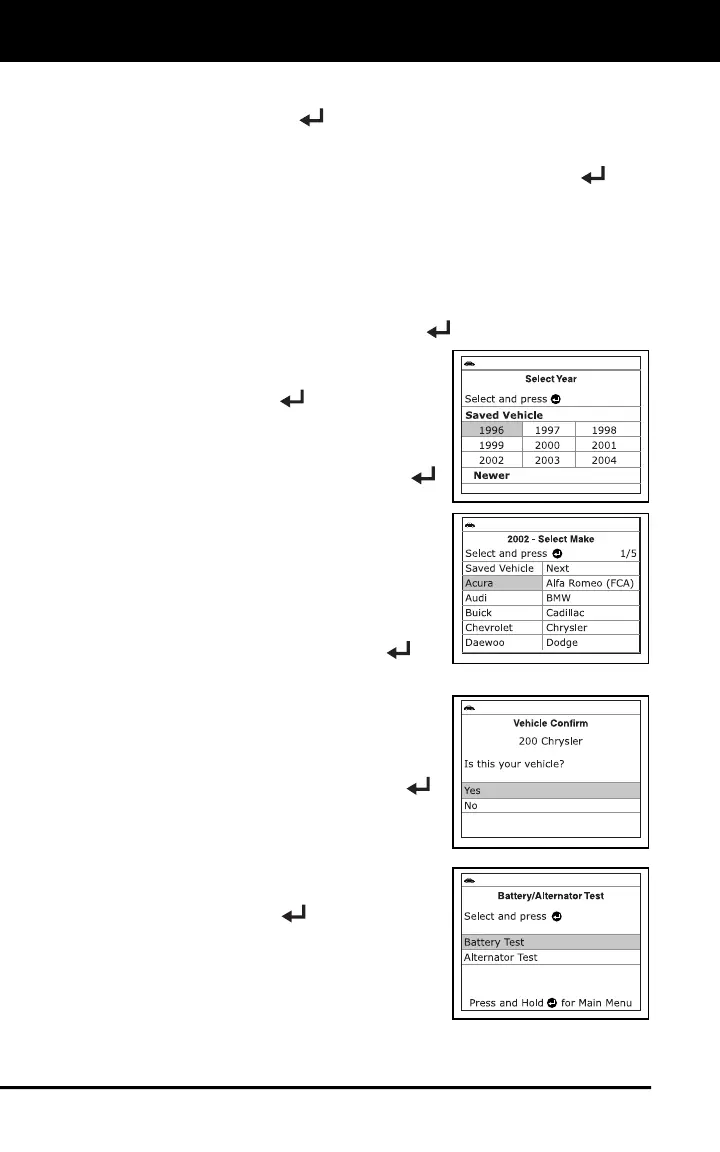
- The Select Year screen displays.
Select the desired vehicle model
year, then press MENU/ENTER
to continue, or, select Saved
Vehicle to return to the Select
Vehicle screen and select a
previously tested vehicle.
- The Select Make screen
displays.
Select the desired vehicle make,
then press MENU/ENTER
to
continue.
- The Confirm Vehicle screen
displays.
If the information shown is correct
for the vehicle under test, select
Yes, then press MENU/ENTER
.
Proceed to step 3.
If the information shown is not
correct for the vehicle under test, or
if you wish to reselect the vehicle,
select No, then press
MENU/ENTER
to return to the
Select Vehicle screen.
3. A “One moment please . . .” message
displays while the request is processed.
The Battery/Alternator Test Menu
displays.



 To Next Page