FixAdvisor
™
Controls
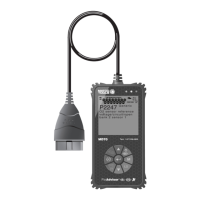
DISPLAY FUNCTIONS
12 MD70
1. I/M MONITOR STATUS field - Identifies the I/M Monitor status area.
2. Monitor icons - Indicate which Monitors are supported by the
vehicle under test, and whether or not the associated Monitor has
run its diagnostic testing (Monitor status). When a Monitor icon is
solid, it indicates that the associated Monitor has completed its
diagnostic testing. When a Monitor icon is flashing, it indicates that
the vehicle supports the associated Monitor, but the Monitor has not
yet run its diagnostic testing.
3.
Vehicle icon - Indicates whether or not the FixAdvisor is being
properly powered through the vehicle’s Data Link Connector (DLC).
A visible icon indicates that the FixAdvisor is being powered through
the vehicle’s DLC connector.
4.
Link icon - Indicates whether or not the FixAdvisor is
communicating (linked) with the vehicle’s on-board computer. When
visible, the FixAdvisor is communicating with the computer. If the
Link icon is not visible, the FixAdvisor is not communicating with the
computer.
5.
Computer icon - When this icon is visible it indicates that the
FixAdvisor is linked to a personal computer. Optional software is
available that makes it possible to upload retrieved data to a
personal computer.
6.
Internal Battery icon - When visible, indicates the FixAdvisor
batteries are “low” and should be replaced. If the batteries are not
replaced when the battery symbol
is "on", all 3 LEDs will light up
as a last resort indicator to warn you that the batteries need
replacement. No data will be displayed on screen when all 3 LEDs
are lit.
7. DTC Display Area - Displays the Diagnostic Trouble Code (DTC)
number. Each fault is assigned a code number that is specific to that
fault.
8. Test Data Display Area - Displays DTC definitions, Freeze Frame
data, Live Data and other pertinent test information messages.
9. FREEZE FRAME icon - Indicates that there is Freeze Frame data
from “Priority Code” (Code #1) stored in the vehicle’s computer
memory.
10. PERMANENT icon - Indicates the currently displayed DTC is a
“Permanent” code.
11. PENDING icon - Indicates the currently displayed DTC is a
“Pending” code.
12.
icon - Indicates the status of the Malfunction Indicator Lamp
(MIL). The MIL icon is visible only when a DTC has commanded the
MIL on the vehicle’s dashboard to light.
13. ABS icon - Indicates the currently displayed DTC is an Anti-Lock
Brake System (ABS) code.
14. SRS icon - Indicates the currently displayed DTC is Supplemental
Restraint System (SRS) code.


 To Next Page