Additional Tests
VIEWING THE FIRMWARE VERSION
MD70 79
5. Use the UP and DOWN buttons, as necessary, to highlight
the desired vehicle make, then press the ENTER
button.
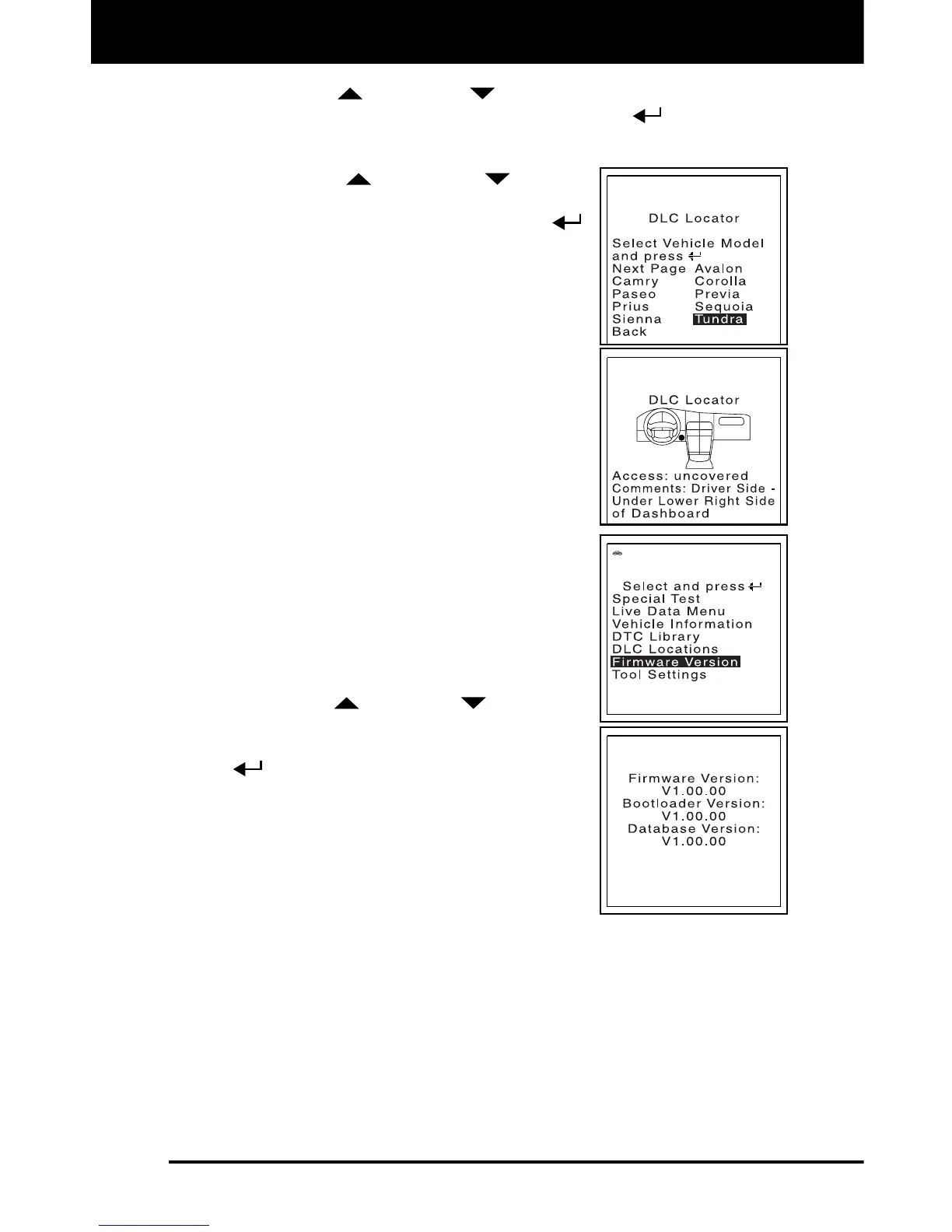
The Select Vehicle Model screen displays.
6. Use the UP
and DOWN buttons,
as necessary, to highlight the desired
vehicle model, then press the ENTER
button.
A description of the DLC location for
the selected vehicle displays.
7. When you have finished viewing the DLC
location, press the M button to return to the
Main Menu.
VIEWING THE FIRMWARE VERSION
You can view the current firmware version for
the FixAdvisor.
1. With the FixAdvisor turned on, press and
release the M button.
The Main Menu displays.
2. Use the UP
and DOWN buttons, as
necessary, to highlight Firmware Version
in the Main Menu, then press the ENTER
button.
The Firmware Version screen displays.
The screen shows the FixAdvisor’s
current firmware version, bootloader
version and database version.
3. Press the M button to return to the Main
Menu.


 To Next Page