1. Introduction
M1100 – M1200 User Manual Rev. 1.3 Page 9/40
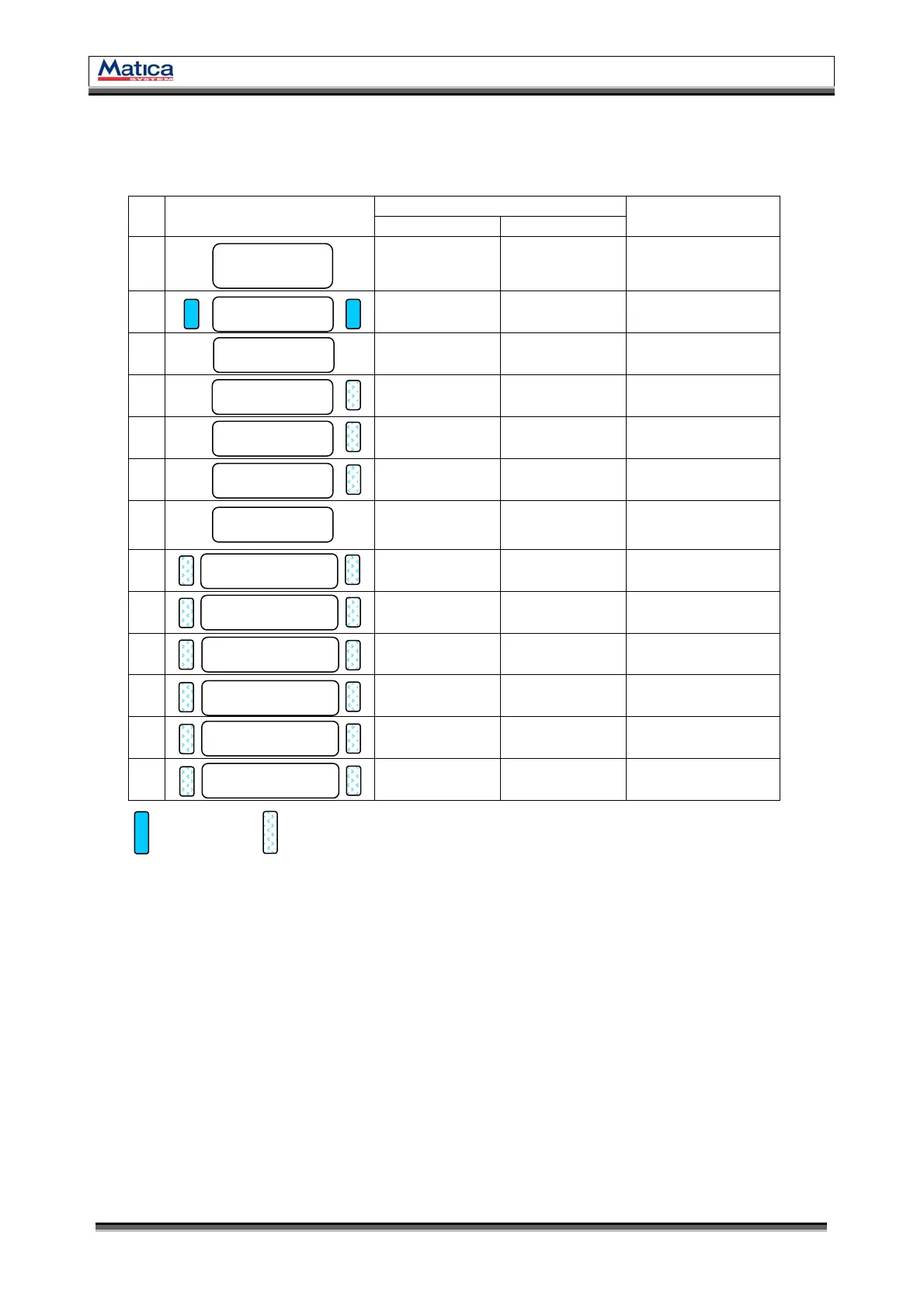
1.4 LCD Panel Display and Button Operation
M1100 – M1200 Printer shows the real-time process status to user. Please refer to the
below LCD panel display and button operation.
LED Buttons
No
LCD Message
Left Press Right Press
Printer Status
1
M1100–M1200
System Ready
Printer Setting
Information
(only for A/S)
Software
Power ON/OFF
System Stand By
2
Ver X.XX…
Initialize…
Initializing
3
M1100–M1200
Printing!
Printing
4
M1100–M1200
Mag R/W
Magnetic
Read/Write
5
M1100–M1200
Out of Ribbon
No Ribbon
6
M1100–M1200
Out of Card
No Card
7
M1100–M1200
Top Cover Open
Move
transportation
roller to left
Move
transportation
roller to right
Top Cover open
8
Ribbon Not Found
<Replay Cancel>
Replay
Cancel &
initialize
Fail to find a proper
color
9
Card In Error
<Replay Cancel>
Replay
Cancel &
initialize
Fail to the card
loading
10
Reposition Error
<Replay Cancel>
Replay
Cancel &
initialize
Fail to the card
transporting
11
Head U/D Error
<Replay Cancel>
Replay
Cancel &
initialize
Fail to the print
head up and down
12
Card Out Error
<Replay Cancel>
Replay
Cancel &
initialize
Fail to the card out
13
Mag R/W Error
<Replay Cancel>
Replay
Cancel &
initialize
Fail to the magnetic
Read/Write
* LED ON / LED BLINKING
▪ M1100 - M1200 System Ready : System is ready to print. Press left button to see the printer setting
information and press right button or Power ON/OFF by software.
▪ Ver X.XX… Initialize… : Under checking the printer’s version and initializing.
▪ M1100-M1200 Printing! : Printing.
▪ M1100-M1200 Mag R/W : Reading or writing the data on Magnetic Stripe.
▪ M1100-M1200 Out of Ribbon : No Ribbon in the printer or Ribbon is used all. Check the Ribbon!
▪ M1100-M1200 Out of Card : No Cards in the hopper. Check the Cards on the hopper!
▪ M1100-M1200 Case Open : Top Cover is open. Please close the Top Cover.
▪ Ribbon Not found : Ribbon search is failed. Press left button to replay or press right button to cancel.
▪ Card In Error : Card insertion is failed. Check the card on the hopper! Press left button to replay
or press right button to cancel.
▪ Reposition Error : Card is not moved to the proper position. Press left button to replay or press right
button to cancel.
▪ Head U/D Error : Printer head is not moved to the proper position. Press left button to replay or
press right button to cancel.
▪ Card Out Error : Card is not outputted. Press left button to replay or press right button to cancel.
▪ Mag R/W Error : Reading or writing the data is failed. Press left button to replay or press right
button to cancel.


 To Next Page