44
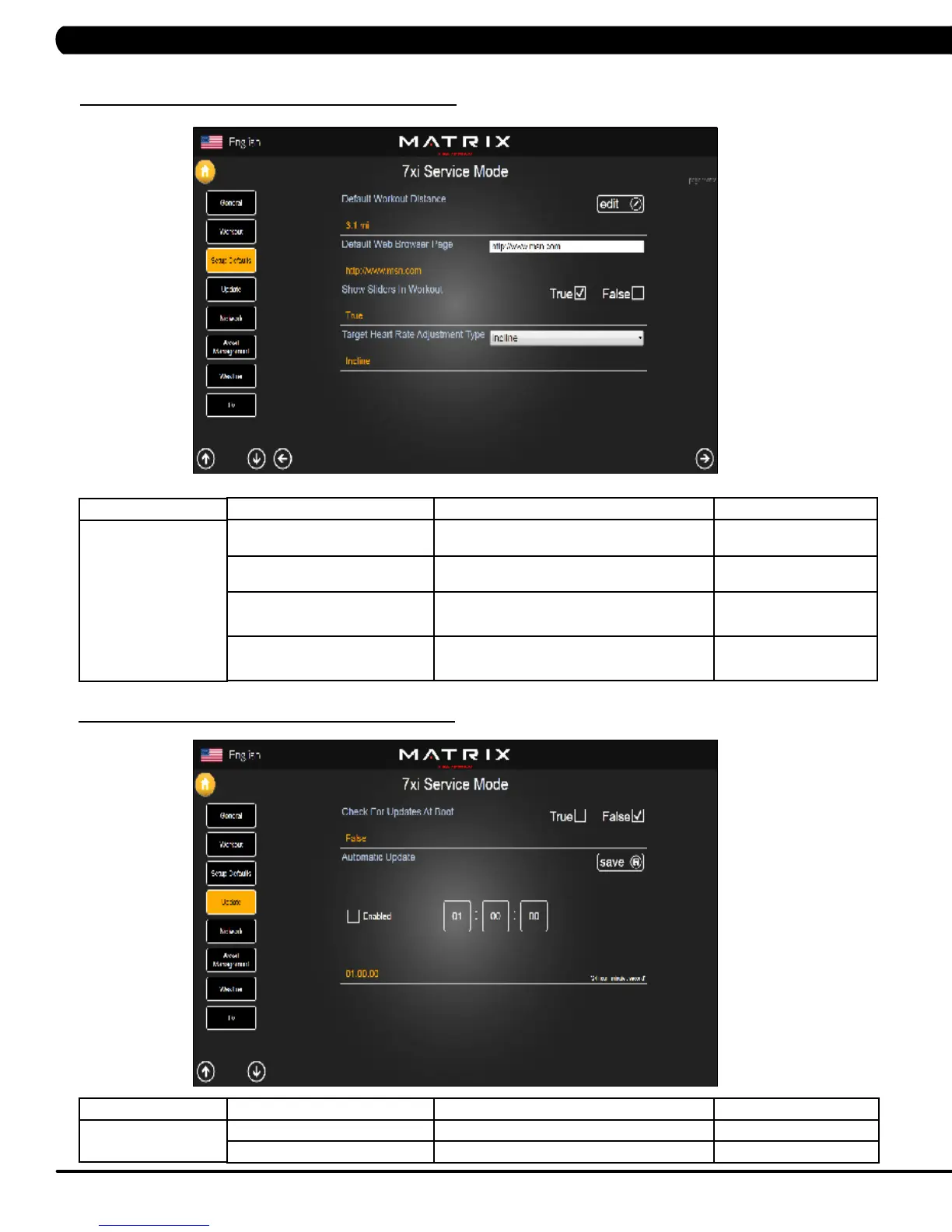
7.4 SERVICE MODE - SETUP DEFAULTS – TAB 2
FUNCTION & DEFAULTS DESCRIPTIONS MODIFIED
Default Workout Distance This option controls the default program
Distance
Maximum: 12.4
Minimum: 0.1
Default Web Browser Page This option controls the default machine Web
Browser Page
N/A
Show Sliders In Workout This option controls whether the Slider bars
show during a workout. True = On, False = Off.
True or False
Target Heart Rate Adjustment Type This option controls the Target Heart Rate
program adjustment type to Incline or Speed
Incline or Speed
MANAGER MODE
Setup Defaults
CHAPTER 7: SERVICE MODE
7.5 SERVICE MODE - UPDATE
FUNCTION & DEFAULTS DESCRIPTIONS MODIFIED
Check For Updates At boot True = Check for automatic updates. True or False
Automatic Update Time the software will automatically update.
N/A
MANAGER MODE
Update


 To Next Page