Introduction &
Contents
Installing your
VCR
Setting up your
VCR
Playing a
Video Tape
Recording
Programmes
Advanced
Features
Help and
Specification
7
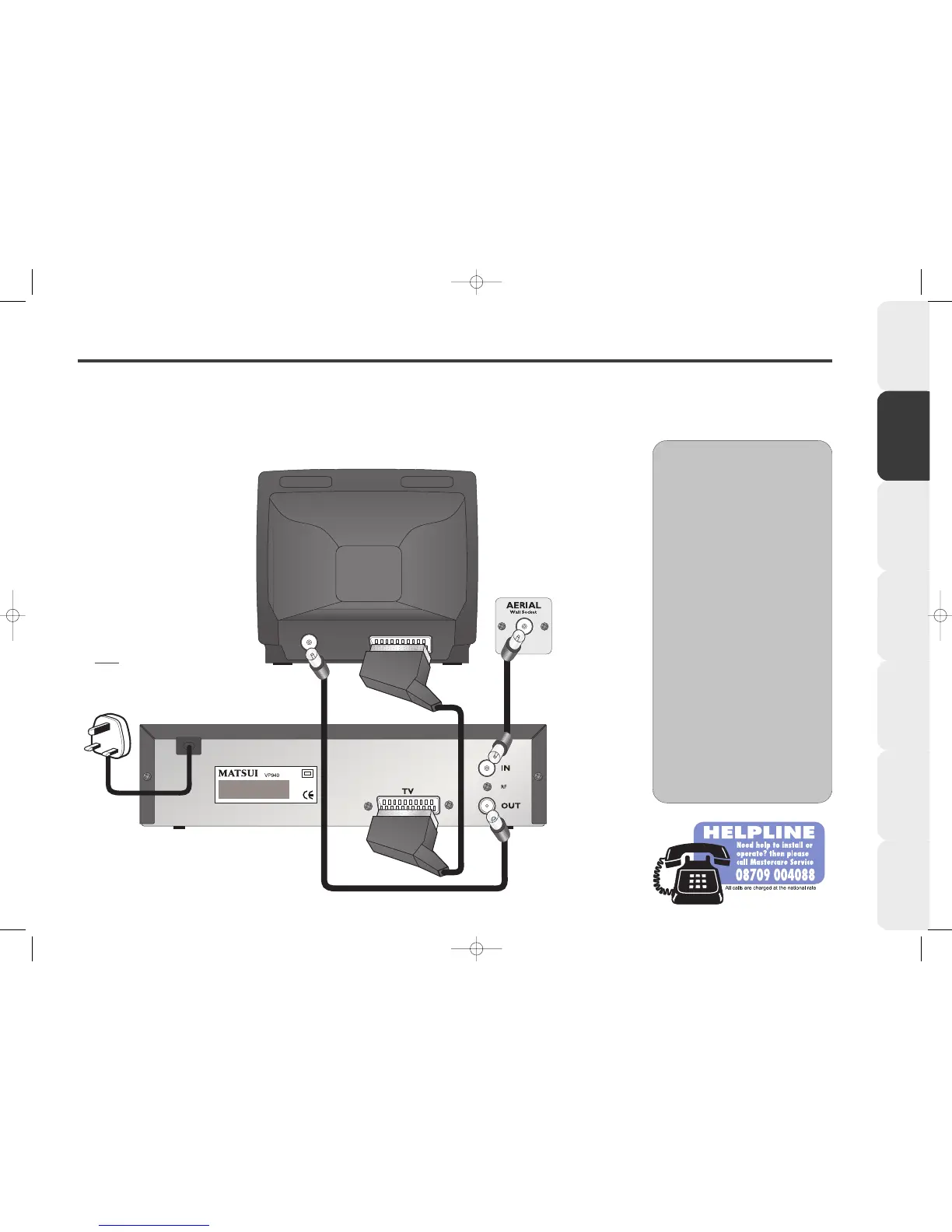
Connecting your VCR to a TV
We recommend connecting your VCR to your TV using a SCART lead AND a normal aerial lead.
If you connect using a SCART lead you will find it easier to set-up your VCR,
you will also benefit from improved picture quality playback from your VCR.
AA
AA
dd
dd
vv
vv
ii
ii
cc
cc
ee
ee
••
•• We recommend all connections
are made with both your VCR and
TV unplugged from the mains
supply.
••
•• If you use a cable service then
connect the aerial lead to your
cable decoder box instead of your
main aerial wall socket.
(Consult your cable decoder box
instructions for more details)
••
•• The type of household aerial
required depends on the position
of your home, it’s distance from the
transmitter and local interference. If
you do not have a household
aerial and you are uncertain of
what to buy, you should seek the
advice of a local aerial contractor.



 To Next Page