Introduction &
Contents
Setting up your
VCR
Playing a
Video Tape
Recording
Programmes
Advanced
Features
Help and
Specification
9
Installing your
VCR
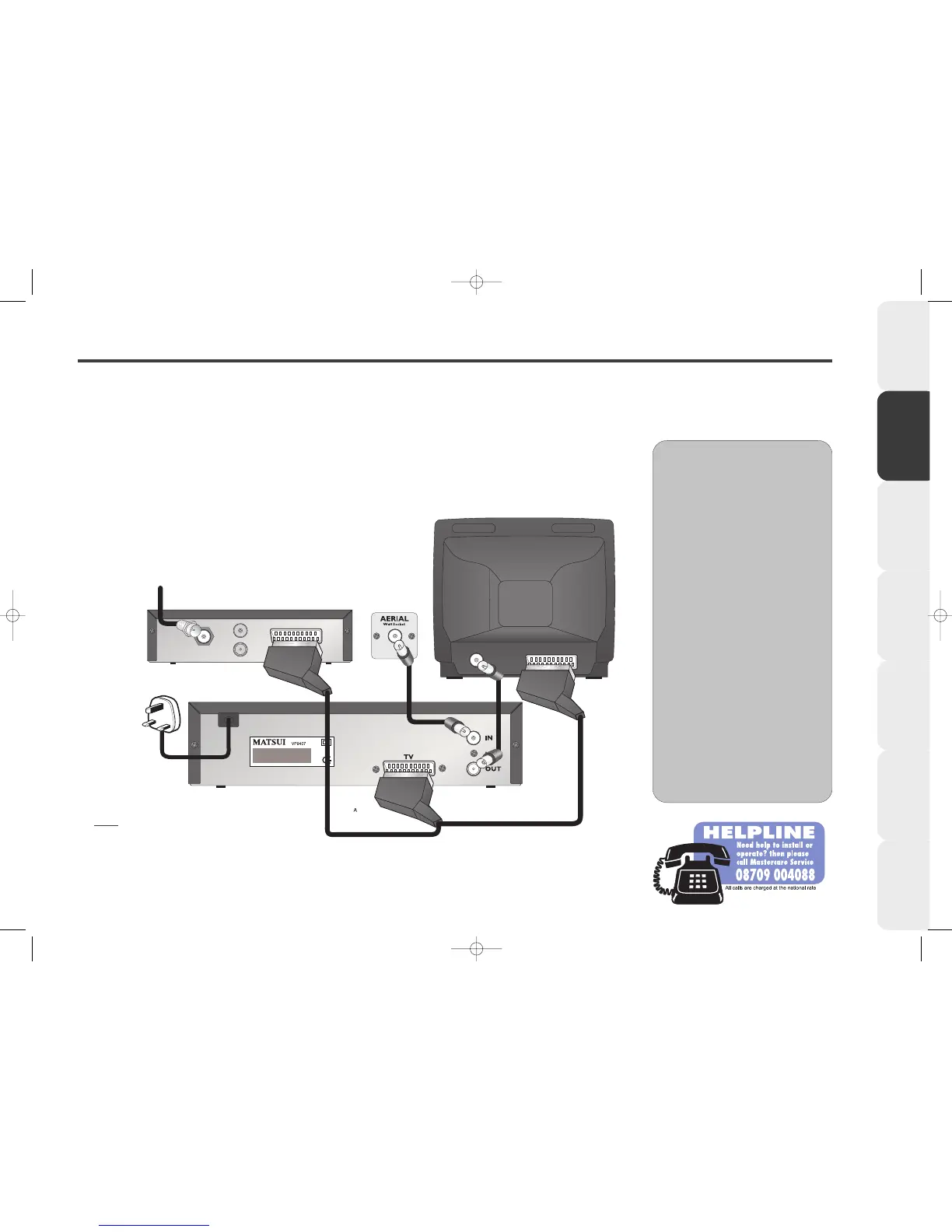
Connecting your VCR to a TV and Decoder
If you are connecting your VCR to a TV and a digital or satellite decoder and you only have a single scart socket on your TV and
decoder we recommend you connect your equipment as shown below.
Please consult your satellite decoder instruction book for more connection options.
We recommend all connections are made with both your VCR, TV and decoder unplugged from the mains supply.
EE
EE
xx
xx
tt
tt
rr
rr
aa
aa
AA
AA
dd
dd
vv
vv
ii
ii
cc
cc
ee
ee
••
•• Before you can use your VCR, it
must be connected to your TV
using an aerial lead. You must also
connect your VCR to your
household aerial.
••
•• You can connect your VCR to a
TV and a Satellite decoder using a
2-way SCART lead. Call Partmaster
Direct on 0870 9090444 and ask
for part number SAT2.
••
•• If you use a cable service then
connect the aerial lead to your
cable decoder box instead of your
main aerial wall socket.
(Consult your cable decoder box
instructions for more details)
Back view of a Decoder (not supplied).
Connect this lead to your
satellite dish or socket.
Back view of TV(not supplied).
Back view of VCR.
Aerial lead
(not supplied).
2 way SCART lead (not supplied).
Aerial lead
(supplied).
DO NOT PLUG
YOUR VCR INTO
THE MAINS
SUPPLY YET.
NOTE: If your TV has more than one
SCART socket please refer to your TV’s
Instruction Book for information about
which SCART socket to use.



 To Next Page