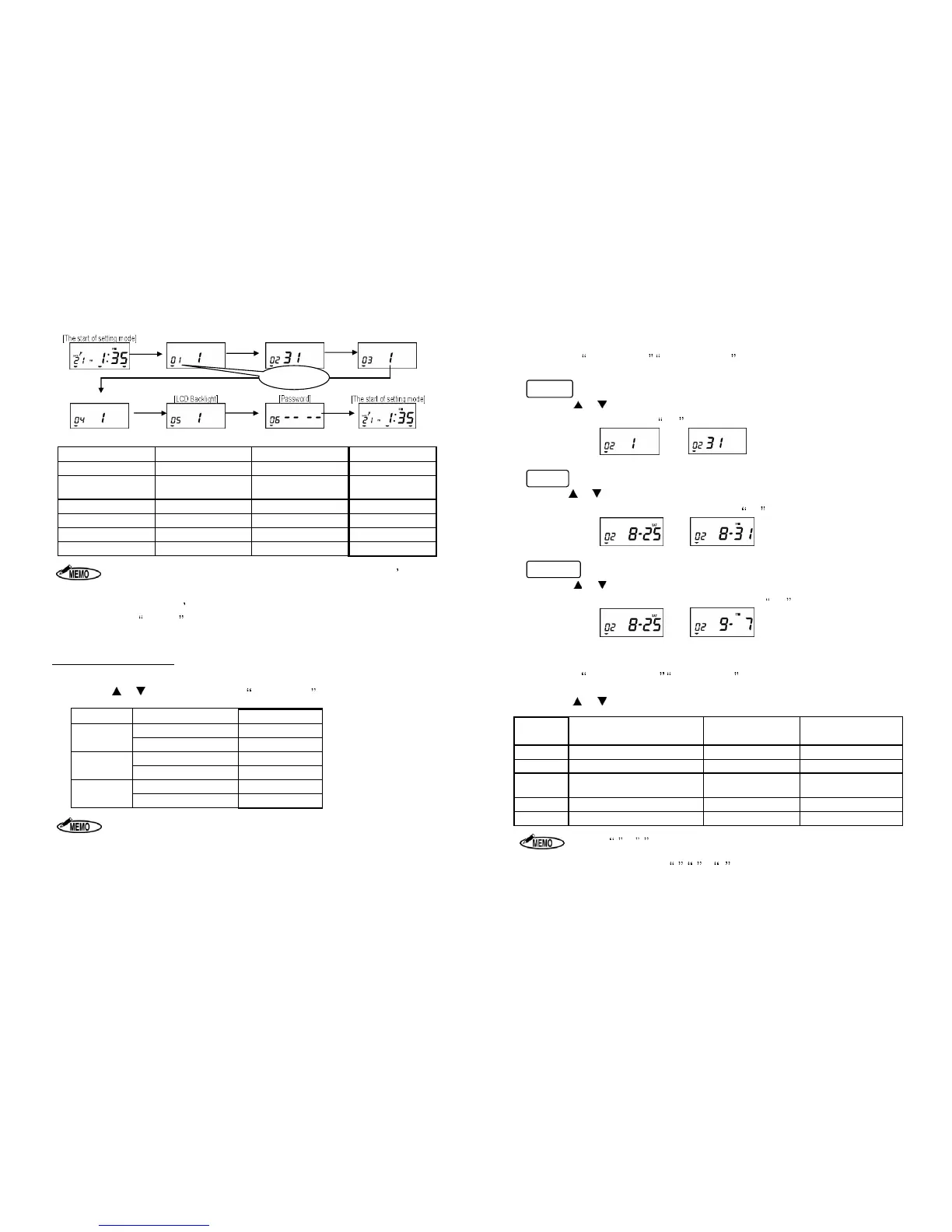
Items (MODE 1) Initial data Setting range Code No.
Machine Mode
1
1 to 6 01
Pay Closing Date
31
Mode Number
02
60 or 100 Scale
1
1 to 5 03
Daily Total Time
1
1 or 2 04
LCD Backlight 1 1 to 3 05
Password
----
0000 to 9999 06
1. If 1 or 2 is selected for Code No.3 (60 or 100 scale), the machine doesnt print
the Daily Total Time and so Code No. 04 (Daily Total Time) is not show
display.
2. ER-1600E doesn t have the option of the setting of Daily Total Time(Code 04).
3. If the CANCEL
key is pressed while setting data, the display returns to the start
of the setting mode without registering the changes.
Specific Setting Procedures
1. Setting Machine Mode (Code No: 01)
Press the or key to select the desired Machine Mode from the following table.
Monthly
12H
1
24H
2
Weekly
12H
3
24H
4
Bi-weekly
1. The time is printed only in 24-hour format.
2. When setting in the Laid Down Position, only 24-hour format is displayed.
- 10 -
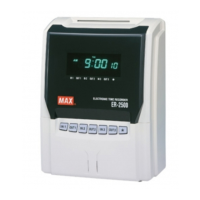
2. Setting Pay Closing Date (Code No: 02)
After setting Machine Mode, Pay Closing Date is shown on the display.
Monthly
Press the or key to select the Pay Closing Date. When the display shows the
desired closing date, press the SET key.
Weekly
Press the or key to select the Pay Closing Date (from today to the next 6 days).
When the display shows the desired closing date, press the SET key.
Bi-weekly
Press the or key to select the Pay Closing Date (from today to the next 13 days).
When the display shows the desired closing date, press the SET key.
3. Setting 60 or 100 Scale (Code No: 03)
After setting Pay Closing Date, 60 or 100 Scale is shown on the display.
Select the printing style for the time and the Daily Total Time printing.
Press the or key to select the desired number from the following table.
Time Printing Style Daily Total Time
Capacity of
employees
1 Regular minutes (1/60) Nothing 150
2
1/100
th
of an hour Nothing 150
3
Regular minutes (1/60)
Regular minutes
(1/60)
50
4
1/100
th
of an hour 1/100
th
of an hour
50
5
Regular minutes (1/60) 1/100
th
of an hour
1. When 1 or 2 is selected, ER-1600 does not print the Daily Total Time.
2. When using Daily Total Time, the capacity of employees in a day/month is up to 50.
3. ER-1600E cannot set 3 , 4 or 5.
4. When using 1/100
th
of an hour as the printing style, ER-1600 prints
shown on the chart below.


 To Next Page