46
Advanced Functions
46
EN
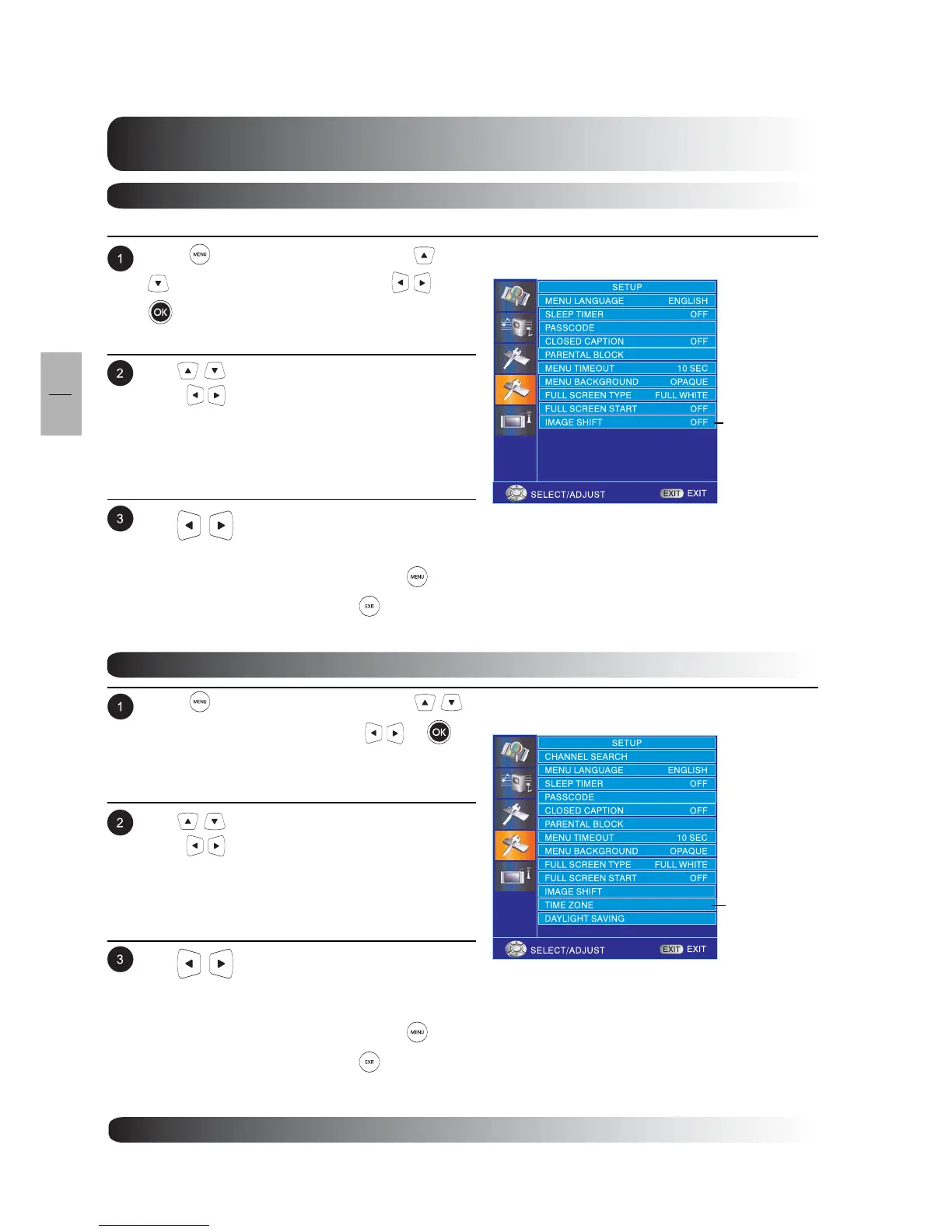
Use keys to select IMAGE SHIFT then
press to enter IMAGE SHIFT setting.
Use to change the setting. Available
options are: OFF,10 SEC, 20 SEC and 30 SEC.
After achieving the disired setting, press key to
return to previous menu or press to exit menu.
Image Shift
Press to access the OSD menu. Use
keys to select SETUP then press
or
to enter SETUP menu.
Image Shift screen eliminates electrically charged residual images and prevents burn-in images.
Time Zone
Press to access the OSD menu. Use
keys to select SETUP then press
or
to
enter SETUP menu.
Use keys to select TIME ZONE then
press to enter TIME ZONE setting.
Use to change the setting. Available
options are: SAMOA, HAWAII, ALASKA, PACIFIC,
MOUNTAIN, CENTRAL, EASTERN and ATLANTIC.
After achieving the disired setting, press key to
return to previous menu or press to exit menu.
IMAGE SHIFT
TIME ZONE


 To Next Page