69
Advanced
69
EN
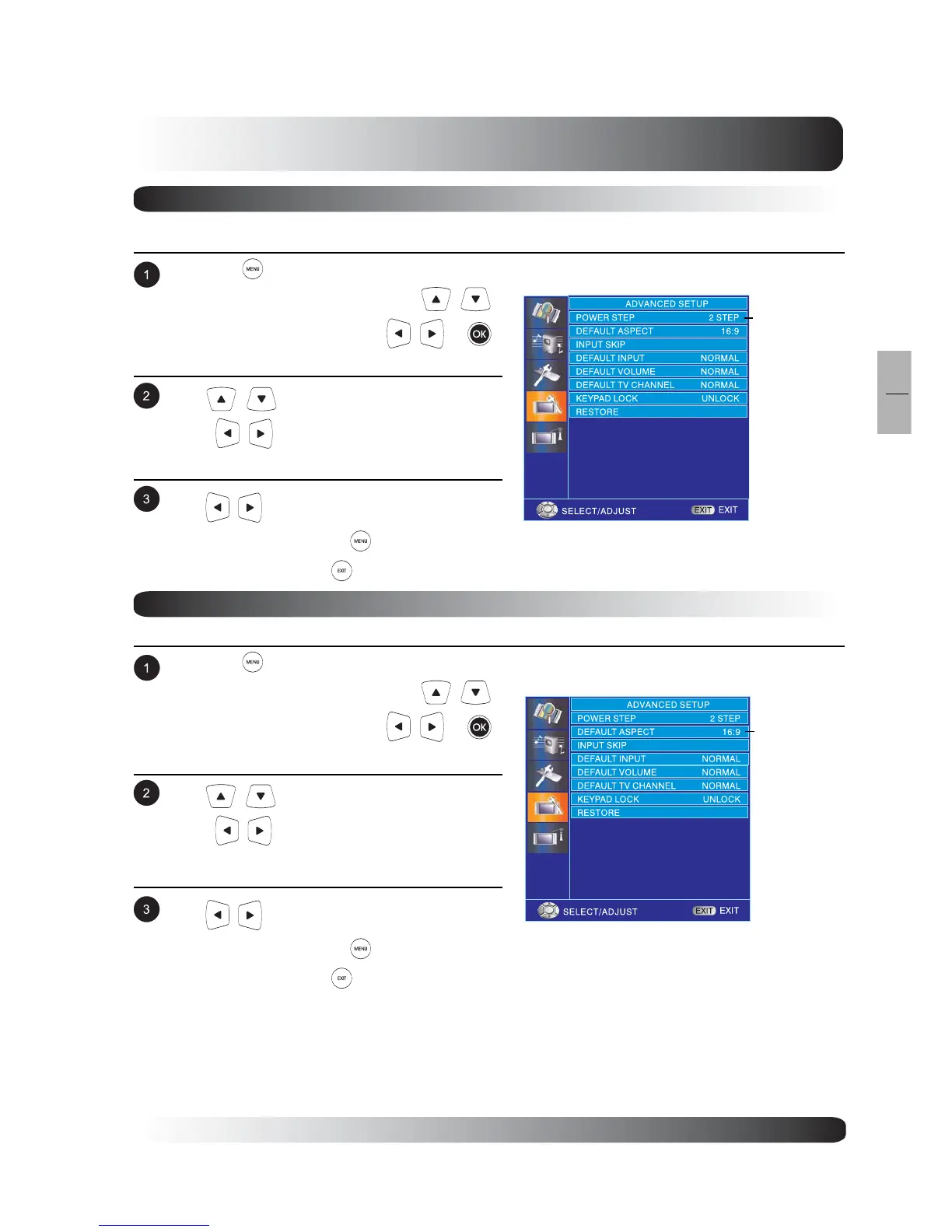
Power STEP
To switch TV to power-on automatically or remain turned off after power is resotred after a “power-outage”
incident.
Press the on remote control or MENU key on
the front panel or remote control. Use
to select ADVANCED and press or
keys to enter ADVANCED function.
Use to select POWER STEP and
press key to enter POWER STEP menu.
Use to change the setting. After achiev-
ing desired setting, press to return to
previous menu or press to exit menu.
Default Aspect
To select the default power-on aspect ratio.
Press the on remote control or MENU key on
the front panel or remote control. Use
to select ADVANCED and press or
keys to enter ADVANCED function.
Use to select DEFAULT ASPECT and
press key to enter DEFAULT ASPECT
menu.
Use to change the setting. After achiev-
ing desired setting, press to return to
previous menu or press to exit menu.
POWER STEP
DEFAULT
ASPECT


 To Next Page