52
TV Functions
52
EN
Memorizing Channels
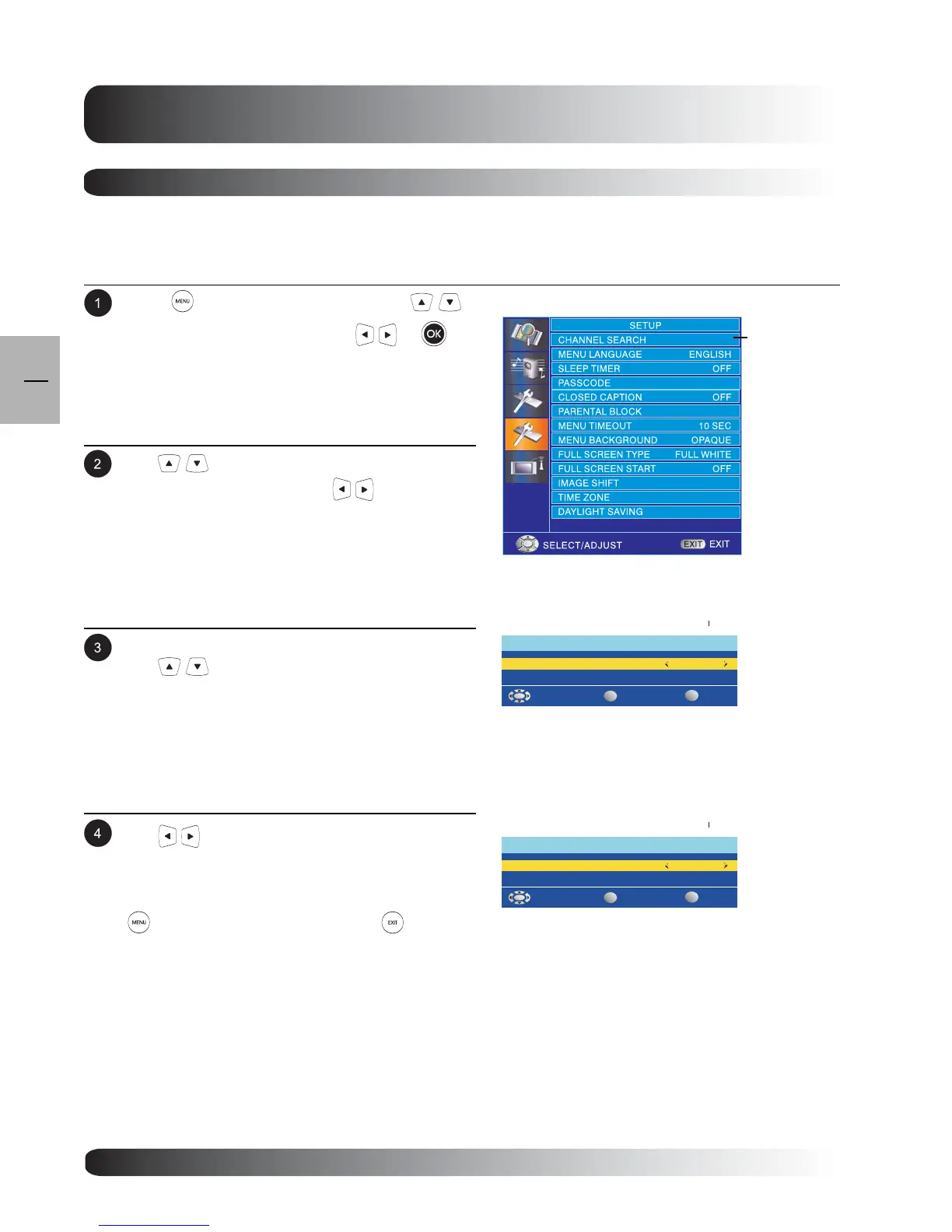
Press to access the OSD menu. Use
keys to select SETUP then press or to
enter SETUP menu.
.
Setting Tuner to AIR or CABLE
The TV tuner is compatible with Cable TV or standard reception using an antenna. Users must setup the tuner
to either AIR or CABLE reception modes prior to memorizing channels.
The CHANNEL SEARCH menu is now displayed.
Use keys to select AUTO SCAN.
Use keys to select CHANNEL SEARCH
from the SETUP menu. Press to enter
CHANNEL SEARCH setting.
MANUAL SCAN
CHANNEL SEARCH
AUTO SCAN
SELECT/ADJUST
OK
SET
AIR
CHANNEL
SEARCH
Use keys to set the TV tuner to AIR or
CABLE. If you are using an indoor/outdoor TV
antenna, please select AIR. If you are using Cable
TV, please select CABLE. When complete, press
to return previous menu or press key to
exit menu.
MANUAL SCAN
CHANNEL SEARCH
AUTO SCAN
SELECT/ADJUST
OK
SET
AIR


 To Next Page