8
Functional Description
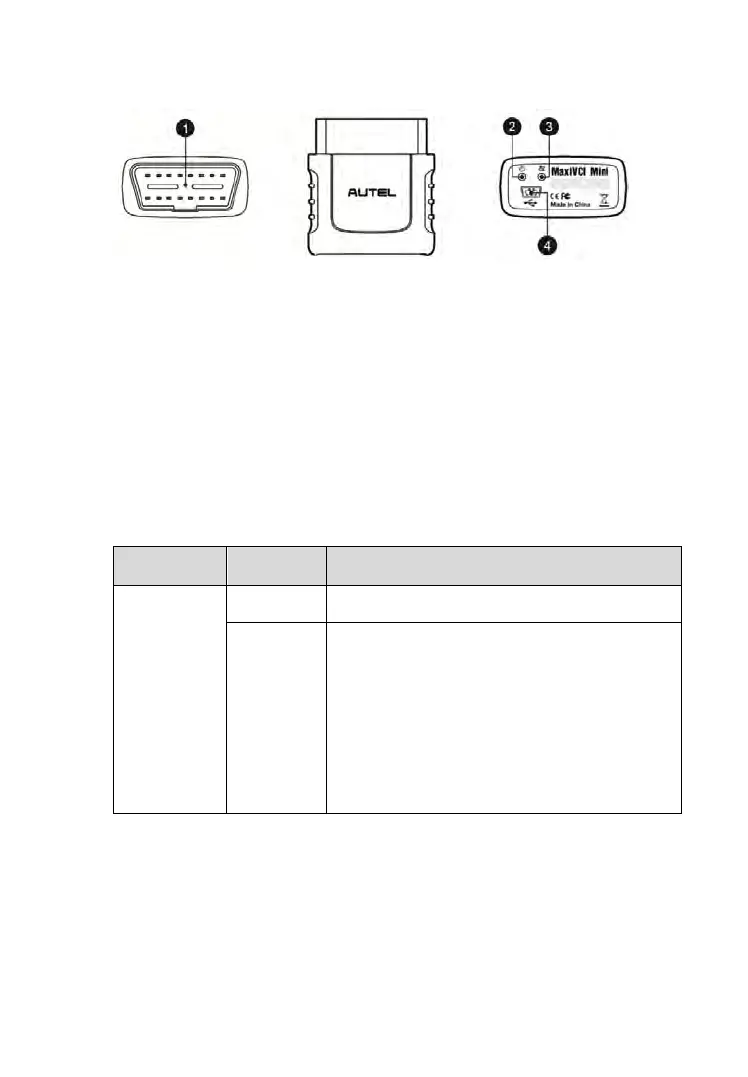
1. Vehicle Data Connector (16-Pin) – connects the MaxiVCI Mini to the
vehicle’s 16-pin DLC directly.
2. Power LED – refer to Table 2-2 Power LED on the Front Panel on page
8 for details.
3. Connection LED – refer to Table 2-3 Connection LED on the Front
Panel on page 9 for details.
4. USB Port – provides the easiest connection between the device and the
display tablet or the PC via a USB cable.
Table 2-2 Power LED on the Front Panel
Illuminates solid green when powered on.
Flashes red when system failure occurs.
Note: The power LED illuminates red
automatically every time when the device
is powered up, which is a normal self-test
procedure, and it will turn green
automatically later when the device starts
working normally.
Figure 2-4 MaxiVCI Mini Views



 To Next Page