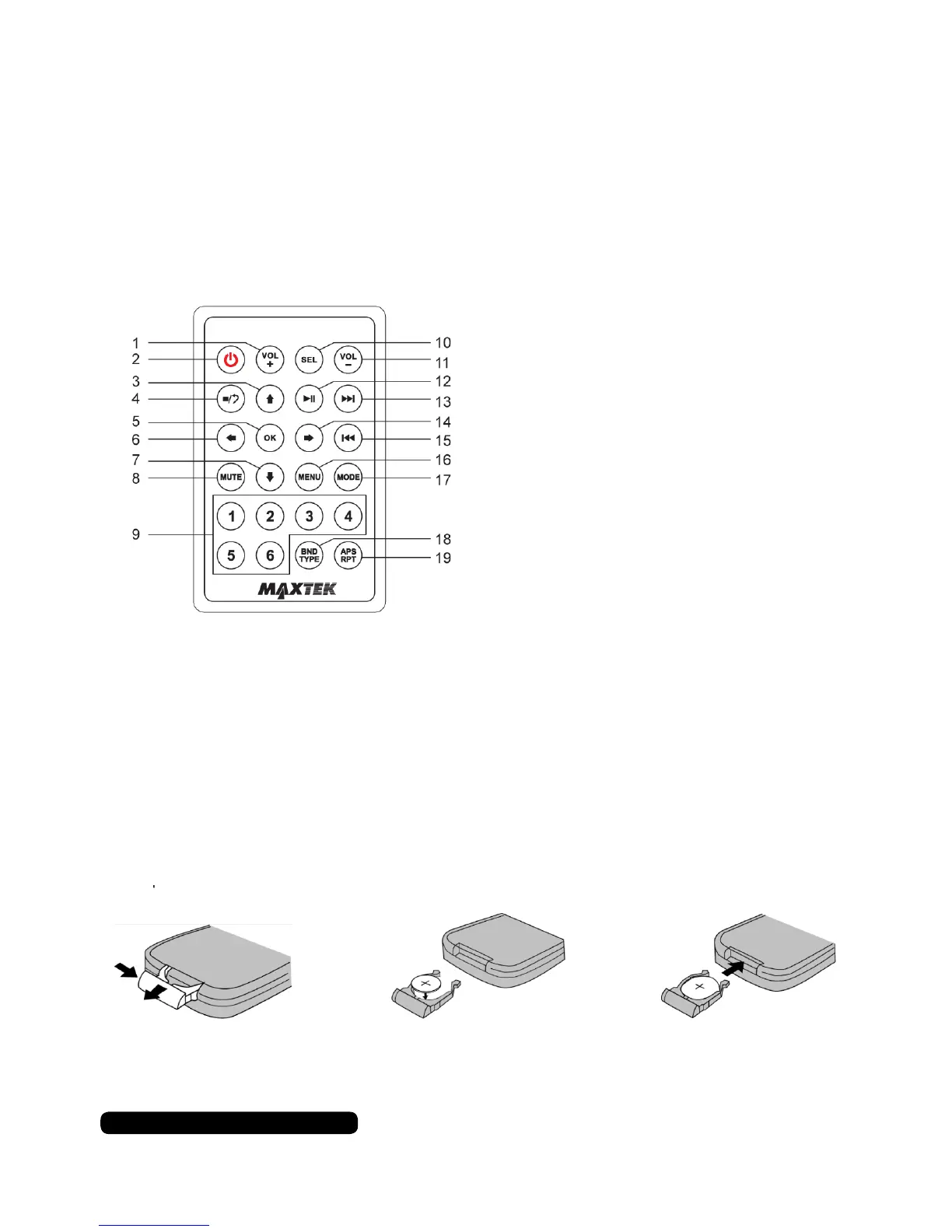
Remote Control
8
After Sales Support
UK/N.IRELAND HELPLINE N
O
:
REP.IRELAND HELPLINE N
O
:
WEBSITE:
EMAIL:
01270 508538
1800 995 036
www.quesh.co.uk
enquiries@quesh.co.uk
Operating the Remote Control
Aim the remote at the IR sensor on the fascia. The maximum distance at which
signals can be received is approximately 6m.
Vol +
Power On/Off
Navigation Up
Stop/Playback
Enter
Navigation Left
Navigation Down
Mute
Tuning/Preset
Source Select
Vol -
Play/Pause
Next
Navigation Right
Skip Back
Menu
Mode
Band/Select
Auto Preset Scan/Repeat
1.
2.
3.
4.
5.
6.
7.
8.
9.
10.
11.
12.
13.
14.
15.
16.
17.
18.
19.
Replacing the Batteries
Follow the 3 steps below:
• Remove the cover from the back of the remote.
• Insert a CR-2025 Lithium Battery observing the polarity marking.
• Replace the cover on the back of the remote.


 To Next Page