15
After Sales Support
UK/N.IRELAND HELPLINE N
O
:
REP.IRELAND HELPLINE N
O
:
WEBSITE:
EMAIL:
01270 508538
1800 995 036
www.quesh.co.uk
enquiries@quesh.co.uk
USB/SD Operation
Navigate Files
To navigate all files on either SD Card or USB stick, press the Return button in the
top right corner on the screen on either the video screen or music screen.
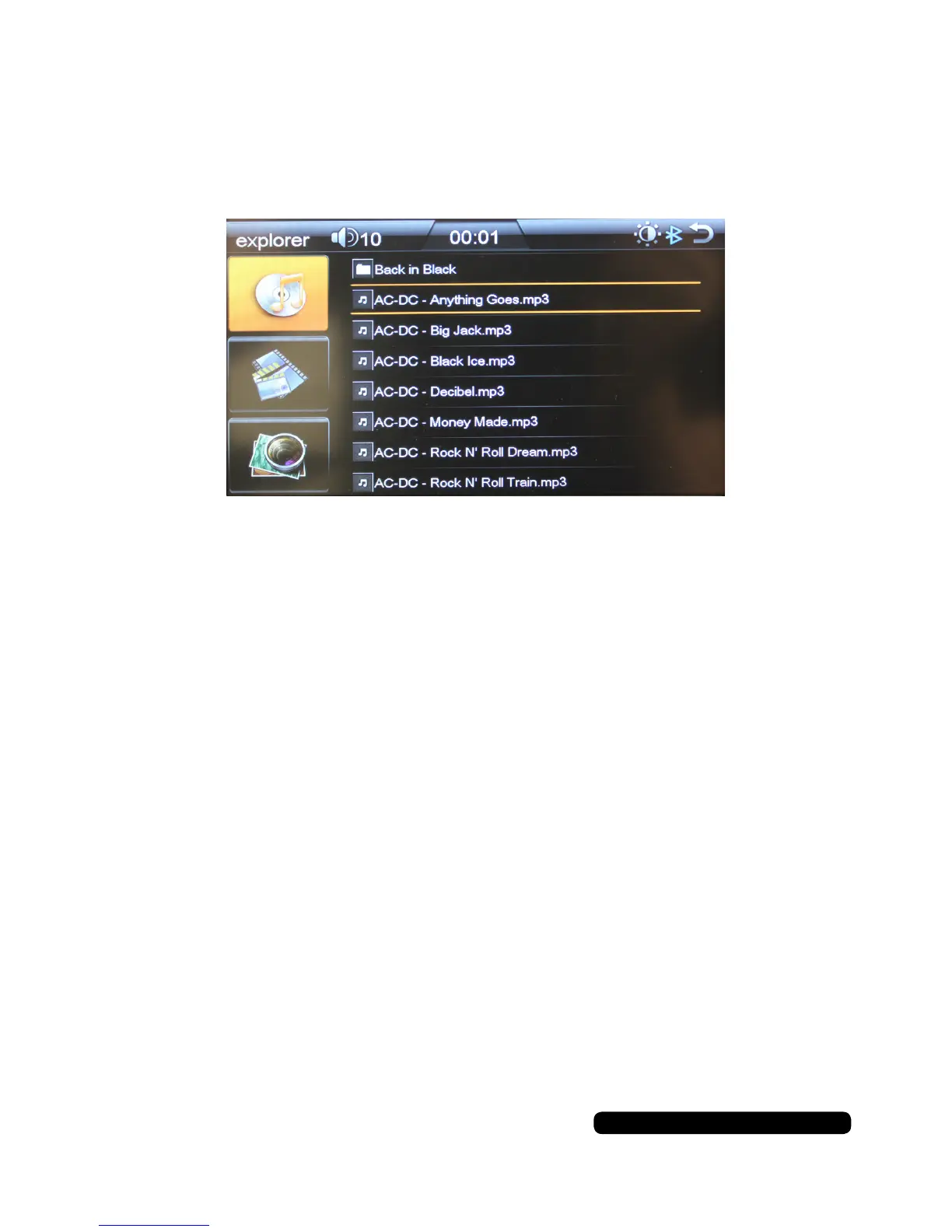
You will see the ‘explorer’ screen.
The first of the three icons on the left is for filtering music files only.
The middle icon on the left is for filtering video files only.
The bottom icon on the left is for filtering photo files only.
Press on the Icons to either select a file or navigate through the folders. Pressing
the folder at the top of the list will allow you to view the previous folder unless you
are in the root directory.
Use the return button in the top right corner to go back to the main menu.


 To Next Page