18
After Sales Support
UK/N.IRELAND HELPLINE N
O
:
REP.IRELAND HELPLINE N
O
:
WEBSITE:
EMAIL:
01270 508538
1800 995 036
www.quesh.co.uk
enquiries@quesh.co.uk
EQ
EQ Inputs
You can customise your personal preferences to audio output where the option is
available. In most cases EQ options will be Pop, Rock, Classical and Off.
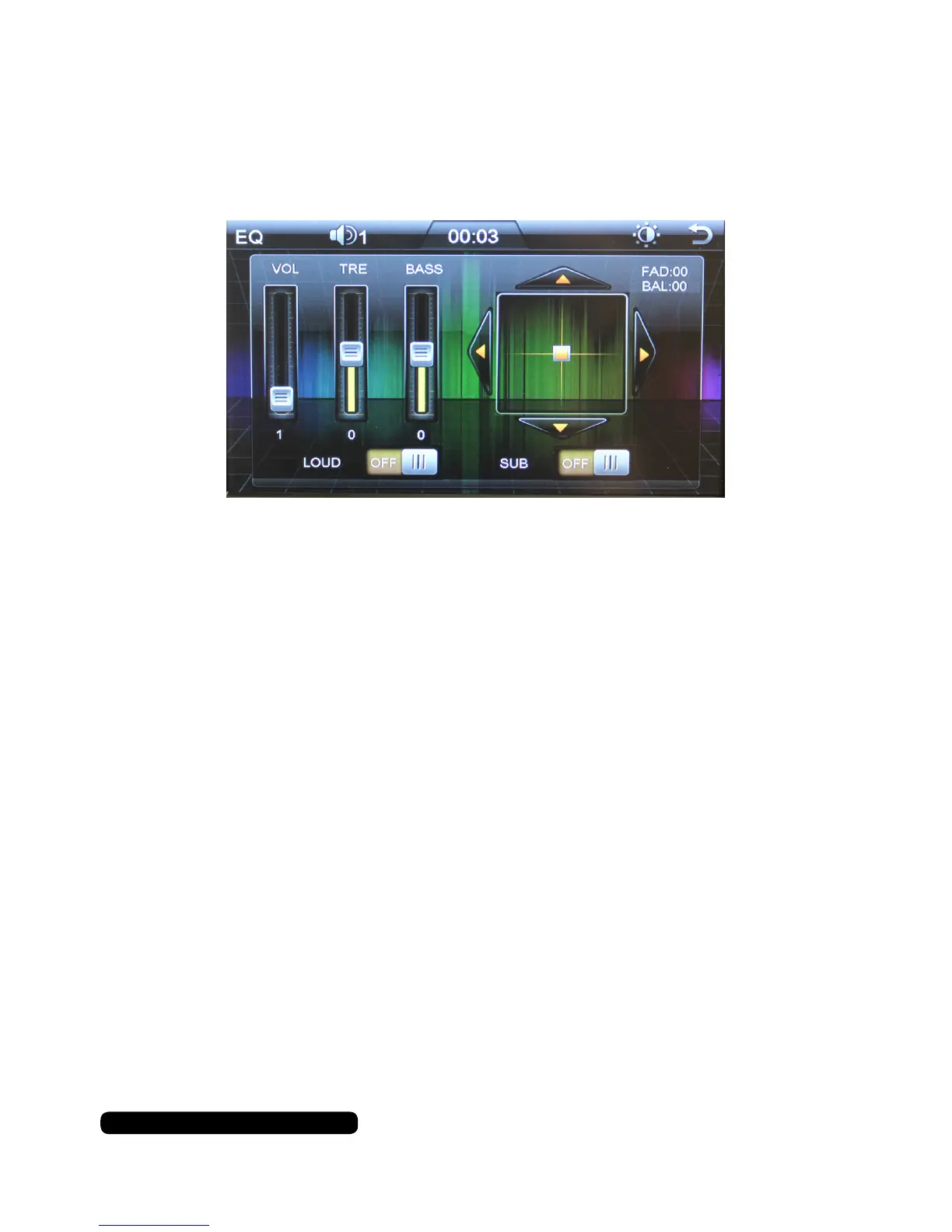
On this screen you can activate the Sub and Loudness option as well as control
the volume (VOL), treble (TRE) and bass (BASS).
You are able to set the balance between left and right as well as front and rear
speakers on this grid. Press the arrow keys to balance the sound to your personal
preference.
BAL is left or right audio bias where as the FAD is the front or back speaker bias.
It is also possible to change the setting from the fascia.
Press the volume dial to cycle through the options. Turn the dial to change the
values and press the volume dial to confirm your selection.


 To Next Page