23
After Sales Support
UK/N.IRELAND HELPLINE N
O
:
REP.IRELAND HELPLINE N
O
:
WEBSITE:
EMAIL:
01270 508538
1800 995 036
www.quesh.co.uk
enquiries@quesh.co.uk
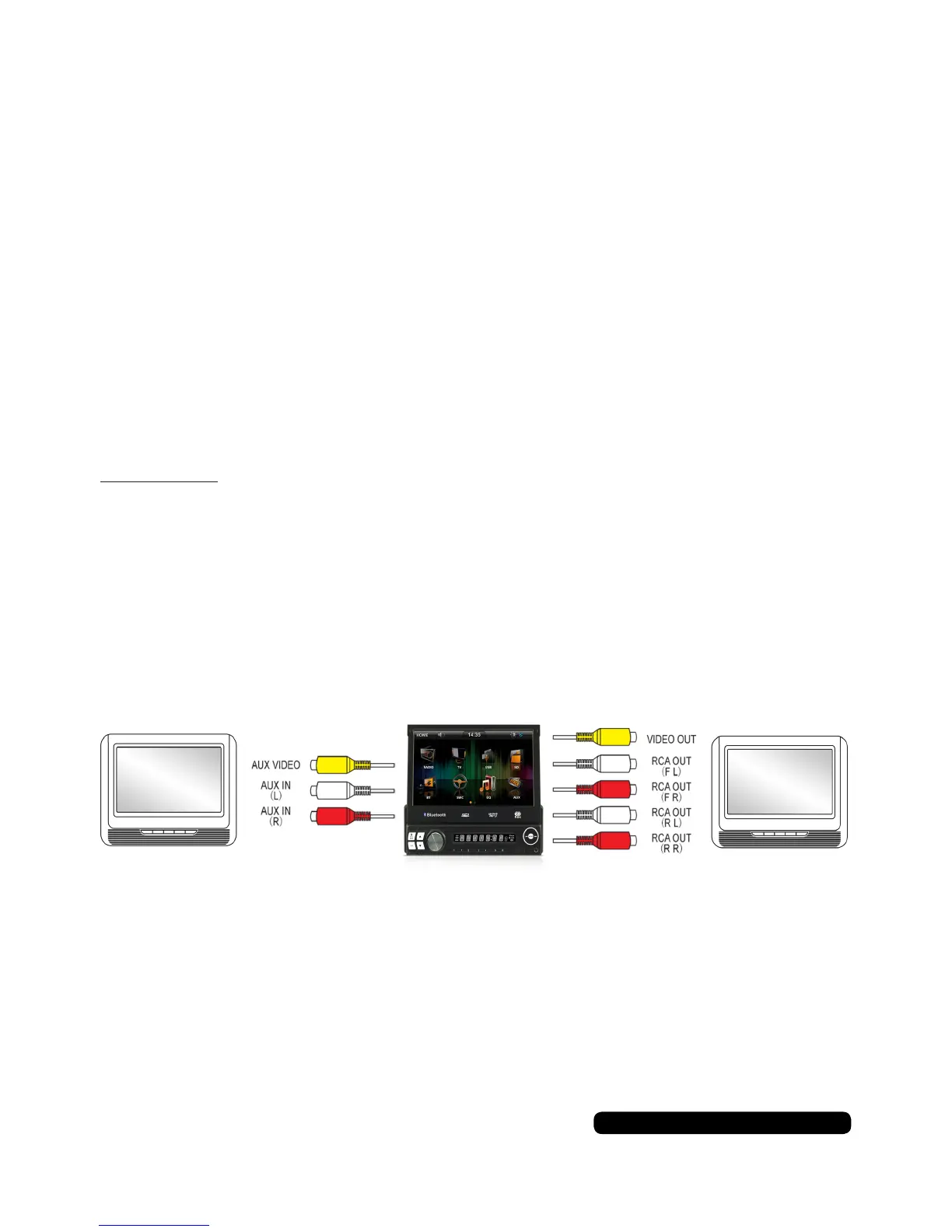
RCA Setup
RCA, AUX IN
It is possible to connect a DVD player or device that uses RCA out. Connect the
corresponding colours of the RCA out from the device to the RCA plugs marked
AUX IN.
You will be able to view the input via the AUX option on the main menu.
RCA, AUX OUT
It is possible to connect slave screen or device that can receive an RCA input
to this unit. The video will only show if there is an external player connected.
Connect the corresponding colours of connectors marked VIDEO OUT (Yellow),
then either the front or back red and white AUDIO OUT from the unit to the RCA
plugs to the device’s RCA/AUX in.
Please Note:
You cannot play a video through the unit’s SD or USB ports and display it on
attached screens.
RCA
Output
AUX
Input


 To Next Page