1
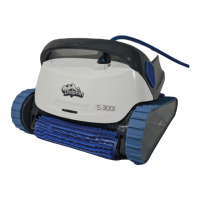
S 300i
Robotic Pool Cleaner
User Instructions
EN
Contents
1. INTRODUCTION ......................................................................................................................................................2
2. SPECIFICATIONS .....................................................................................................................................................2
3. WARNINGS AND CAUTIONS ..............................................................................................................................2
4. ROBOTIC POOL CLEANER PARTS ................................................................................................................... 4
5. USE THE POOL CLEANER ....................................................................................................................................5
5.1 Setup ..................................................................................................................................................................5
5.2 Place the Pool Cleaner in the water ................................................................................................... 6
5.3 Robot Indicator Lights ............................................................................................................................... 6
5.4 Remove the Pool Cleaner from the water .......................................................................................7
6. USE THE
MyDolphin™ Plus
IOT MOBILE APP ............................................................................................. 8
6.1
Getting Started with the MyDolphin™ Plus App
............................................................................... 8
6.2
Prepare the Pool Cleaner for Connection
.......................................................................................... 8
6.3
Activate the Pool Cleaner Using your Mobile Smart Device
....................................................... 8
6.4
Led Lights
........................................................................................................................................................ 9
7. OFFSEASON STORAGE ....................................................................................................................................... 9
8. CLEANING THE DUAL FILTER BASKET ..........................................................................................................10
8.1
Cleaning after use - removing and cleaning the dual filter basket
.........................................10
8.2
Periodic filter cleaning
...............................................................................................................................11
8.3
Clean the Impeller
...................................................................................................................................... 12
9. TROUBLESHOOTING ........................................................................................................................................... 13
10.
MyDolphin™ Plus
- TROUBLESHOOTING ....................................................................................................14



 To Next Page