7
Skimmi Robotic Pool Skimmer | User Instructions
QUICK START GUIDE
Getting started
Start via app or automatically
Let it swim
Dolphin Skimmi User Manual
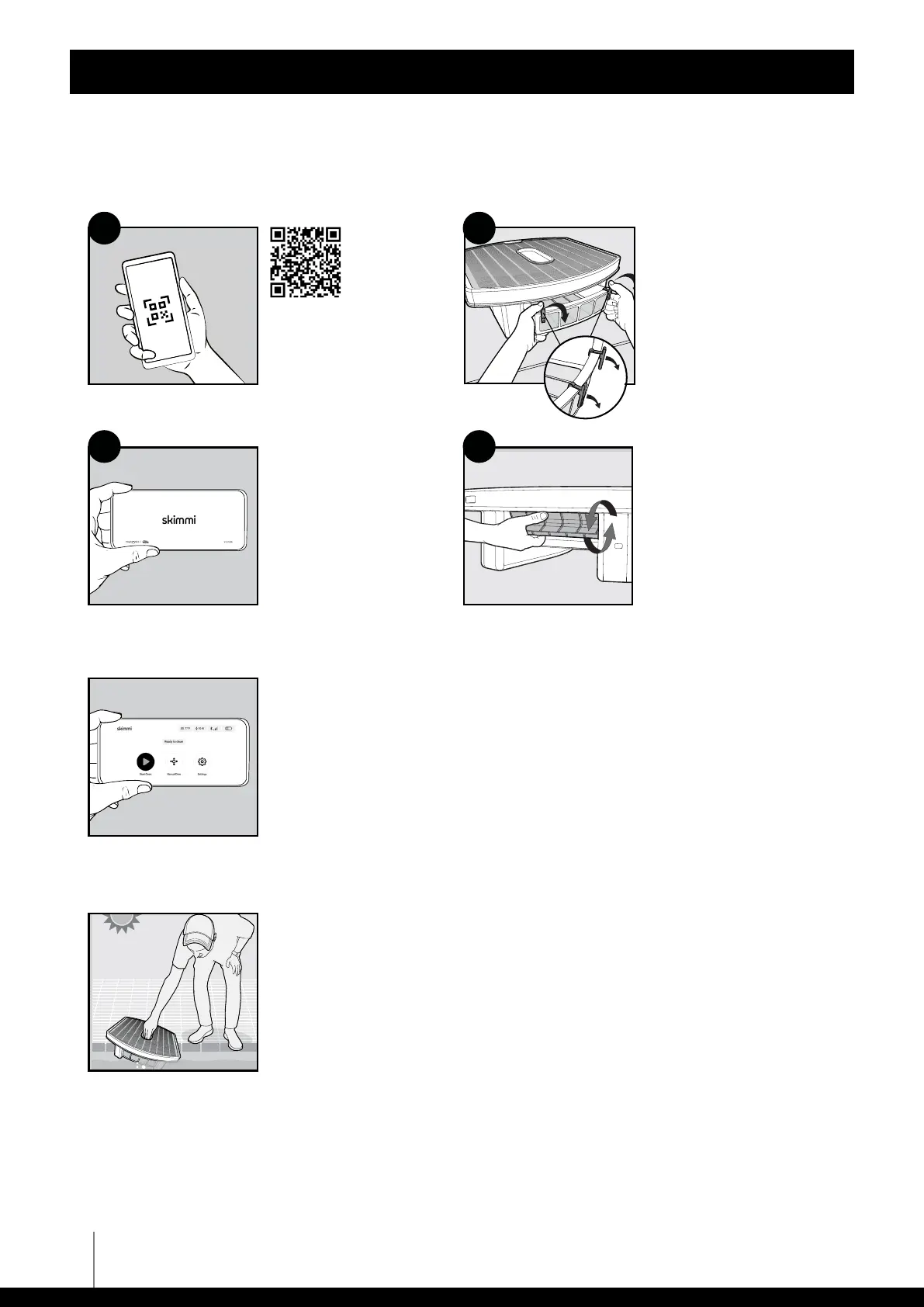
draw 02 - remove the clips
1. Install the phone
app MyDolphin
TM
Skimmi from the
store.
2. Start the app and
connect.
1. Spin front paddle wheel
during first pairing.
2. Configure settings if
needed.
3. See "Settings" section of
the user manual for
details.
1
4
3
1. Remove 2 storage clips
from the filter tray.
We recommend saving
them to keep the robot
OFF when in storage.
2. Insert the filter tray until
it snaps into place to
activate the robot.
2
Start with app (default)
Close the filter tray and start Skimmi via the app.
"Auto Start"
Turn ON "Auto Start" in the device settings. Now whenever the filter tray is
closed, Skimmi will start working after 15 seconds.
Place Skimmi in a sunny pool. No need to charge or remove Skimmi, except to
rinse the filter tray.
Draw 01 - Place Skimmi in a sunny pool
1. Scan QR code.
2. Register for the
warranty. The serial
number is under the
robot, on the inside of
the floats.












 To Next Page