Display scroll
Only 13 characters can be displayed at
one time. To display the rest of the
characters of a long title, press and hold
the text button (
). The display
scrolls the next 13 characters. Press and
hold the text button (
) again after
the last 13 characters have been displayed
to return to the beginning of the title.
qBluetooth® Audio Device
Information Display
If a Bluetooth
®
audio device is connected,
the following information is displayed in
the audio display.
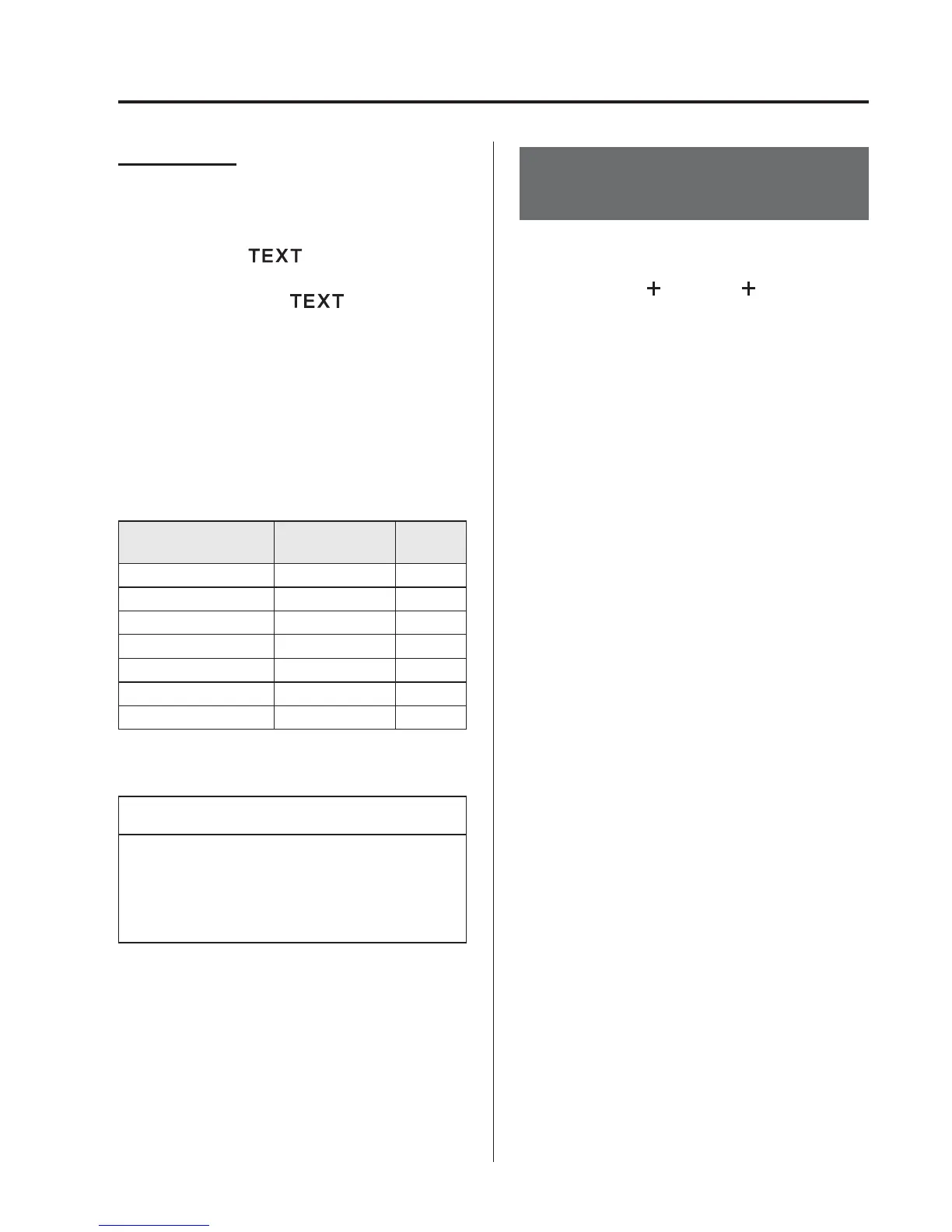
AVRCP Ver.
lower than 1.3
AVRCP
Ver. 1.3
Device name X X
Title ― X
Artist name ― X
Album name ― X
File number ― X
Playback time ― X
Folder number ――
X: Available
―: Not available
NOTE
Some information may not display
depending on the device, and if the
information cannot be displayed, “NO
TITLE” is indicated.
Bluetooth® Audio (Type
C/Type D Audio)
í
Applicable Bluetooth
®
specification
(Recommended)
Ver. 1.1/1.2/2.0
EDR/2.1 EDR/3.0
(conformity)
Response profile
l
A2DP (Advanced Audio Distribution
Profile) Ver. 1.0/1.2
l
AVRCP (Audio/Video Remote Control
Profile) Ver. 1.0/1.3/1.4
Interior Features
Bluetooth®
5-133
í
Some models.



 To Next Page