EN
19
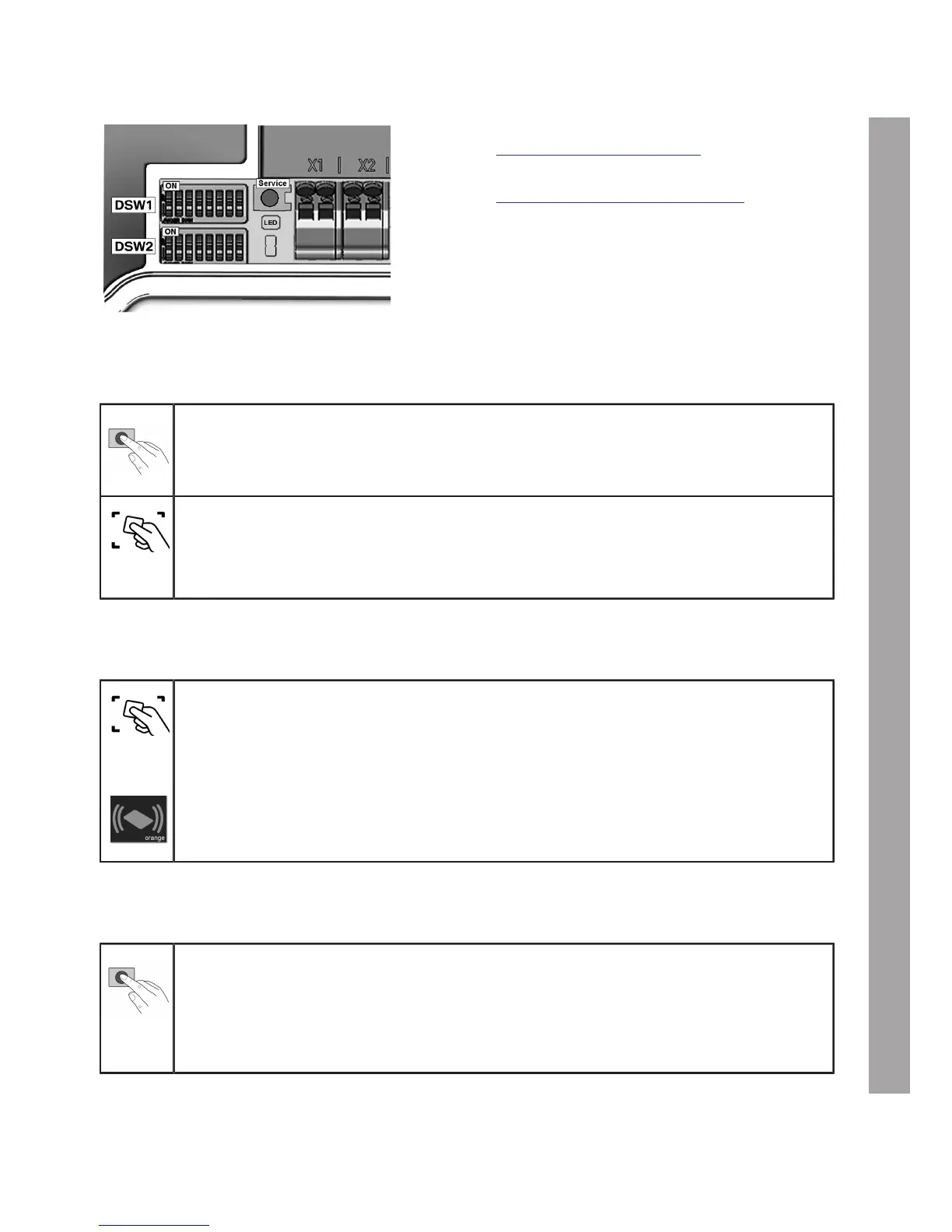
1. Remove the housing cover, see section
"Remove the housing cover".
2. Remove the terminal panel cover, see section
"Remove the terminal panel cover", to gain
access to the service button.
Enabling RFID function, programming RFID master card
1. Press the service button until the 2nd signal tone sounds (around 6 seconds). All
the saved RFID cards (including the master card) will now be deleted and an automatic
restart will be performed.
2. After the restart, as soon as the RFID reading area is displayed, hold the RFID master
card in front of the RFID reading area within 60 seconds and wait for the signal tone.
The RFID master card is now programmed. Keep it in a safe place. The RFID master
card can also be used to authorise a charging process.
Programming additional RFID user card
1. Hold the RFID master card in front of the RFID reading area and wait for the signal
tone.
2. Within 5 seconds hold the new RFID user card in front of the RFID reading area and
wait for the signal tone. The RFID status indicator will change to orange.
3. Within 5 seconds hold the new RFID user card in front of the RFID reading area again
and wait for the signal tone as confirmation. The RFID user card is now programmed
and the RFID status indicator will change back to white.
Deleting all RFID cards in the memory
1. Press the service button until the 2nd signal tone sounds (around 6 seconds). All
the saved RFID cards (including the master card) will now be deleted and an automatic
restart will be performed.
2. Now restart the programming process for the RFID master card if you wish to retain
the RFID function.


 To Next Page