14
Version with charging socket (France and Italy only)
The version with a charging socket has the same
functions as the version with a charging cable.
The Wallbox is fitted with a charging socket
including shutter (additional contact protection)
to suit the national regulations of the country in
which it is installed.
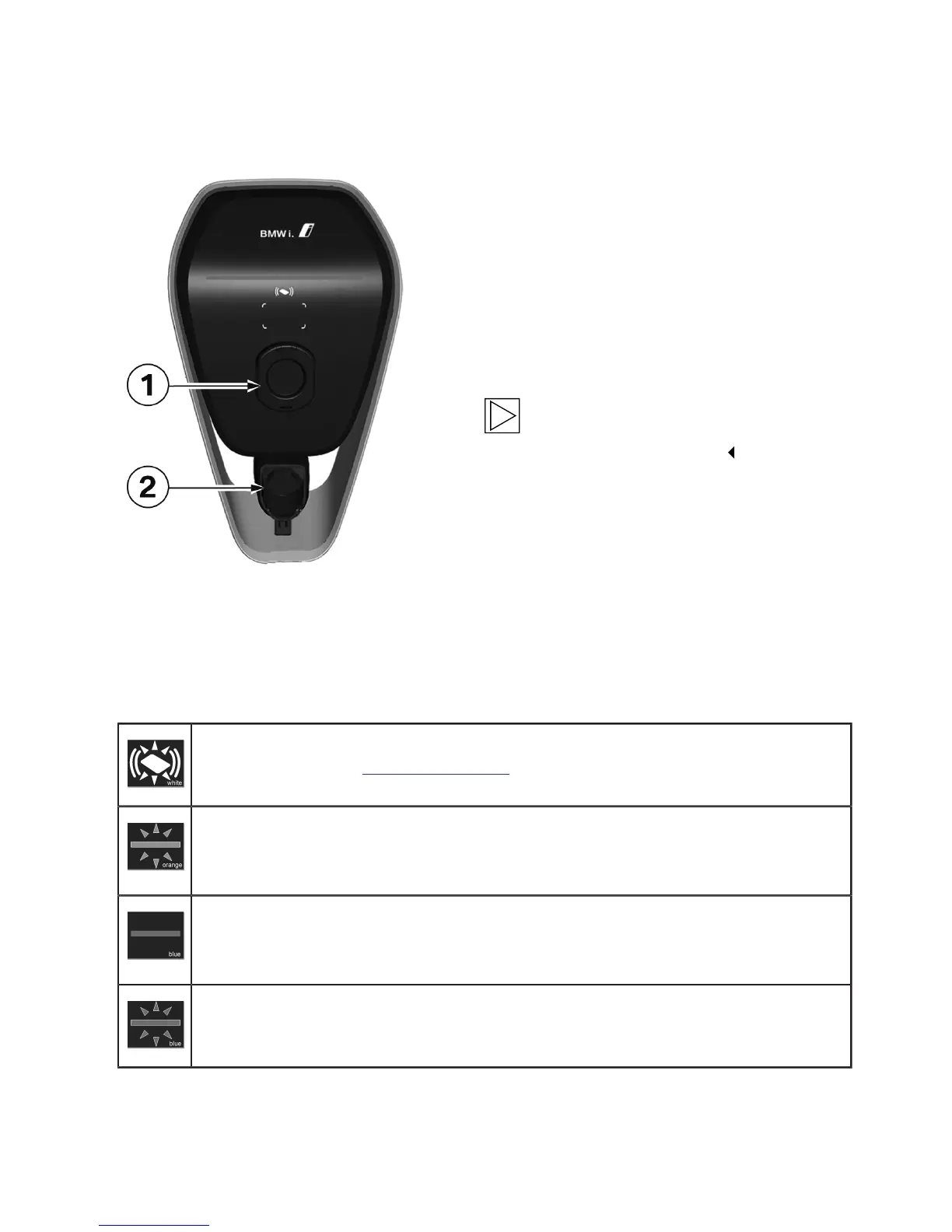
1 Charging socket with shutter
2 Charging cable plug holder
Note
No charging cable is included, a separate
charging cable is required.
Start/end charging process
Starting charging process
RFID authorisation (optional): If your Wallbox has RFID functionality, please refer to the
instructions in section: "RFID authorisation".
Connect the vehicle to the Wallbox (if it is not already connected). While it attempts to
mechanically lock the charging cable plug (version with a charging socket) and perform
internal self-tests, the status LED will be lit for several seconds in orange.
After the self-test has been completed successfully, the status LED will be lit again in
blue. The vehicle has been successfully connected and authorised. The charging process
can then be started from the vehicle.
Whilst the charging process is active, the blue status LED will flash.


 To Next Page