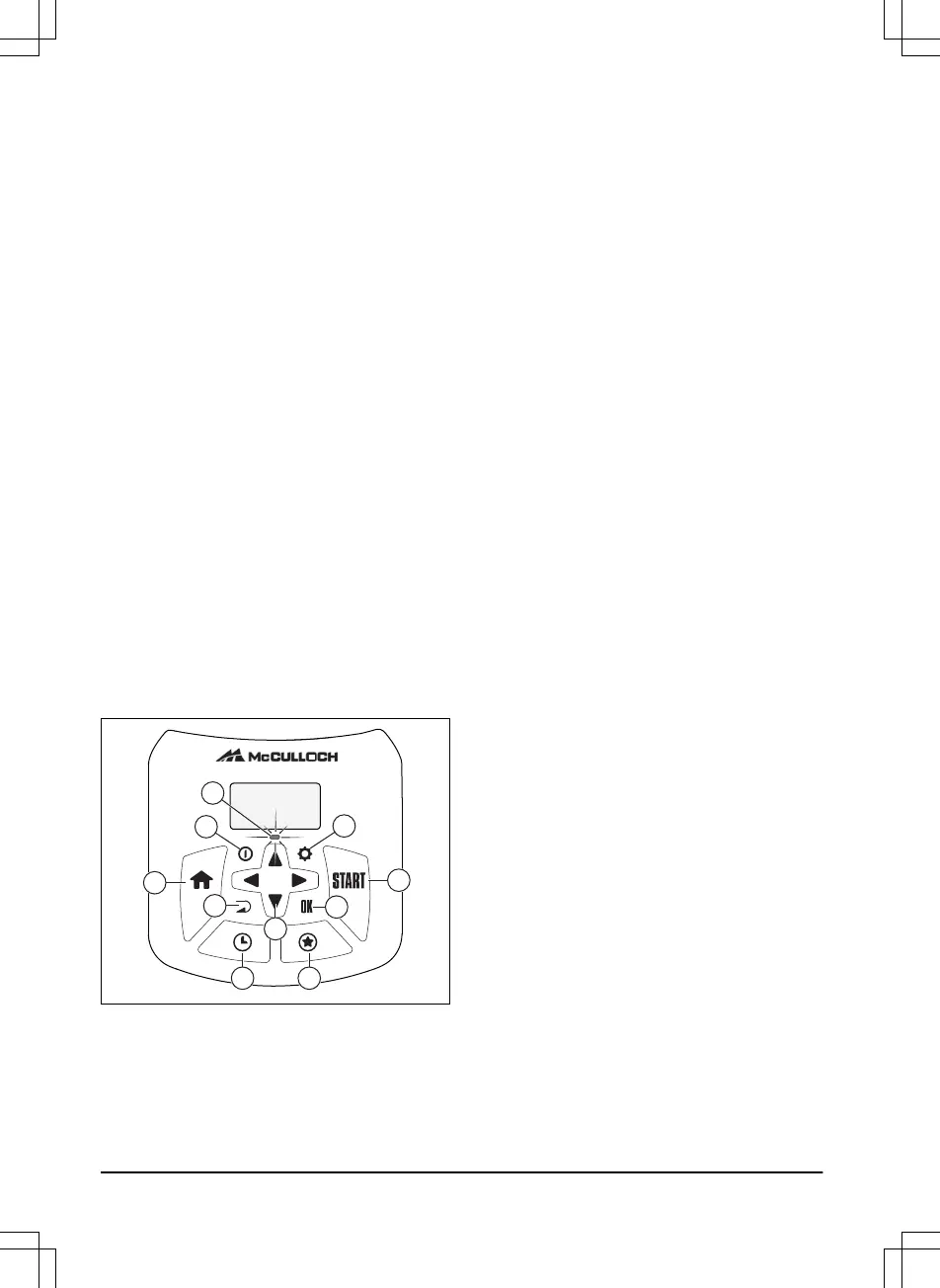
1.9 Keypad
The keypad on the product lets the operator
navigate in the menu. To access the keypad,
push the STOP button and open the hatch.
• The indicator lamp (A) on the keypad is an
important status indicator. Refer to
The
indicator lamp on page 30
.
• The ON/OFF button (B) is used to turn the
product ON/OFF.
• The Settings button (C) is used to go to the
main menu.
• The Home button (D) is used to choose the
park modes:
Home & Stay
and
Home &
Wait
.
• The Start button (E) is used to start the
operation of the product.
• The BACK button (F) is used when moving
back up in the menu lists.
• The OK button (G) is used to confirm the
chosen settings in the menus.
• The arrow keys (H) are used to navigate in
the menu. The up/down arrow keys are also
used to enter digits, for example, PIN code,
time and date
• The Schedule button (I) is used to go to the
schedule menu.
• The STAR button (J) is used to choose
operating modes:
2nd area
,
Power Cut
and
Spot Cut
.









 To Next Page