EasyManua.ls Logo

McLaughlin Vision GX2 - 8 Operation of Receiver (RX)

Default Icon
37 pages
Print Icon
To Next Page IconTo Next Page
To Previous Page IconTo Previous Page
Loading...
- 21 -
Tutorial
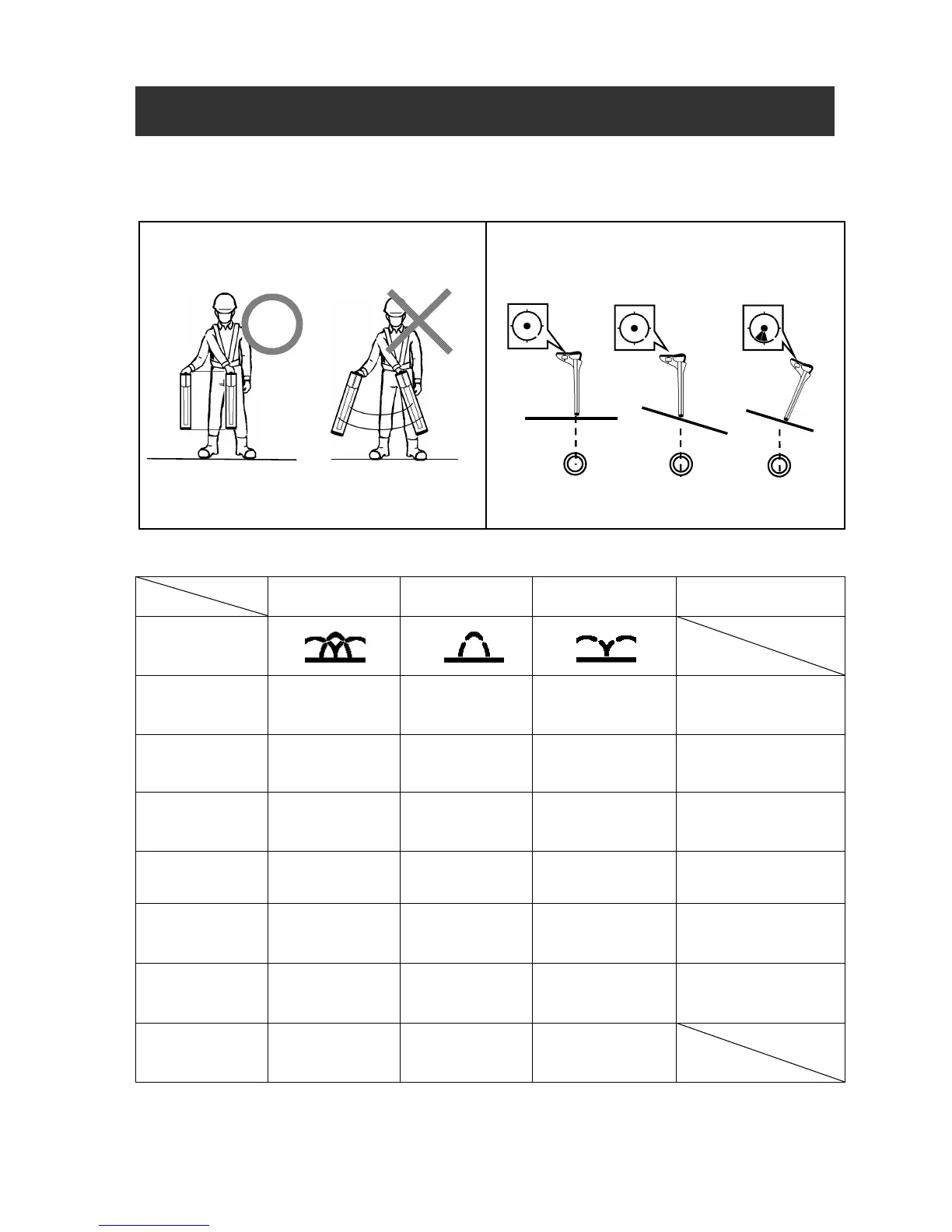
Basic of the measurement.
Move the Receiver from side to side to determine
the exact position.
Hold
the Receiver perpendicular to t
he ground.
Use the DIGITAL LEVEL.
Measurement Mode
PEAK & NULL
MODE
PEAK MODE NULL MODE
Functional
Description
Icon
Bar Graph PEAK PEAK NULL
Display the graph
detecting right
above the cable
Sensitivity
Indication
0 100% 0 100% 0 9999
Indicate the receiver
sensitivity
Left and Right
direction
display
YES NO YES
Display the direction
by left and right
allow
YAW angle
display
YES YES YES
Display the YAW
angle
Continuous
Depth
measurement
YES
YES
*See page 10
YES
Display the real time
depth of the cable
Continuous
Current
measurement
YES
YES
*See page 10
YES
Display the current
value of transmitting
signal
Purpose Various uses
Simple
operation
Route s
earching
Using around the
metal objects
*Use the Depth Key when measuring the depth of the buried pipe more accurately
8. Operation of Receiver (RX)
Pinpoint the
position.
Do not swing like this.