- 14 -
7-1. Direct connection mode
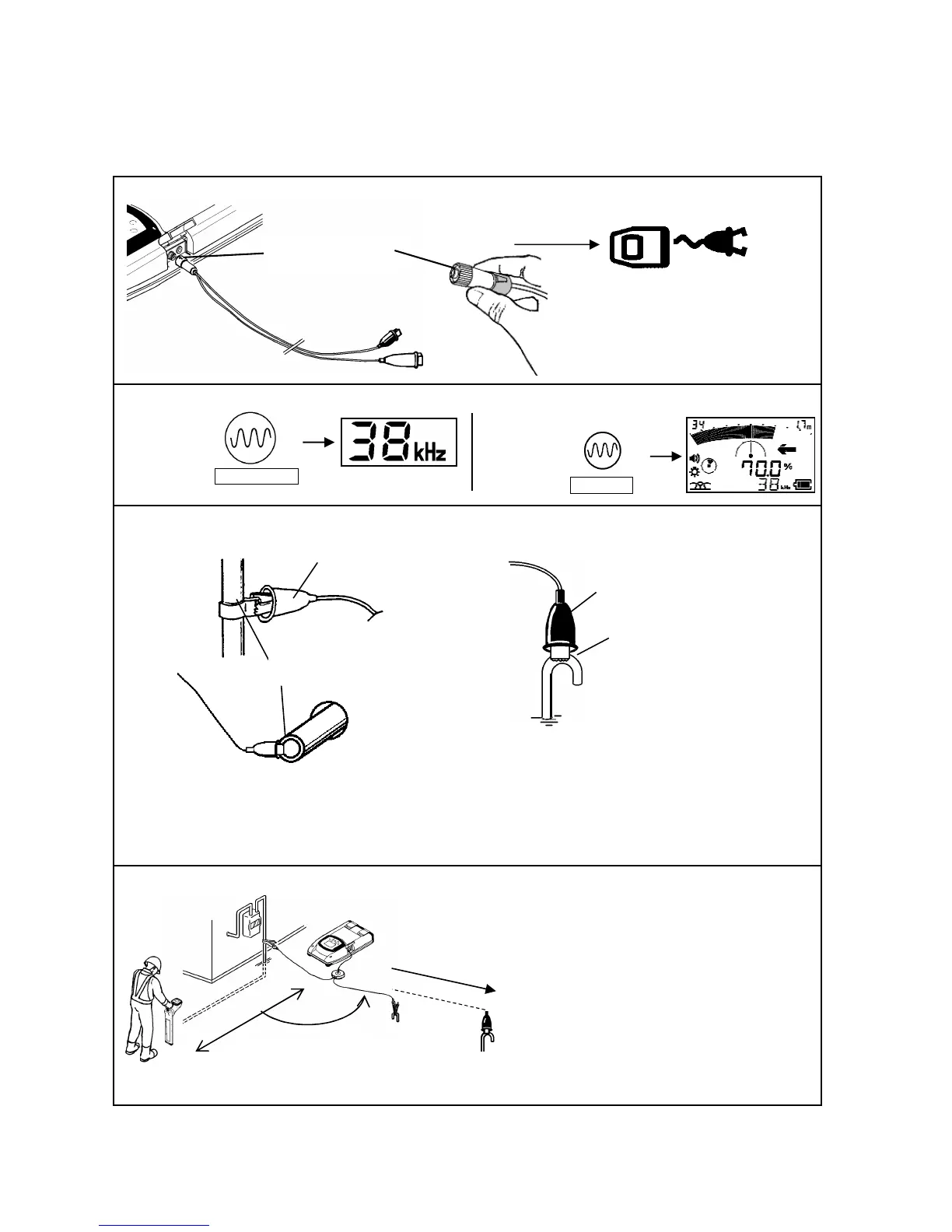
A specific route can be detected in Direct Connection mode. Use two connecting cables provided in the
carrying case as one of the standard accessories.
When the clips are connected to the transmitter, Direct Connection mode automatically selected.
Connect the cable clips to the target line and ground stake.
Place the Earth/Ground as far as possible and at right
angle to the object line.
Keep Receiver at least 5m/16ft. away from the signal
connection point as illustrated
Receiver
Press Frequency key
Black clip
Ground stake
Red clip
Metal pipe
connection area if rusted or painted to
ensure a good electrical connection.
Check the grounded point. Find the best place to
ground to have a GOOD SIGNAL LOOP
indication.
*Set a receiving frequency on the Receiver the same as
the transmitter.
90°
5m/16ft or more away
Display of the Direct mode
This groove is facing up.



 To Next Page