- 22 -
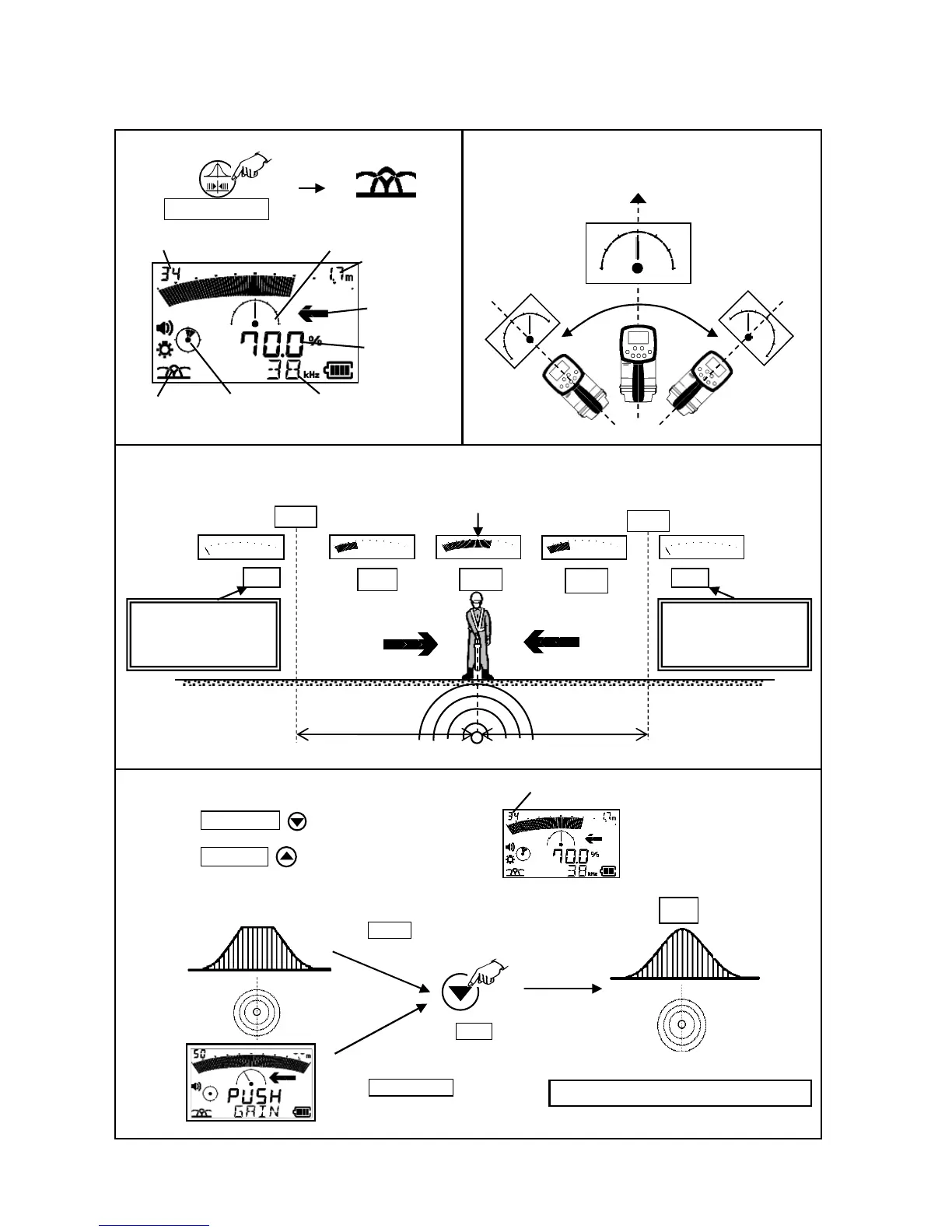
8-1. Peak & Null mode
Starting Peak & Null Mode
To find the direction of the object line,
adjust the sensitivity of the receiving level.
A) Manual gain control mode
B) Semi-automatic gain control mode
Press the Gain/Select key, sensitivity is decreased.
Press the Gain / Log key, sensitivity is increased.
Select peak & null
Direction of
the object line
PEAK & NULL
Gain setting value
Digital level
Yaw Angle
Real time depth
Direction of the buried cable.
30%
OUT OF RANGE
Percentage of the receiving
level is not indicated.
Move to the direction allow
Maximum (peak) value, the precise position and direction, are obtained when the
eceiver blade is located on the top of the object line
70% appears as an initial receiving level.
Press Gain key.
Note: 100% is not the maximum peak value.
70%
OUT OF RANGE
Percentage of the receiving
level is not indicated.
Press PEAK / NULL key.
To find the position of the object line
Gain setting value
0: minimum sensibility
99: maximum sensibility
Yaw Angle
Operational frequency or
Real time current index
approximately same
as depth
approximately same
as depth



 To Next Page