- 9 -
5-2. Receiver
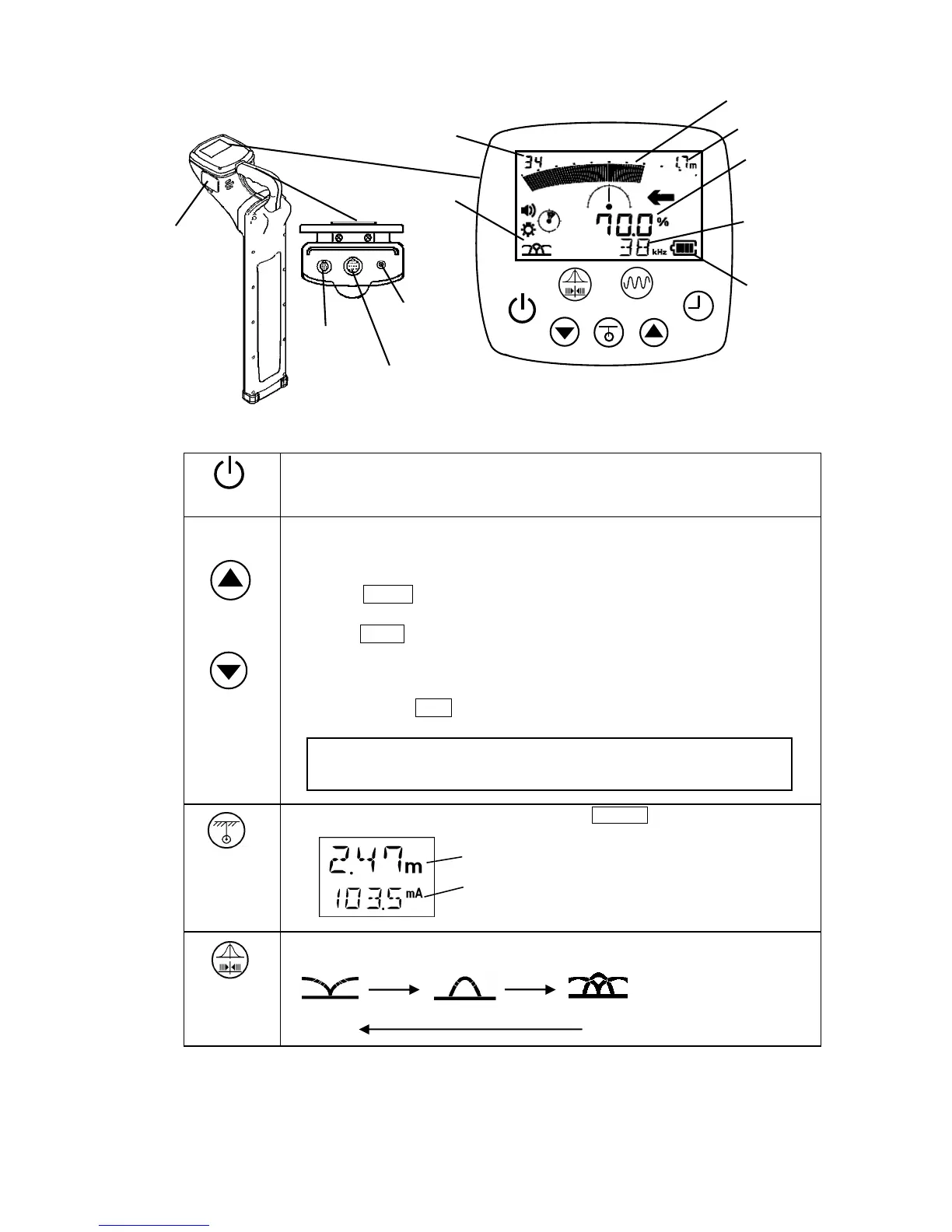
1)Key function
*Power save function: Automatically powers off after 5~30 minutes of inactivity.
ignal sensitivity for PEAK MODE.
: Press DEPTH key at the peak value spot.
Earphone plug
PC interface
connector
Sensor connector
(Signal input terminal)
Frequency
Receiving
sensitivity
DEPTH
GAIN
LOG
MODE
PEAK/NULL
FREQUENCY
Gain setting value
Depth
Current index: Details page 26
Note: Current index is not displayed if probe is used.
Note: 100% is not the maximum peak value. When 100% appears, press Gain key again
until a new sharp peak value is obtained, that is not 100%.
When pressing the Gain key, sensitivity is adjusted automatically to 70%.
* Semi-Automatic gain control mode (AUTO GAIN)
POWER
PEAK
PEAK & NULL MODE: Maximum sensitivity is the point directly above the object line and the buried object line location is
indicated with arrow.
PEAK MODE: Maximum sensitivity is the point directly above the object line.
NULL MODE: Minimum sensitivity is the point directly above the object line. The buried object line location
arrow.
Selects locating mode:
PEAK/NULL
* Manual gain control mode (MANU GAIN)
Press the ▼Gain key, sensitivity is decreased.
Press the ▲Log key, sensitivity is increased.
PEAK & NULL
Real time depth



 To Next Page