Page 10 Micro 26 - Operator’s Manual
March 2019Section 5 - Components and Controls
Platform Controls
ORANGE and the word WARNING – Indicates a potentially hazardous
situation which, if not avoided, could result in death or serious injury.
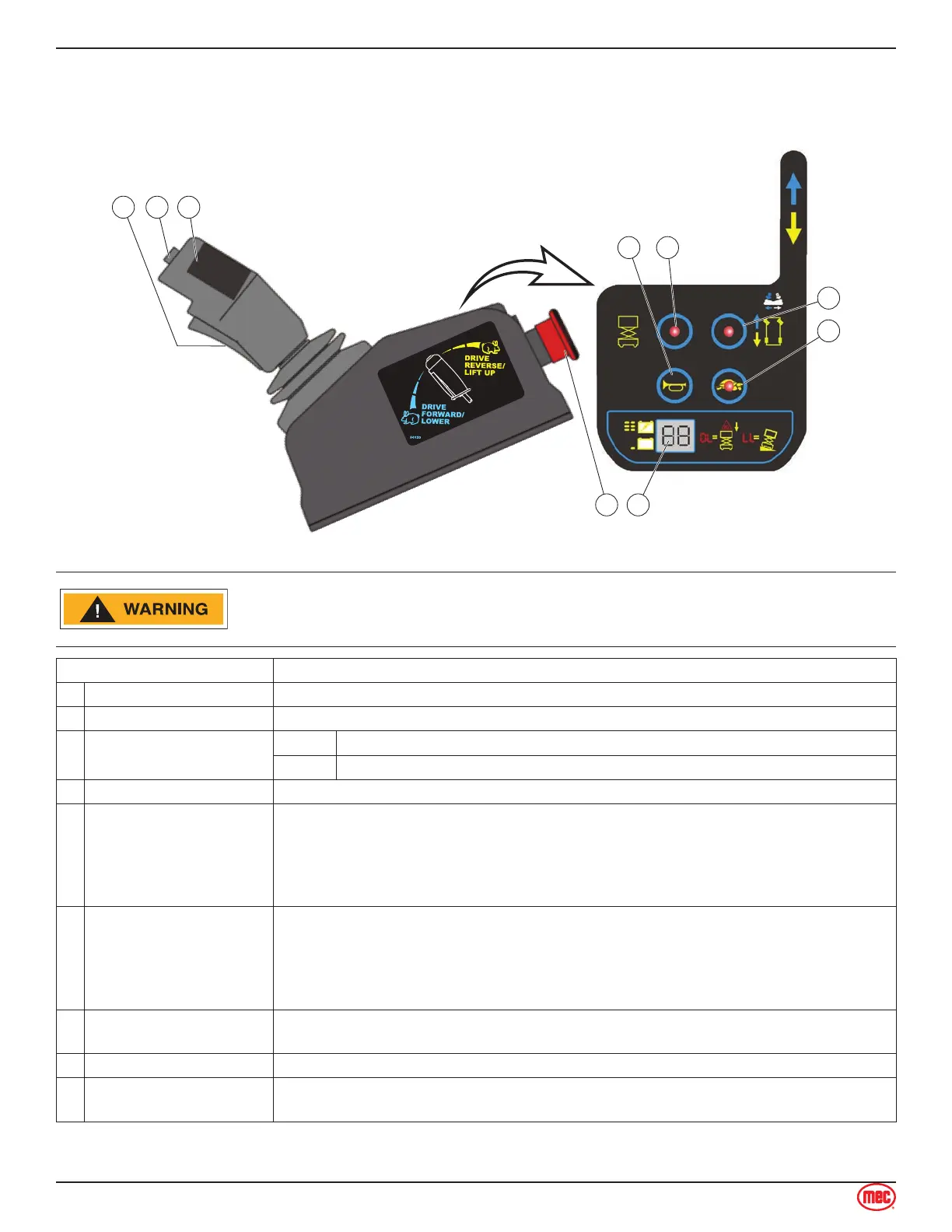
Control Description
1 Function Enable Switch Squeeze to enable DRIVE, STEER, and LIFT functions from the Control Handle.
2 Steer Switch Using your thumb, press and hold the rocker switch to steer Left or Right.
3 Control Handle
DRIVE Proportionally controls Forward and Reverse travel.
LIFT Proportionally controls Lift and Lower functions.
4 Horn Button Press to sound warning horn.
5 Lift Select
Press this button to enable the Lift function.
Regardless of if the Function Enable Switch is pressed or released, if no
machine movement is made in 10 seconds then the current selection of Lift
will time-out.
Release then press the Function Enable Switch to reactivate selected function.
•
•
6 Drive Select
Press this button to enable the Drive function.
Regardless of if the Function Enable Switch is pressed or released, if no
machine movement is made in 10 seconds then the current selection of Drive
will time-out.
Release then press the Function Enable Switch to reactivate selected function.
•
•
7 Drive Speed Select
Light ON indicates Low Speed Drive is selected.
Light OFF indicates High Speed Drive is selected.
8 LED Display Indicates the state of battery charge and displays diagnostic codes when necessary.
9 Emergency Stop Switch
Press the EMERGENCY STOP switch at any time to stop all machine functions.
Turn switch clockwise to reset.



 To Next Page