Page 11 Micro 26 - Operator’s Manual
March 2019Section 5 - Components and Controls
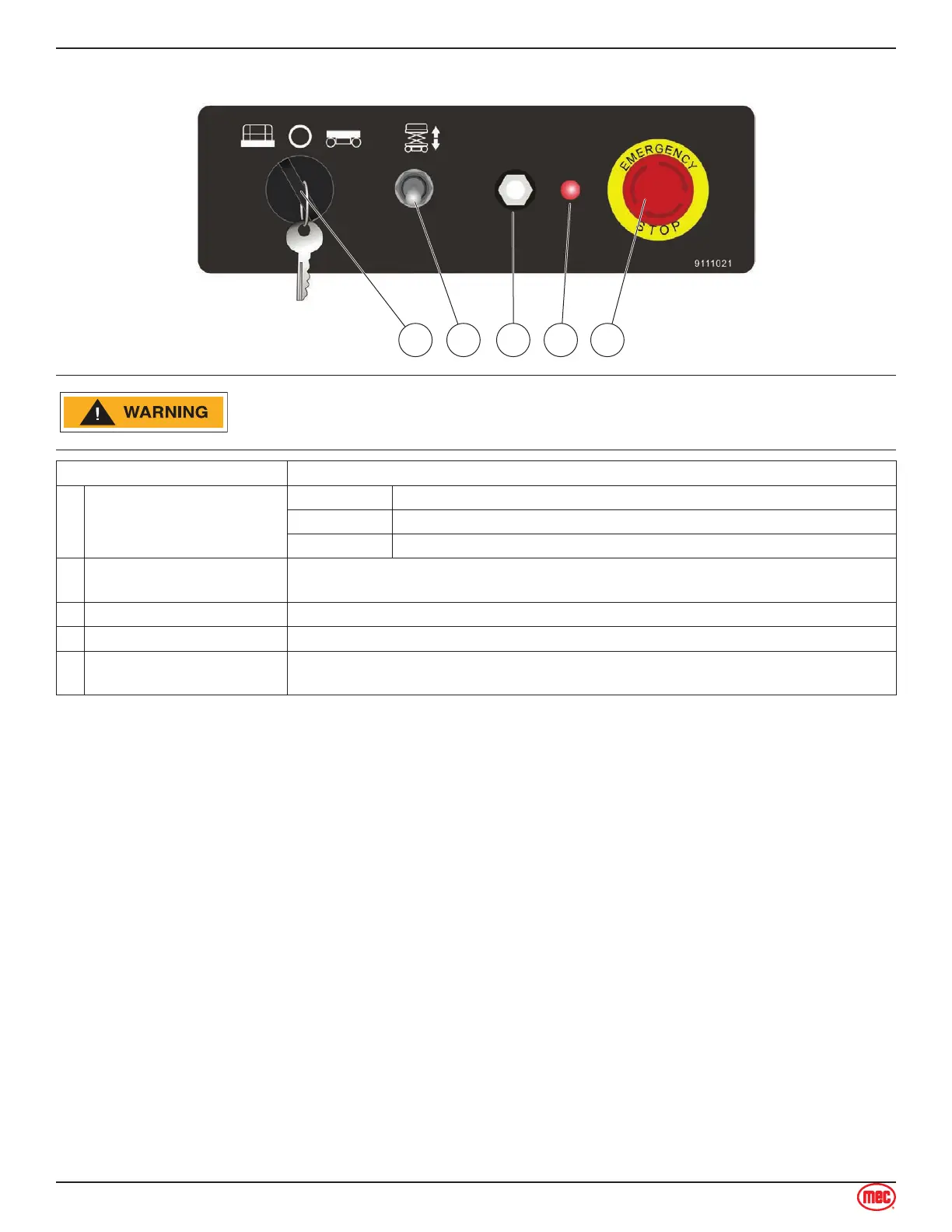
Lower Controls
ALWAYS be aware of the machine’s position and of your surroundings
before activating any control function.
Control Description
1 Key Switch
PLATFORM Select to operate from the platform control panel.
BASE Select to operate from the base control panel.
OFF Select to stop operation from either control panel.
2 Platform Lift/Lower Switch
With the Key Switch in the BASE position, move this switch up to lift the platform
or down to lower the platform.
3 7-Amp Circuit Breaker Trips when there is excess electrical load. Push to reset.
4 Indicator Light ON indicates that machine system is powered up and functioning.
5 Emergency Stop Switch
Press the EMERGENCY STOP switch at any time to stop all machine functions.
Turn switch clockwise to reset.



 To Next Page