RX8000 Integrated Receiver/Decoders
1553-FGB 101 759 Uen K
www.mediakind.com
• Audio Status – The decode status of the currently selected
audio decoders.
• CA Status – The status of the descrambler block within the
IRD.
• Service Filter Status (shown if licensed) – Indicates the state
of the service filter block.
• Output Feed – The status of the output Transport Stream
feed.
• Mode – Indicates whether unit configuration is active or
redundant.
A small window located at the bottom left of the Status Page will show events raised and all the
necessary details of those events.
The About button, located on the top right-hand side of the Status page shows, when selected,
details of the IRD such as software version and serial number.
The Clear button, located next to the Refresh button on the top left-hand side of the Status page, is
used to clear the Base Decoder Failure alarm. For more information on this alarm, refer to section
3.9.3.9, Base Decoder Failure Alarm.
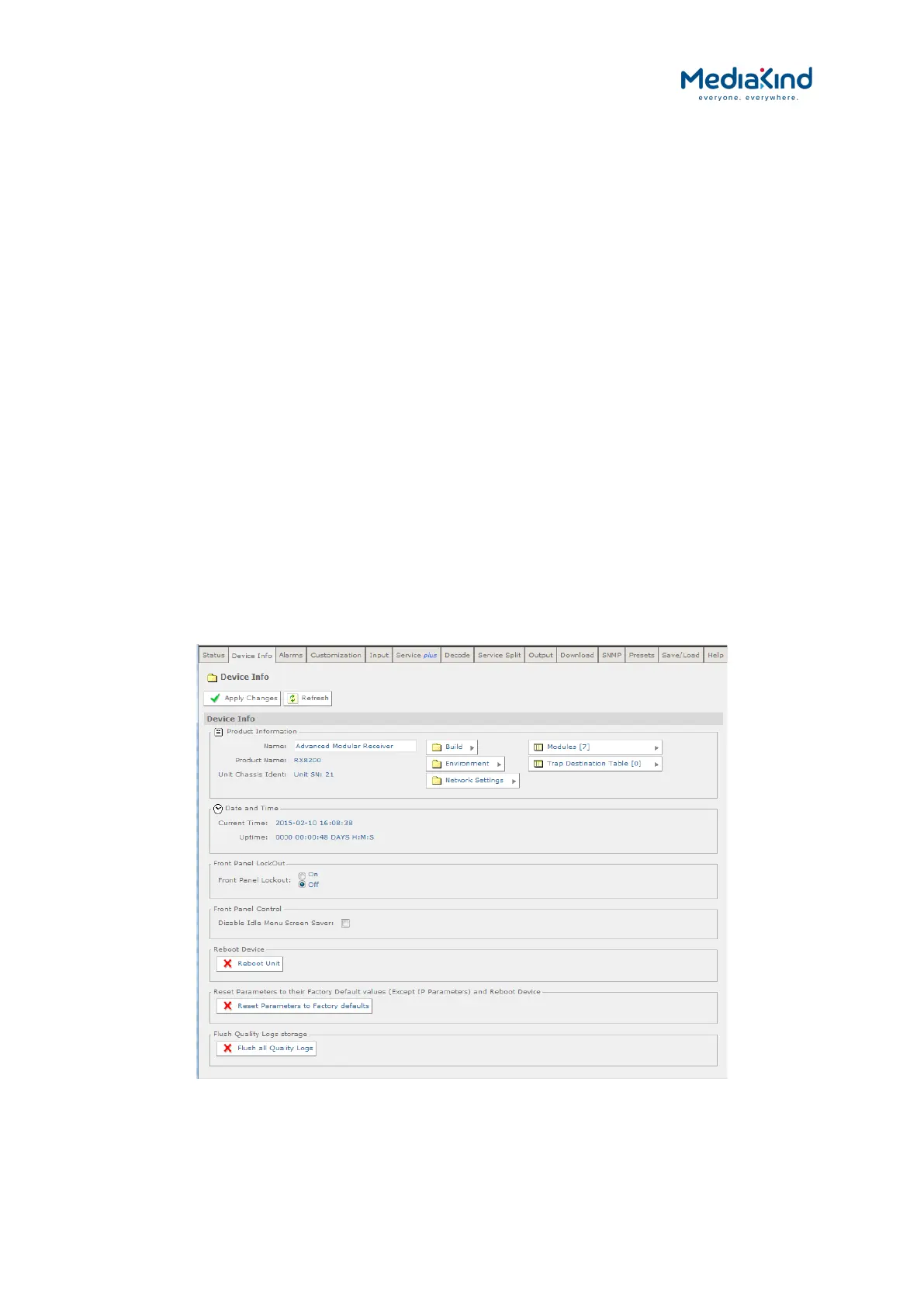
3.9.2. Device Info
The Device Info page provides access to system level settings of the IRD. To view this web page,
select the Device Info tab from the top of the current web page.
Figure 3-17 Device Info Web Page
Product Information


 To Next Page