Need help?
Do you have a question about the Medit i700 and is the answer not in the manual?
Outlines the initial steps for connecting the scanner and its accessories.
Covers running the installer, selecting preferences, and post-installation restart.
Lists conditions prompting the need for scanner calibration.
Step-by-step guide on performing the scanner calibration process.
Details the optimal path for scanning a full arch of teeth.
Detailed steps for disinfecting and sterilizing scanner tips.
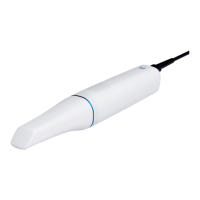
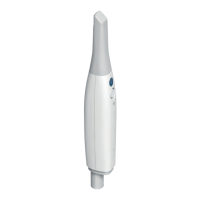
The Medit i700 Intraoral Scanner is a sophisticated digital impression system designed for dental professionals, offering a streamlined workflow for various dental procedures including crowns, bridges, dentures, and orthodontics. This device aims to enhance efficiency and accuracy in dental practices by providing high-quality 3D models of the oral cavity.
The Medit i700 serves as the primary tool for acquiring digital impressions of a patient's teeth and surrounding soft tissues. It captures detailed 3D scan data, which can then be used for diagnosis, treatment planning, and the fabrication of dental prosthetics. The scanner is integrated with the Medit Link software, a comprehensive platform that manages patient data, facilitates communication between clinics and labs, and provides tools for analytics and 3D viewing. The i700's core function is to convert the physical anatomy of the mouth into a precise digital model, eliminating the need for traditional, often uncomfortable, impression materials.
The device operates by projecting light onto the oral structures and capturing the reflected light with its internal cameras. This data is then processed in real-time by the Medit Link software to construct a 3D model. The scanner's design allows for efficient scanning of full arches, quadrants, and specific areas of interest, ensuring comprehensive data acquisition for various clinical needs. The Medit Link platform further extends the scanner's functionality by offering features like cloud storage for patient data, communication tools for collaboration with dental labs, and payment processing options.
The Medit i700 is designed for user-friendliness and efficiency in a clinical setting.
Setup and Connection: The initial setup involves connecting the i700 handpiece to a power hub, which in turn connects to a PC via a USB 3.0 cable and to a power source via a medical adapter and power cord. This ensures a stable and high-speed data transfer for real-time scanning. The Medit Link software, pre-loaded on a USB memory stick, needs to be installed on the PC. Before installation, it's crucial to ensure the Windows system and device drivers are up-to-date and to disconnect the i700's USB 3.0 cable from the computer.
Power Management: For optimal performance, specific power options need to be configured on the PC. This includes disabling USB selective suspend settings and setting the computer to "Do nothing" when the lid is closed, preventing interruptions during scanning or data processing.
Calibration: Regular calibration of the i700 is essential to maintain the accuracy and reliability of the 3D models. Calibration should be performed before the first use and periodically thereafter, especially if the quality of 3D models is inconsistent or environmental conditions (like temperature) have changed. The calibration process involves placing the handpiece into a calibration tool and following on-screen instructions, turning the dial anticlockwise. The default calibration period can be set in the Medit Link software, typically 14 days.
Scanning Technique: The i700 supports a recommended scan path for full arch and occlusion scans. For full arch scans, the technique involves building up main scan data by scanning the occlusal surface from the last molar to anterior teeth, maintaining a consistent distance (1-2 mm) and speed. For anterior teeth, scanning the lingual, incisal, and labial sides from a sideward angle of attack is recommended. When scanning the opposite molar, tilting the tip toward the lingual side to capture the lingual teeth, gingiva, and occlusal surface (1:1:1 ratio) is crucial. For occlusion scans, the patient should be sitting, and the scanner tip inserted to capture six to eight teeth from both the maxilla and mandible using a rolling method. Gingiva scan data is particularly important for the occlusion stage.
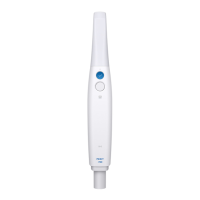
Remote Control Mode: The i700 features a remote control mode, accessible via the scanner's control button, which allows users to manage various commands within the Medit Link software. This includes controlling scan data view (pan, rotate, zoom), selecting scan stages, and accessing settings for scan, scanner, data, and control. The control button also functions as a 4-way directional pad. This mode enhances convenience by reducing the need to interact directly with the computer during scanning.
Proper cleaning and sterilization are vital for the longevity of the Medit i700 and to ensure patient safety.
Handpiece Cleaning: The handpiece should be wiped down with a 60-70% alcohol solution, with the safety cap on, after each use. It's important to turn off the device and unplug all cables from the power hub before cleaning. The handpiece cover should be attached to the front of the scanner during cleaning. Denatured alcohol (ethyl or propanol) is the recommended cleaning solution. The surface should be dried with a clean, lint-free cloth. Care must be taken not to clean the handpiece when the device is on, as fluid ingress can cause malfunction.
Reusable Tip Cleaning and Sterilization: The reusable tips, which come into direct contact with the patient, require thorough cleaning and sterilization between patients.
Mirror Care: The mirror within the tip is a delicate optical component. It should be handled with care to avoid scratches or smudges, which can affect scan quality. If the mirror is contaminated, disconnect the scanner tip, pour alcohol (free of impurities) onto a clean cloth or cotton-tipped swab, and wipe the mirror. Dry with a clean, lint-free cloth, ensuring it is free of dust and fibers.
Disposal: Scanner tips must be sterilized before disposal and treated as clinical waste. Other components are designed to conform to environmental directives such as RoHS (Restriction of Hazardous Substances) and WEEE (Waste Electrical and Electronic Equipment).
 General
| Scanning Technology | 3D-in-motion video technology |
|---|---|
| Weight | 245g |
| Connectivity | USB 3.0 |
| Scanning Speed | Up to 70 FPS |
| Accuracy | 10 μm |
| Light Source | LED |
| Anti-Fogging | Yes |
| Field of View | 16 x 13 mm |
| Scan Area | 16mm x 13mm |
| Depth of Field | 21 mm |
| Compatibility | Windows |

 To Next Page