4 Quick Start Guide for Initial Operation
After the SyncBox / N2X was connected to the power supply and the net work, it can be configured and moni-
tored by using "Meinberg Device Manager" software.
The Meinberg Device Manager program can be downloaded here:
Windows: https://www.meinbergglobal.com/download/utils/windows/mbgdevman_setup.exe
Linux: https://www.meinbergglobal.com/download/utils/linux/mbgdevman.tar.gz
Configuration via the Network with the MEINBERG DEVICE MANAGER
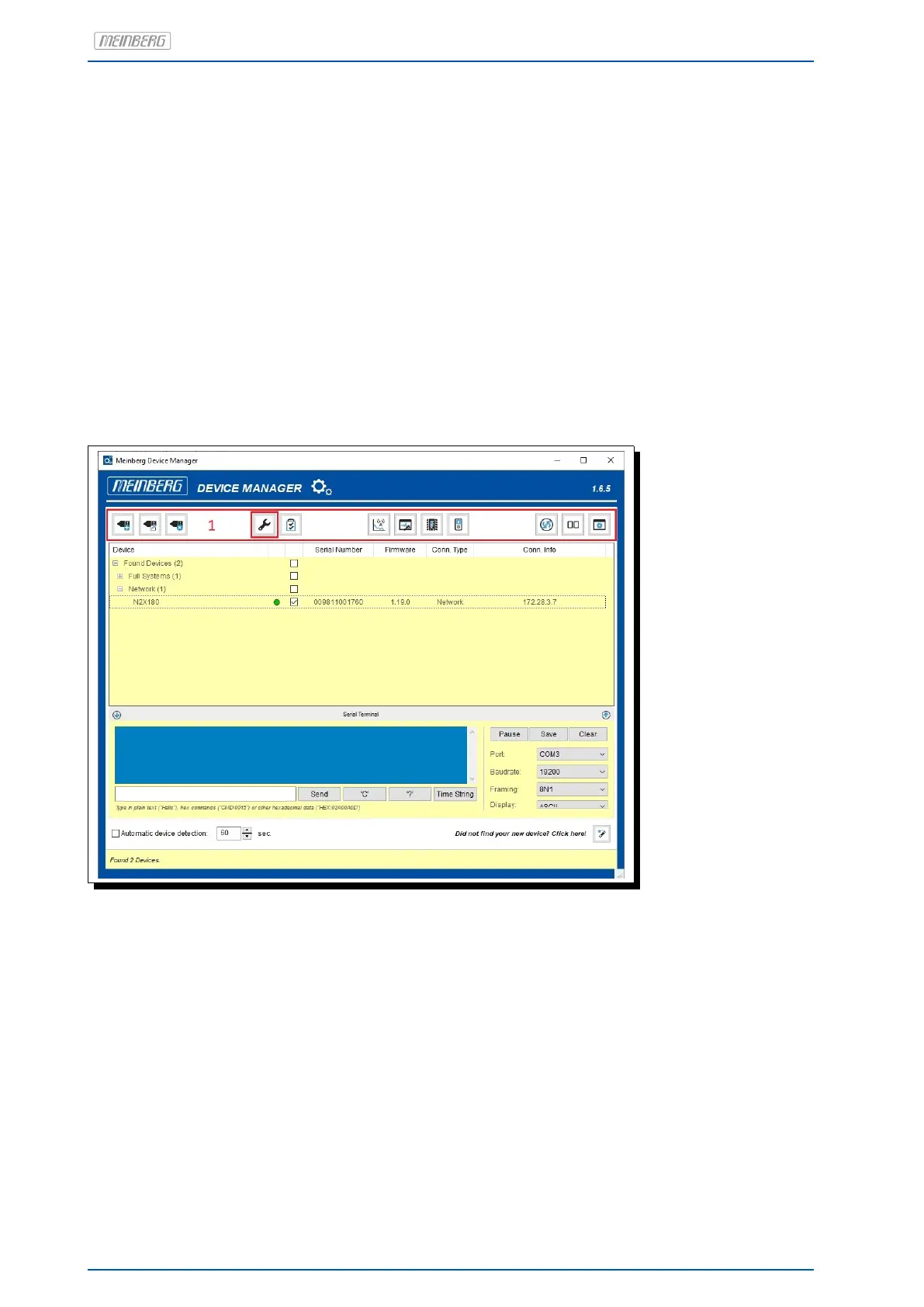
After the start of "mbgdevman" all connected modules are displayed in a tree-structured list and can be
selected by clicking on them. The list also displays basic information about them, such as the serial number,
hostname, firmware version, type of connection (network, serial) and connection parameters (e.g. IP and MAC
address).
If the module/assembly group is not displayed it can be manually connected via the menu button "Add De-
vice." In addition, a new password can be set here.
In the menu area (see 1 figure) the menu button "Configure Device." is located. All important configurations of
the connected module/system can be made here. You can reach all important status menus by using the "Show
Device Status" menu button.
14 Date: 17th September 2019 SyncBox N2X


 To Next Page